

Tools & Comparisons ·
Free Tools That Track Citations and Brand Mentions Separately
Compare free tools that report citation rate and brand mention rate as separate numbers, and see which are ongoing plans and which are one-time checkers.
Free AEO, GEO and LLM tracking tools overlap, but the free offers differ. See what each label measures and how to pick a tool for your client by job today.
Avinash Saurabh · · 14 min read

If you have started looking for free AEO tools, you have probably noticed that one vendor calls its product an AEO tracker, the next calls it a GEO platform, and a third says it does LLM tracking. It is easy to wonder whether those are three kinds of tools or one kind with three names. For the most part it is one job with a few names, and the label on the box tells you very little about what the free offer actually does. This guide helps you read past the label and shortlist free tools by function, with a consultant who wants to track one client in mind.
The short answer to "are free AEO, GEO and LLM tracking tools the same thing?" is that they overlap a lot but are not guaranteed to match. There is no industry standard for how vendors use AEO and GEO, and "LLM" names the technology underneath, not a measurement method. So the useful questions are what the tool checks, what it reports, how often it checks, and whether "free" covers repeated use.
Seven free offers are covered, spanning free AEO tools, free GEO tools and free LLM tracking tools under whatever name each vendor picked, and they are grouped by what the free offer does, not by which label the vendor chose. Each one was judged on the same four points:
AeoNut is listed first because the reader this is written for, a freelance consultant who wants repeatable tracking for a client, needs ongoing tracking more than a single score. The other six are in the list because each one fits a specific task better than a tracker would. This guide does not go deep on long-term monitoring or how long each tool keeps your history, which is covered in the monitoring guides.
Here is how the three labels are usually used in marketing tools.
If you want to compare AEO vs GEO tools, you will find the feature lists look the same more often than they look different. Ranking free GEO tools above free AEO tools, or the other way round, because of the name will not help you. Two things that a tool may measure are worth knowing, because they are separate signals:
Many tools add more, such as citation rate, position in the answer, share of voice, sentiment, competitor appearances, cited pages and the raw answers. None of that comes with the label. It comes with the product.
| Tool | What the free offer does | Free limit or condition | Best fit |
|---|---|---|---|
| AeoNut | Ongoing AI visibility tracking | One project, unlimited prompts, every feature; provider data billed separately | One client brand that needs real prompts, reporting and repeat checks |
| Notion Cue | Domain scan with a basic AEO score and citation count | One scan a day, score for three LLMs, exact free terms unclear | A light domain scan |
| AEObot | Monthly AI visibility scan | One workspace, five prompts or pages, ChatGPT and Perplexity | A small starter sample |
| Citadex | A free credit balance to try the product | 500 signup credits, one project, seven engines; credit use not specified | Testing the product |
| HubSpot AI Search Grader | One-time brand perception check | Free, no account, based on training data | A quick qualitative snapshot |
| Ahrefs AI Visibility Checker | One-time mention and source snapshot | Free, no signup or card, top five results per section | A quick cross-platform check |
| Semrush AI Search Visibility Checker | Free AI visibility report | Three checks a day, no registration | Repeatable manual spot checks |
Best for: a freelancer or small consultancy that wants ongoing tracking for one client brand without paying a platform subscription first.
AeoNut's Free plan is free forever, with unlimited prompts, your own keys, and no card. It is the only AI visibility tracker that is free forever with unlimited prompts. The wording matters, because free checkers, credit-limited plans and one-off graders do exist, and they do different jobs. What this plan gives you is a full tracker for one client brand, the same one a paying agency uses.
Each client brand is a project with its own prompts, competitors, engines, countries and schedule. Because prompts are unlimited, you can track the questions the client's buyers really ask instead of choosing the ten you can afford. You can set how often it runs (daily, twice a week or weekly), and for each engine you can choose scraped data, which is the answer real users see in the apps at the lowest cost, or API data from the exact model you pick.
The analytics are what make it a tracker and not a grader. For each project AeoNut reports Mention rate, citation rate (shown as "Cited"), Avg. position, Share of voice against the competitors you track, Sentiment, and trends by engine, prompt and country. You also get the cited pages and sources, a competitor leaderboard and the raw AI answers for every prompt, so you can show a client the real wording and not only a score.

AeoNut tracks twelve engines: ChatGPT, Gemini, Perplexity, Claude, Grok, Google AI Overviews, Google AI Mode, Mistral, Meta AI, Qwen, Z.ai and MiniMax.
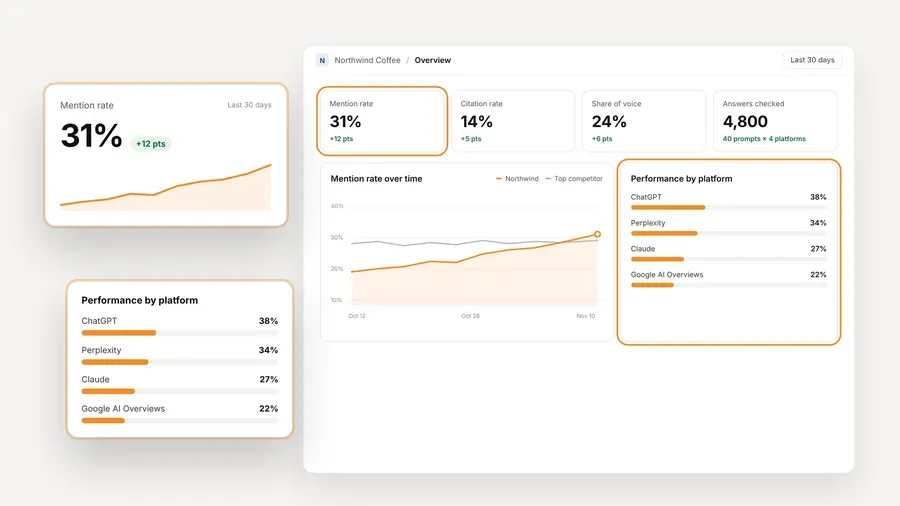
The platform is free, and the data is what your provider charges. You connect a key from OpenAI, Anthropic, Gemini, Perplexity or DataForSEO, and the provider bills you directly at its own price. AeoNut does not mark it up, and a cost preview shows the estimated monthly cost before anything runs, with spend per client, budget caps and alerts on top. One key from a single provider is enough to start, and AeoNut recommends restricted keys with spending limits and shows you how to set them up, which takes most of the worry out of a surprise bill.

Free also includes white-label reports with your branding, exports to PDF, Excel, Markdown and CSV, a read-only MCP server so an assistant can draft summaries from the real data, and a read-only API. Pro is $99 a month ($79 a month billed annually) for up to 10 client projects, and Unlimited is $499 a month ($399 billed annually) for unlimited projects. Every plan has every feature, and plans differ only in how many client projects they hold.
Where it fits and where it does not: Free covers one client project. If you are testing the service on one client or tracking your own brand, that is exactly the size of it. If you already carry several clients, you will want a paid project allowance, and the flat fee is there so the cost does not grow with every client you add.
Best for: someone who wants a quick domain scan and a basic visibility readout, without connecting provider keys.

Notion Cue describes a site scanner that checks citation, mention and recommendation presence across LLMs. Its free tier lists one domain scan a day, an AEO score for three LLMs, a basic citation count, an llms.txt validator and seven days of history. The site says its domain audit needs no integrations or API keys.
The thing to check before you rely on it is which three models the free score covers, because the free tier says only "3 LLMs" and does not name them. The product page also talks about weekly scans, alerts, sentiment and competitor gaps, but it does not say those apply to the free tier, so treat them as extras you would need to confirm. The pricing display also shows $0 a month for its Pro and Agency rows, which leaves the paid prices unclear. This is a good light scan, and you would want to verify the recurring terms before using it as a client reporting system.
Best for: a consultant who wants a small monthly scan with a clearly named prompt allowance and is fine starting with ChatGPT and Perplexity.

AEObot's free tier gives you one brand workspace, five tracked prompts or pages, a monthly scan, and ChatGPT and Perplexity, with no card. It also includes a preview of an action plan, free crawlability, sentiment and fan-out tools, AEO audit and schema generators, and a basic AI content optimizer. Its paid tiers show where the free one stops: Starter is $50 a month for 50 prompts or pages with weekly scans, and Growth is $250 a month for 250 prompts or pages with daily scans, five engines and up to five workspaces.
The limit is the five prompts or pages, the two engines and the monthly scan. That is a fair sample for a first look, though a client with a real prompt list will outgrow it quickly, and weekly tracking is a paid feature.
Best for: someone who wants to try a product with a real starting balance and seven engines, and can live with some uncertainty about how fast the credits go.

Citadex's free offer is 500 credits on signup, with one project and seven engines, and no card. The paid tiers are Pro at $39 a month ($33 a month billed annually) for 1,500 credits a month and one project, and Business at $139 a month ($99 a month billed annually) for 5,000 credits a month, five projects and all 13 engines. Enterprise is custom.
The free offer is a signup balance, not a monthly allowance. The pricing page does not say what a credit buys, how long the signup credits last, or whether free users get recurring tracking, so it is not possible to turn 500 credits into a number of prompts or scans. Try it to see the reports, and do not budget it as free monthly tracking until Citadex spells those out.
Best for: a pitch or a first client conversation where you want a free, written snapshot of how AI systems describe a brand.

The HubSpot AI Search Grader is free, needs no account, and runs as a one-time check. You give it the company name, location, industry and product or service details, and it checks ChatGPT, Perplexity and Gemini and cross-validates across the three. It scores five areas out of 100: Sentiment Results (40 points), Presence Quality (20), Brand Recognition (20), Share of Voice (10) and Market Competition (10), and it adds a written interpretation.
Keep the caveat attached to it. The analysis is based on the models' training data, so it is a brand-perception diagnostic and not a live view of search answers or your client's prompts. It is a handy conversation starter, and HubSpot points to its separate HubSpot AEO product for ongoing monitoring.
Best for: a fast, no-signup snapshot of mentions and cited pages across several platforms, including for more than one brand.

The free Ahrefs checker needs no signup or card and does not state a limit on how many brands you can check. It queries ChatGPT, Gemini, Perplexity, Microsoft Copilot, Google AI Overviews and Google AI Mode, and reports total mentions, mentions by platform, the topics that trigger mentions, and the domains and pages cited alongside the brand.
The free report shows only the top five results in each section, and Ahrefs describes it as a one-time snapshot. For daily mentions, historical trends and custom prompt tracking, the separate paid product is Brand Radar, which is listed in pounds, at £159 a month for selected platforms and £560 a month for all platforms. Use the checker for a quick look and a tracker when you need repeatable, prompt-level reporting.
Best for: a consultant who wants a useful manual report without registering and can work with a daily check limit.

The Semrush checker allows three free checks a day with no account. It covers ChatGPT, Gemini, Google AI Overviews and Google AI Mode, and the report can include an AI Visibility Score from 0 to 100, mentions, citations, platform coverage, estimated audience reach, top cited pages, best-performing topics and a competitor comparison.
Three checks a day is a handy quota for manual spot checks, but it is not a saved, scheduled campaign. Semrush describes a separate AI Visibility Toolkit for prompt tracking and ongoing monitoring, and the checker page does not give its price, so look at that before assuming it covers a client.
Pick among free AEO tools, free GEO tools and free LLM tracking tools by the job you have this week, and use the label only as a search term.
If you track the same client month after month, a snapshot tool will not show you a trend, and that is the point where a tracker is worth the setup.
If one client is where you are starting, set up your AeoNut Free plan, connect a key, add the questions that client's buyers ask, and let the first checks run. You will see the cost preview before anything runs, and you can start with one key from one provider. Start free with AeoNut.
Not necessarily. The labels overlap, but free offers range from a one-time score to a credit balance to a repeated scan with a strict prompt and engine cap. Compare what is actually measured, how repeat use works, and what the underlying data costs.
No. A checker usually returns a one-time snapshot, while a tracker repeats a defined set of checks and keeps the results. Ahrefs and HubSpot describe their free products as a snapshot and a one-time diagnostic, and Semrush's checker gives three manual checks a day and is separate from its ongoing toolkit.
Yes, for one client project. The Free plan is $0 forever with unlimited prompts and every feature, and it needs no card. The AI answer data is not free, because you connect your own provider keys and the provider bills you for what you run.
Pick a tool that repeats checks, has a clear prompt allowance and covers the engines your client cares about. In this list AeoNut Free is the best fit for one client that needs unlimited prompts and broad engine coverage, as long as you accept the provider's data charges. AEObot offers monthly scans but caps you at five prompts or pages and two engines, and a one-time grader suits a pitch better than a trend report.
Tools & Comparisons ·
Compare free tools that report citation rate and brand mention rate as separate numbers, and see which are ongoing plans and which are one-time checkers.

Tools & Comparisons ·
Is a self-hosted AI visibility tracker worth your time? Compare setup, upkeep, data control and engine coverage with a managed free plan before you decide.

Tools & Comparisons ·
Which free AEO tracking tool keeps running, saves history and shows change? Compare five free options on schedule, trends and alerts to pick one for a client.