

Tools & Comparisons ·
Free Tools That Track Citations and Brand Mentions Separately
Compare free tools that report citation rate and brand mention rate as separate numbers, and see which are ongoing plans and which are one-time checkers.
Which free AEO tracking tool keeps running, saves history and shows change? Compare five free options on schedule, trends and alerts to pick one for a client.
Avinash Saurabh · · 15 min read

If a client asks whether they show up in ChatGPT, a one-time check can tell you where they stand today, but it can't tell you whether anything is getting better. What you really need is a free AEO tracking tool that keeps running on a schedule, saves what it finds, and lets you compare this month with last month. That is what free AEO monitoring over time means, and it is a different thing from a free grader that hands you a single score and then asks for a card.
This guide sorts the free options by that difference. AI answers change from one run to the next, even when the prompt stays the same, so a single check can easily misstate how visible a brand usually is. Research on measuring AI search visibility makes the same point: don't measure once. Repeated runs on the same prompts, engines and location are what turn a number into a trend you can show a client.
If you search for an answer engine optimization tracker free to use, you will find dozens of pages, and most are checkers rather than monitors. Each tool had to pass a simple test before it made the list, and then we ranked the ones that passed on three separate questions.
Vendors also call this same job GEO or LLM tracking, and our guide to which free tracking label means which tool sorts those names out. Where a product's own pages disagree with each other, we say so instead of picking the friendlier version. "Not documented" in the table below means the pages we reviewed don't establish the feature on the free plan. It doesn't prove the feature is missing, so check the vendor's page before you promise anything to a client.
Whichever tool you pick, a few habits make the history worth having. Keep the prompt set steady for at least a month, because changing prompts mid-way breaks the comparison and you will not know whether the brand moved or the question did. Track the same engines and the same country each time. Then look at the same numbers on the same day each week, and note any change in mention rate or share of voice next to what you did that week, such as publishing a page or fixing a listing.
It also helps to separate the two things a tracker reports. Being mentioned means the brand is named in the answer text, and being cited means a page of the brand's is listed as a source. They can move in different directions, so read both. A client who is named often but never cited has a different job ahead than one who is cited but rarely named. Good AEO monitoring over time shows you both lines, and it is the reason a free answer engine optimization tracker with saved history beats a one-time score.
| Rank | Tool | Free recurring cadence | History or trends on free | Free alert evidence | Main caveat |
|---|---|---|---|---|---|
| 1 | AeoNut | Daily, twice a week or weekly, set per project | Trends by engine, prompt and country | Budget caps and spend alerts; visibility-drop alerts not documented | One project on Free; your provider bills the data |
| 2 | GEOflux | Every three days | Full answer history, saved charts and a trend view | Email digests; visibility-drop triggers not documented | 15 prompts, three engines, limited to 500 free accounts |
| 3 | Trendos | Daily runs described | Historical data and daily changes described | Not documented | Product pages disagree on prompt limits, engines and quotas |
| 4 | RankBits | Weekly | Scan history and time-series data, with limited free detail | Drop alerts shown as Pro | Homepage labels "Visibility over time" as Pro |
| 5 | Prompt Monitor | Daily | Free history and trends not documented | Not documented | Small allowance; trend reporting unclear |

Best for: A freelancer or small consultancy tracking one client brand who wants a free answer engine optimization tracker that keeps running, with a schedule you choose and reports in your own name.
AeoNut's Free plan is a full AI visibility tracker for one brand, and it is free forever with no card. It isn't a trial, and it isn't a bundle of prompts that runs out. You get unlimited prompts, every feature and all twelve engines: ChatGPT, Gemini, Perplexity, Claude, Grok, Google AI Overviews, Google AI Mode, Mistral, Meta AI, Qwen, Z.ai and MiniMax. For a consultant with one client who wants to see movement before spending anything, it's the free AEO tracking tool that fits the job most closely, and it's the only AI visibility tracker that is free forever with unlimited prompts.
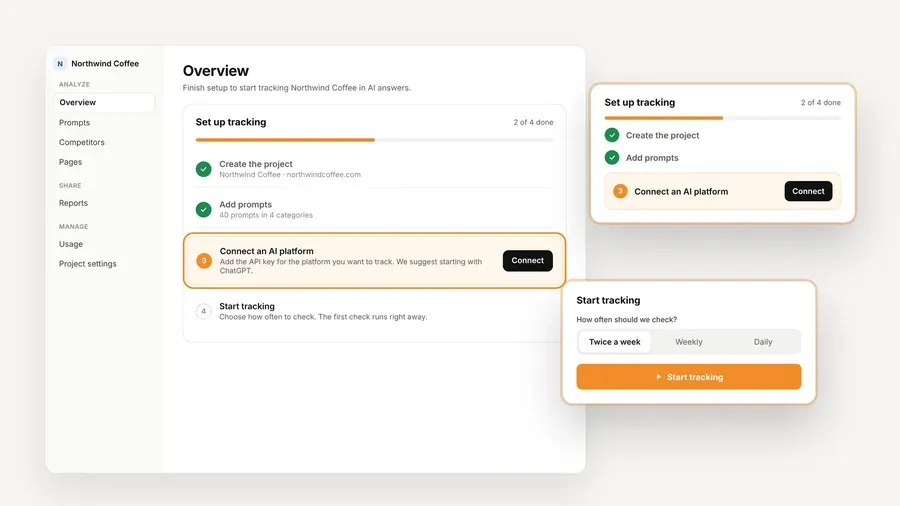
The part that matters for monitoring over time is how the schedule works. Each project has its own prompts, competitors, engines and countries, and you pick how often it runs: daily, twice a week or weekly. A weekly run is plenty for most clients, and a client you are pitching might get daily runs for a month so you have a sharper trend to show. Because the prompts are unlimited, you can add the real questions the client's buyers ask instead of choosing the twenty that fit under a cap.
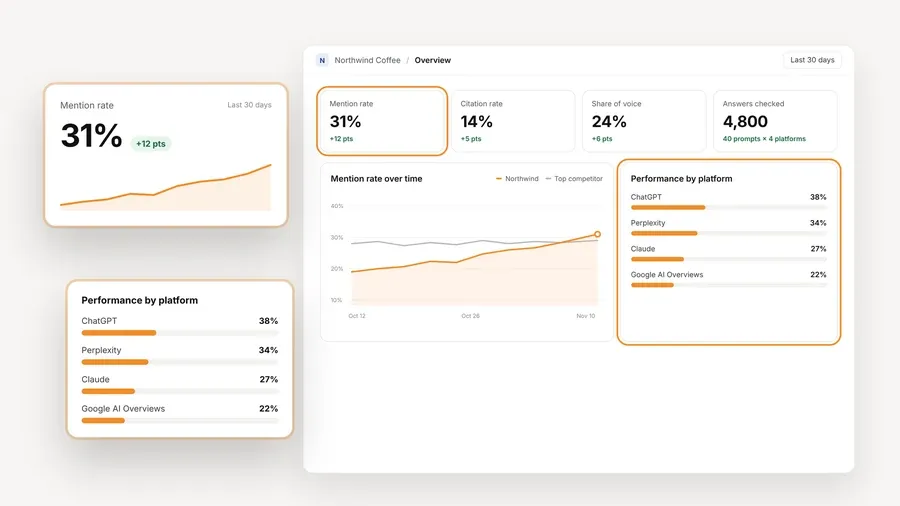
What you see afterward is the history. AeoNut reports Mention rate, the citation rate it labels "Cited", Avg. position, Share of voice against the competitors you track, and Sentiment, with trends by engine, prompt and country. There is a competitor leaderboard, the pages and sources the engines cite, and the raw AI answer for every prompt, so when a number moves you can open the answers and see why. White-label client reports carry your brand, not ours, and that holds on Free too. You can also export CSV, read the same data through the API, or connect an AI assistant to the MCP server and ask it for a weekly briefing.
On cost, here is how it works. The platform is free, and the AI answer data is billed by your own provider at its price. You connect a key from OpenAI, Anthropic, Gemini, Perplexity or DataForSEO, and one key from a single provider is enough to start. AeoNut never marks that data up, and it shows a cost preview before tracking runs, plus spend per client, budget caps and alerts. For scale, the example on the site is 10 clients with 100 prompts each, tracked daily on ChatGPT, Perplexity and Google AI Overview, which comes to about $135 a month in data. One client on a weekly schedule is a much smaller number, and the preview tells you the real one before anything runs.
One honest limitation: the alerts AeoNut documents are about spend, not about visibility dropping, so you check the trend view or the weekly briefing yourself instead of waiting for a ping. Free also holds one client project. If you pick up a second client, Pro is $99 a month ($79 a month billed annually) for up to 10 client projects, with every feature included on every plan, so your history comes with you.

Best for: Someone who wants a recurring free tracker with saved answer history and email digests, and whose main engines are ChatGPT, Gemini and Google AI Mode.
GEOflux's free plan runs 15 prompts across three engines every three days, with three competitors. Its pricing page says each run builds a trend from visibility, Share of voice, sentiment and citations, and it keeps the full answer history so you can look back. You also get three shareable reports per project and email digests. Of the five tools here, it is the one whose free history and charts are described most clearly, and that makes it a good second pick.
The prompt count is the main thing to weigh. Fifteen prompts covers a focused set, though a full client prompt library may not fit. Google AI Overviews isn't included on the free plan either. The credit system is worth reading too, because answers from different engines carry different credit weights, so a prompt allowance doesn't mean the same answer volume everywhere. Paid plans start with Starter at $99 a month and Growth at $199 a month, both with daily runs.
One honest limitation: GEOflux says Free accounts are limited to 500, so check that spots are still open. It also pauses new runs after 90 days with no activity, after reminders at days 60, 75 and 85. Your brand, prompts, saved answers and charts stay, and tracking can start again once you come back. The digests are emails, but the pricing page doesn't say they fire when visibility drops, so we wouldn't call them score-drop alerts.

Best for: A consultant who values daily, historical AI search data and wants several projects in one free account, as long as they confirm the current limits before relying on them.
Trendos describes a free plan with daily prompt runs, a 24-hour data refresh and reports that show daily changes over a date range you pick. Its FAQ lists up to 10 projects, 20 custom prompts and 600 answers analyzed per month, with unlimited countries and no card. It also says historical data is available from day one, and it offers an MCP connection so compatible assistants can read the data.
The catch is that its own pages don't line up. The FAQ describes 20 free custom prompts, while the features page says custom prompts are paid. One page lists seven engines, and another lists a different set, and the pages we reviewed don't reconcile them. The FAQ also doesn't explain how 600 monthly answers get counted against daily runs, so we wouldn't work out a daily prompt quota from it.
One honest limitation: free daily tracking is appealing, but you should confirm the current prompt cap, answer allowance and engine list inside your own account before you promise a client a specific daily volume. Visibility-change alerts and free white-label reports aren't documented in what we reviewed. On pricing, the detailed page lists Basic at $39 a month while the FAQ says plans start at $30 a month, so treat the starting price with care.

Best for: A technically comfortable consultant who is happy with a weekly scan, wants an API or MCP workflow, and accepts that some free results are trimmed.
RankBits' pricing page lists Free as $0 forever for one brand, with weekly tracking, five prompts, five basic engines and search sources, and 100 responses a month. Scheduled scans and public shareable reports are included, and exports are not. API access is open to every plan after email verification, and RankBits' API documentation describes a time series with score, mention rate, citation rate and scan IDs. That's real evidence of weekly tracking you can look back on.
The messaging is where it gets muddy. The homepage labels "Visibility over time" and drop alerts as Pro, while the pricing page and API docs support weekly free tracking. The safest reading is that free weekly scheduled tracking is documented, and the full trend and alert experience on the homepage is not clearly part of Free.
One honest limitation: RankBits' API documentation says free accounts get full scores and the competitor leaderboard but only the first three result rows and prompt-breakdown rows. Five prompts is also a small set for a client with a long list of buyer questions.

Best for: A low-volume user who wants daily position and competitor checks across a small set of keywords and prompts, and who is willing to confirm whether history is kept.
Prompt Monitor's pricing page lists a $0 a month Free plan with five keywords, 10 prompts, daily monitoring, position tracking and competitor analysis. Its product page names ChatGPT, Claude and Gemini. Pro is $49 a month with 20 keywords and 50 prompts, and Enterprise is $199 a month with 50 keywords and 100 prompts. The page doesn't say the free plan is free forever, only that the price shown is $0.
Daily monitoring is what puts it on this list, since repeated runs are the first thing you need to see change. What we can't confirm is the rest of the story.
One honest limitation: saved history, retention, trend charts and alerts aren't documented for the free plan in the materials we reviewed. You can describe it as daily monitoring, but not with confidence as a free tool with trend views.
Two other names come up in searches for a free AEO monitoring tool, and they're worth understanding so you don't mistake them for the real thing.
AEOPAD's free plan gives you 10 checks a day on ChatGPT only, up to three saved trackers and 90 days of history, with no card. Its own FAQ puts scheduled checks, email reports and score-drop alerts on the $29 a month Pro plan. So the history is real, but you start each check yourself. Its pricing page also lists "All 4 AI engines," which conflicts with the FAQ's statement that Free is ChatGPT-only, so go with the FAQ.
Serpstat's LLM Brand Monitor has a free plan with 10 checks and two projects a month, no card. One check is one query run against one model, so five queries across four models uses 20 checks. Weekly automated scans are documented on the $39 a month Pro plan, and the support page we reviewed doesn't show that free users can schedule them. The dashboard can show mention trends across checks, which makes it a fair place to try a few checks, but not a tool to build a client's monitoring on.
Match the tool to your situation, and be honest about how many prompts you really need.
If you manage more than one client, the free plans above all cap you at one brand or a small project count, and that is the moment to look at a flat-fee paid plan instead of stacking free accounts. For how plan limits compare in general, the guide to free AI visibility plan limits is a good next step.
Picking an answer engine optimization tracker free of time limits is the hard part, and the setup after that is quick. A good free AEO monitoring setup takes about an hour. Create the project, add the prompts your client's buyers ask, connect one provider key, pick weekly or daily, and let it run for a month before you judge it. Start free with AeoNut and you will have a first trend line to show a client by the next call.
AeoNut lets you set daily, twice-weekly or weekly runs on the free plan. GEOflux runs every three days, Trendos describes daily runs, RankBits documents weekly free tracking and Prompt Monitor lists daily monitoring. They differ a lot in free quotas and in how clearly they show history, so compare the limits before you commit.
AeoNut shows trends by engine, prompt and country, and GEOflux describes saved answer history with charts. Trendos describes historical data and daily changes, but its plan pages disagree on quotas. RankBits exposes a time series in its API documentation while its homepage labels the trend view as Pro. Prompt Monitor's free history isn't documented.
Don't assume so. RankBits places visibility-drop alerts on Pro, and AEOPAD does the same for score-drop alerts. GEOflux lists email digests without defining them as drop alerts, and the alerts AeoNut documents cover budget and provider spend. If you need a drop alert, confirm it on the vendor's page first.
Not always. AeoNut's platform is free, but the connected provider bills for the answer data, and AeoNut shows an estimate before each run. Other tools meter answers, checks or credits instead, so read the exact allowance before you make a commitment to a client.
Tools & Comparisons ·
Compare free tools that report citation rate and brand mention rate as separate numbers, and see which are ongoing plans and which are one-time checkers.

Tools & Comparisons ·
Is a self-hosted AI visibility tracker worth your time? Compare setup, upkeep, data control and engine coverage with a managed free plan before you decide.

Tools & Comparisons ·
Looking for a free AI tracker that runs on your own API keys? Compare seven options, see the setup steps and engine keys each needs, and pick what fits you.