

Tools & Comparisons ·
Free Tools That Track Citations and Brand Mentions Separately
Compare free tools that report citation rate and brand mention rate as separate numbers, and see which are ongoing plans and which are one-time checkers.
Promptwatch lists a free Explore plan, but it caps you at 10 prompts on ChatGPT. See what a free forever tracker keeps and how to move your prompts over.
Avinash Saurabh · · 16 min read
If a client has asked whether they show up in ChatGPT and you want to answer with real data, you probably went looking for a free Promptwatch alternative so you could track AI answers without adding another monthly bill. It helps to know up front that Promptwatch does list a free plan, called Explore, so this is not a case of a tool with no free option versus one that has it. The real question is what each free plan lets you keep tracking. Promptwatch Explore covers one project, 10 active prompts, 310 responses a month and ChatGPT only. AeoNut Free covers one client project with unlimited prompts on all twelve engines AeoNut tracks, and it is free forever for the platform. You bring your own provider key, and the provider charges you for the answer data.
AeoNut is our product, so you should know where we stand. We think it is the better fit for a freelancer tracking one client over time, and the rest of this guide shows why with Promptwatch's own published numbers next to ours. Where Promptwatch is the better choice, we say so.
A free plan only helps you if it keeps working long enough to show a trend, so we looked at the things a freelance SEO or AEO consultant runs into first.
If you are weighing free options more broadly, the guide to free alternatives to paid AI visibility trackers covers what you keep and what you give up. Every Promptwatch figure below comes from its own pricing page and documentation, as of November 2026, and we attribute it that way. Plans change, so check the current pages before you decide.
| Tool | Free option | Engines on the free plan | Reporting on the free plan | Main trade-off |
|---|---|---|---|---|
| AeoNut Free | $0 platform fee forever, 1 client project, unlimited prompts, no card | All 12 engines | White-label client reports, PDF, Excel, Markdown and CSV export, MCP server and API | You bring a provider key and the provider bills you for data |
| Promptwatch Explore | Listed as free, 1 project, 10 active prompts, 310 responses a month, daily tracking | ChatGPT only | PDF reports and table exports are not available on Explore | Small prompt set on one engine, and broader coverage needs a paid plan |

Best for: a freelance SEO or AEO consultant who wants to track one client's real prompts across the engines that matter, keep a trend over time, and send a report under their own name without a monthly platform fee.
AeoNut is AI visibility tracking built for agencies, and the Free plan is the full product for one brand. Each client is a project with its own prompts, competitors, engines, countries and schedule. On Free you get one project, unlimited prompts and every feature the paid plans have. That is the only AI visibility tracker that is free forever with unlimited prompts, and it is worth reading that sentence slowly, because some tools have credit-capped free plans and several offer one-off checkers that give you a single score and stop. AeoNut Free is ongoing tracking, so you get a trend to show a client.
AeoNut tracks twelve engines: ChatGPT, Gemini, Perplexity, Claude, Grok, Google AI Overviews, Google AI Mode, Mistral, Meta AI, Qwen, Z.ai and MiniMax. You choose which ones a client needs, which countries, which prompts, and whether the project runs daily, twice a week or weekly, and the guide to free AI search rank tracking tools that run daily shows what daily runs look like elsewhere. For each engine you can pick scraped data, which is the answer a real person sees in the ChatGPT, Gemini or Google apps and costs the least, or API data from a specific model.
Each project reports Mention rate, Cited, Avg. position, Share of voice and Sentiment, with trends by engine, prompt and country. You can open the raw AI answer for every prompt, see which sources were cited, and see whether each source belongs to your client, a competitor or neither.
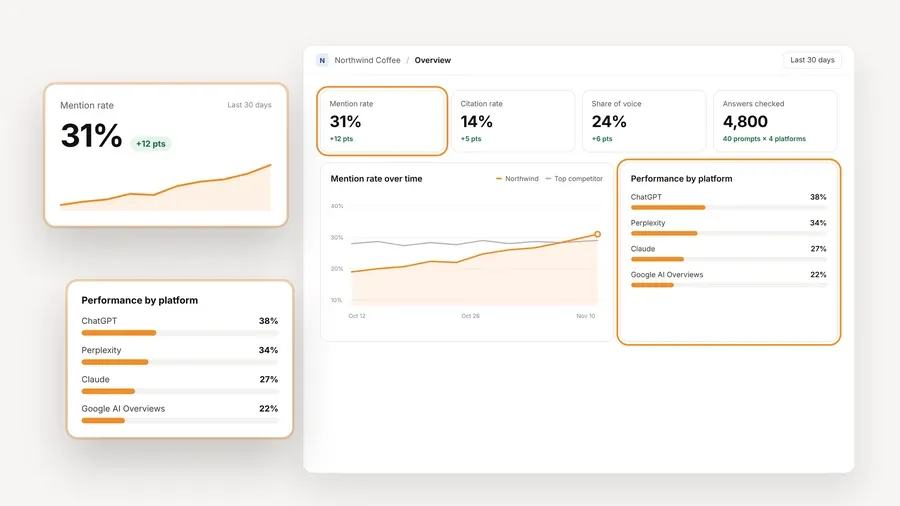
The screen above uses demo data, not a real client's results. It shows the kind of view you would be working from on a Free project, a mention rate and share of voice over time against the top competitor, with the answers broken out by platform.
The platform is free. The AI answer data is not, and we want that to be plain. You connect a key from OpenAI, Anthropic, Gemini, Perplexity or DataForSEO, and that provider bills you directly at its own price. AeoNut never marks it up. One key from a single provider is enough to start.
Because a surprise bill is the thing most freelancers worry about with bring-your-own-key tools, AeoNut shows an estimated monthly data cost before anything runs, lets you see spend per client, and supports budget caps and alerts. It also recommends restricted provider keys with spending limits and shows you how to set them up. The published example on the AeoNut site is about $135 a month in data for 10 clients with 100 prompts each, tracked daily on ChatGPT, Perplexity and Google AI Overview. That is a much bigger setup than a single freelance client on Free, so use the cost preview for your own prompt count rather than treating that number as a quote. If you want a closer look at how keys work across tools, the guide on free trackers that use your own API keys covers the trade-offs.
White-label client reports and shareable links carry your branding, not AeoNut's, and that is true on Free too. Reports export as PDF, Excel and Markdown, and CSV export is available as well. For a consultant who has to explain a number on a call, the read-only MCP server lets an assistant such as Claude read the workspace and answer questions from the real data. There is also a read-only REST API, every read is free, and the limit is 120 requests a minute per workspace.

The report preview above is demo data as well. The point is the shape of it: a PDF built per project and period, with a visibility summary, performance by platform, a competitor leaderboard, cited pages and top prompts, plus the raw data as CSV or Excel.
| Plan | Price | Client projects |
|---|---|---|
| Free | $0 forever, no card | 1 |
| Pro | $99 a month, or $79 a month billed annually ($950 a year) | Up to 10 |
| Unlimited | $499 a month, or $399 a month billed annually ($4,790 a year) | Unlimited |
Every plan includes every feature, and the plans differ only in how many client projects they hold. The paid plans carry three guarantees: "3x Savings, or It's Free," "Lowest Cost Guarantee," and "30-Day Money-Back." They apply to paid plans, not to Free.
Honest limitation: Free is one client project, and you set up and pay for your own provider key. If you are tracking a roster of clients, Pro covers up to 10 on one flat fee without changing the feature set. If you only need to prove the tracking works on a single client before anyone is paying you for it, one project and a key is usually enough to start.

Best for: a reader who wants to start with a small, daily ChatGPT-only tracking set on the free Explore plan, or who values Promptwatch's own model coverage and is ready to consider a paid plan for broader tracking.
Promptwatch measures brand visibility in AI answers. Its Explore plan is a real listed free option and not only the seven-day trial that its paid monthly plans offer, so we do not want to call it a trial. From its pricing page, as of November 2026, Explore is one project, 10 active prompts, 310 responses a month and daily tracking, on ChatGPT only. The pages we reviewed do not promise that Explore is free forever, say whether a card is needed, or explain what happens when you go over the monthly response quota, so check those with Promptwatch before you build a client's tracking on it. For a wider look at that difference, see ChatGPT monitoring: free trial or free plan.
Promptwatch counts two different things, and it is easy to mix them up. Active prompts are the prompts scheduled to run at the same time. Monthly responses are the number of AI answers collected. Each prompt is paired with each selected model on a run day, so the number of models multiplies your response use. Its documentation describes this as models times prompts times runs equals responses. On Explore the model is always ChatGPT, so 10 prompts running daily would use roughly 300 responses in a 30-day month, which is close to the 310 allowance. Treat that as our arithmetic rather than a Promptwatch figure, and expect little room to add prompts.
According to Promptwatch's documentation, collection splits into live-search platforms and API models. For live-search platforms it opens the actual product in an automated browser session and enters the prompt, and it collects Google AI Overviews and AI Mode from real Google results pages. Live-search runs are made from the monitor's country, and country and language settings matter. Each completed run stores the full answer text, the cited source URLs and structured answer elements, and the Responses page shows answers with their citations and scores.
The platform reports visibility, citations, sentiment, prompt volumes and share of voice. Its visibility score is described as combining position, tone, prominence and competitor presence. Promptwatch defines a mention as a response that includes the brand and a citation as an explicit reference to a supporting page or source. Its current live-search list includes ChatGPT, Google AI Overviews, Google AI Mode, Microsoft Copilot, Gemini, Perplexity, Alexa, Meta AI, Codex and Claude Code, and it separately lists API models. Explore supports ChatGPT only, and the paid plans unlock all active models.
If you outgrow Explore, the Brand plans on its pricing page are Essential at $95 a month or $950 a year, Professional at $245 a month or $2,450 a year, and Business at $579 a month or $5,790 a year. Essential covers one project with 50 active prompts and 6,000 responses a month. Professional covers two projects with 150 active prompts and 18,000 responses. Business covers five projects with 350 active prompts and 42,000 responses, with tracking as often as hourly.
There are also agency plans. Kick-off is $199 a month or $1,990 a year, Growth is $399 a month or $3,990 a year, and Scale is $799 a month or $7,990 a year. All three list unlimited projects and prompts, with response caps of 10,000, 25,000 and 65,000 a month. The paid plans list a seven-day trial on monthly billing, and we could not confirm the card or cancellation terms.
Reporting is where the free tier thins out. Promptwatch supports PDF dashboard reports and Excel or CSV exports from tables, and a response export can run up to 10,000 rows. Per its documentation, table exports and PDF reports start at Professional, so an Explore or Essential user cannot download a client PDF or a CSV. Reports are file based, with no public share links, so you send the PDF yourself. Its pricing page lists white label under Enterprise, while its agency materials describe a white-label dashboard and branded client access, so how white label applies on each agency tier is not clear from what we reviewed.
Promptwatch also offers a REST API and MCP access in its plans. We did not find a published numeric API rate limit.
Honest limitation: Explore works as a small way to try the workflow, but it is a narrow base for ongoing client work. Ten active prompts, 310 monthly responses and one engine will not cover most clients' real questions, and no export on the free tier makes it harder to show a trend or hand over a report. Broader models and higher volume need a paid plan.
This table compares the two free tiers only. It does not say Promptwatch lacks a free plan, and it does not say AeoNut's answer data costs nothing.
| Need | AeoNut Free | Promptwatch Explore |
|---|---|---|
| Ongoing free access | Free forever for the platform | Listed as free, with no free forever promise in the pages we reviewed |
| One client or brand | Yes, one project | Yes, one project |
| Prompt capacity | Unlimited prompts | 10 active prompts |
| Monthly answer capacity | No prompt cap, with provider costs on the data | 310 responses a month |
| Engines | Twelve | ChatGPT only |
| Client reporting | White-label reports and exports included | PDF and table exports not available on Explore |
| Data billing | You pay your provider directly, with an estimate shown first | Billing details and bring-your-own-key not established in what we reviewed |
If you came for the Promptwatch free tier, the practical gap is breadth. A freelancer can usually write twenty or thirty real client questions without trying, and a free plan that holds 10 of them on one engine forces a choice before the first report. If you want to see how other free plans cap prompts, engines and projects, the comparison of free AI visibility plan limits lays them side by side.
Switching tools partway through a client's tracking can feel risky, since the trend line is the part you are selling. A calm, step-by-step move keeps most of that safe.
For help choosing which prompts to carry over, the guide on free AI prompt research tools is a good place to start. And if the client's reporting is the part that worries you, see how free AI visibility reporting tools handle client updates.
Pick based on what the client needs to see next month, not on which plan has the nicer name.
A good first step is to pick one client, write down twenty or so of the questions their buyers ask, and set that up on AeoNut Free so you can see the data cost before it runs. Start free with AeoNut and the platform stays free while you decide.
Yes. AeoNut Free is a free-forever platform plan for one project, with unlimited prompts and all twelve engines AeoNut tracks. You supply a provider key and pay that provider for the data. Promptwatch also has a free Explore plan, but its listed limits are one project, 10 active prompts, 310 monthly responses, daily tracking and ChatGPT only.
Promptwatch currently lists Explore as free, separate from the seven-day trials on several paid monthly plans. The pages we reviewed do not say Explore is free forever and do not say whether a card is required, so confirm both with Promptwatch before relying on it.
You pay nothing to AeoNut for the Free plan, but the provider charges for the answer data collected through your own key. AeoNut shows an estimated data cost before tracking runs and offers budget caps and alerts, so you can see and limit the bill. It is not free data or zero-cost tracking.
Promptwatch documents CSV and Excel table exports, with response exports capped at 10,000 rows, but exports start at Professional and are not on Explore or Essential. AeoNut's Done-For-You Switch imports prompts, competitors and tracking history from a current tool. Confirm the Promptwatch export format and field mapping before promising a client an unbroken trend.
Tools & Comparisons ·
Compare free tools that report citation rate and brand mention rate as separate numbers, and see which are ongoing plans and which are one-time checkers.

Tools & Comparisons ·
Is a self-hosted AI visibility tracker worth your time? Compare setup, upkeep, data control and engine coverage with a managed free plan before you decide.

Tools & Comparisons ·
Which free AEO tracking tool keeps running, saves history and shows change? Compare five free options on schedule, trends and alerts to pick one for a client.