

Tools & Comparisons ·
Free Open-Source and Self-Hosted AI Visibility Trackers: Worth It?
Is a self-hosted AI visibility tracker worth your time? Compare setup, upkeep, data control and engine coverage with a managed free plan before you decide.
Compare free tools that report citation rate and brand mention rate as separate numbers, and see which are ongoing plans and which are one-time checkers.
Avinash Saurabh · · 15 min read

When a client asks "are we showing up in ChatGPT?", there are really two questions inside it. One is whether the AI answer names the brand in its text. The other is whether the answer links to the brand's site as a source. Those are different results, and a lot of tools fold them into one number. If you want to track citation rates and brand mentions separately, you need a tool that keeps them apart, and ideally one you can run for free without a trial clock counting down.
A search for a free tool citations and mentions separately turns up very different offers, so this article compares four of them, each a free way to get at both numbers. We looked at them the way a freelancer would, by asking what you can actually do with them on a Tuesday afternoon with a real client waiting. Some of them are free forever, some are one-time checkers, and that difference matters as much as the metrics do. We put AeoNut first because its Free plan is the only option in this comparison that is free forever with unlimited prompts and has mention rate and citation rate as separately named metrics. We'll be fair about where the others fit better.
Four things decided the order, and you can use the same four when you look at any other tool. If you are still sorting out which free tool does which job, the guide to free AI visibility tools by job is a good companion.
If you are searching for a citation rate vs mention rate tool, it helps to know that the label covers a lot of ground. Some tools only count one of the two. Some count both but report them in different places. A few are built for agencies with big budgets, and a few are simple checkers. The four criteria above sort them quickly, and the same questions work on any free AI SEO tool citation tracking claim you come across, because the first thing to find out is whether the tool tracks over time or checks once.
One honest note on the evidence. We could not find an independent test of these tools, and no standard definition of the denominator behind a rate. Each tool decides which runs, engines and prompts count. So when you compare two tools, compare them on the same prompts, the same engines and the same time period, and read each vendor's own definition of its numbers.
A brand mention means the AI answer names the brand in its text. Mention rate is commonly worked out as the share of answered runs that name the brand, and you count an answer once even if it names the brand several times. A citation means the answer links to a page on the brand's domain as a source. Citation rate is commonly shown as the share of sampled answers that link to that domain.
These are independent. An answer can name your client and never link to them. It can link to their page without naming them in the prose. It can do both, or neither. So a high mention rate does not tell you the citation rate is high, and the reverse is also possible.
Here is a made-up example, not a benchmark. Say you sample 100 answers. The brand is named in 40 of them and linked in 12. The mention rate is 40% and the citation rate is 12%. That gap is not a bug in the tool, it is two different things being measured. It is also useful to know, because it tells you whether the client is being talked about, being used as a source, or both.
This is the reason a single combined number can mislead you on a client call. If you want the deeper question of which sources are being cited, that has its own guide on free AI citation source analysis. This article stays on the two rates themselves.
| Tool | Free access type | Separate mention and citation reporting | Free allowance | Best fit |
|---|---|---|---|---|
| AeoNut | Ongoing free plan | Yes, Mention rate and citation rate are separate fields | 1 client project, unlimited prompts, every feature; provider data costs extra | A consultant tracking one client over time |
| GEOflux | Ongoing free plan with caps | Mentions and cited sources are recorded, but two separate aggregate rates are not confirmed | 15 prompts, 3 competitors, checked every three days | A small, fixed prompt set with a slower cadence |
| AI Visibility Tool | Free checker and report | Yes, both rates are defined and reported | 3 suggested buyer questions, each asked once on 4 engines | A quick first look |
| Ahrefs AI Visibility Checker | Free one-time snapshot | No separate citation rate confirmed | No signup, limited preview, top five results per section | A fast baseline with no account |
Best for: An independent consultant who wants to follow one client or brand over time, needs room for the client's real prompt list, and wants mention rate and citation rate as separate numbers without paying a platform subscription.

AeoNut's Free plan is $0 forever, needs no card, and includes one client project with unlimited prompts. Every plan includes every feature, and the plans differ only in how many client projects they hold. So the free plan is a working tracker for one brand, not a trial and not a single report. For a freelancer with a client who has just asked about ChatGPT, that is usually the right size.
The part that matters for this article is how the numbers are shown. The project overview reports Mention rate and citation rate (the product labels it "Cited") as separate fields, next to share of voice, with a comparison to the previous period and daily trends. You can read the two side by side and see right away whether the client is being named, being cited, or both. The figure below is a demo project with made-up numbers, so treat it as a picture of the layout and not a result.

You can set each project to the engines, countries, prompts and schedule the client needs. AeoNut tracks twelve engines: ChatGPT, Gemini, Perplexity, Claude, Grok, Google AI Overviews, Google AI Mode, Mistral, Meta AI, Qwen, Z.ai and MiniMax. The schedule can be daily, twice a week or weekly, and you can break results down by engine, prompt and country. That means you can see, for example, that the client is named often on one engine but rarely linked on another, which is the kind of split a combined score hides.
The cost needs to be stated plainly. AeoNut's platform is free on this plan, but the AI answer data is not. You bring your own key from OpenAI, Anthropic, Gemini, Perplexity or DataForSEO, and that provider bills you directly at its own price. AeoNut does not mark the data up. You can start with a single provider key. Before anything runs, AeoNut shows an estimated monthly data cost, and it also gives you spend per client, budget caps and alerts, so the bill does not surprise you. If you want to see how that setup works in more detail, there is a guide to free trackers that use your own API keys.

Beyond the two rates, the Free plan carries white-label client reports with your branding, CSV export, a read-only API and an MCP server, so you can hand a client something under your own name. You can read more about that in the guide to free reporting tools for client updates.
Limitation: The Free plan covers one client project, and the provider's data charge sits on top of it. If you pick up more clients, you can move to Pro, which is $99 a month (or $79 a month billed annually) for up to 10 client projects, or Unlimited at $499 a month (or $399 a month billed annually).
Best for: Someone who wants a continuing, no-card free plan with a saved answer history and can work with a small prompt allowance and a three-day refresh.

GEOflux's free plan is not a trial. Its pricing page and free tracker page describe a recurring free tier with 45 credits, which works out to 15 prompts checked every three days, plus three competitors. Its free reporting records whether a brand was mentioned for each prompt and each engine, and it records which pages or domains the AI cited. It also says it keeps the full answer history.
That is a good base for comparing the two outcomes. The catch is in what we could confirm. In the plan materials we reviewed, mentions and cited sources are both recorded, but we could not confirm two separate top-line fields for mention rate and citation rate the way AeoNut names them. If you want to read the two as headline numbers, you may have to work them out from the answers yourself.
A few other details are worth checking on the live page before you rely on them. The current pricing page lists ChatGPT, Gemini and Google AI Mode on the Free plan, and says Google AI Overviews and Perplexity are on paid plans, although older copy has listed Perplexity as free. CSV export is described as included on one page and as not included on another. The page also mentions a limit of 500 accounts on the free plan, and its meaning is not clear from what we saw. Starter is $99 a month and Growth is $199 a month, each with a 14-day trial, and the free plan itself is ongoing.
Limitation: Fifteen prompts checked every three days is a small allowance. For a client with a long list of buyer questions you will have to pick, and a three-day cadence gives you fewer data points per month than a daily schedule.
Best for: A consultant who wants a quick, free first look where the report itself defines mention rate and citation rate separately, and who does not need scheduled tracking.
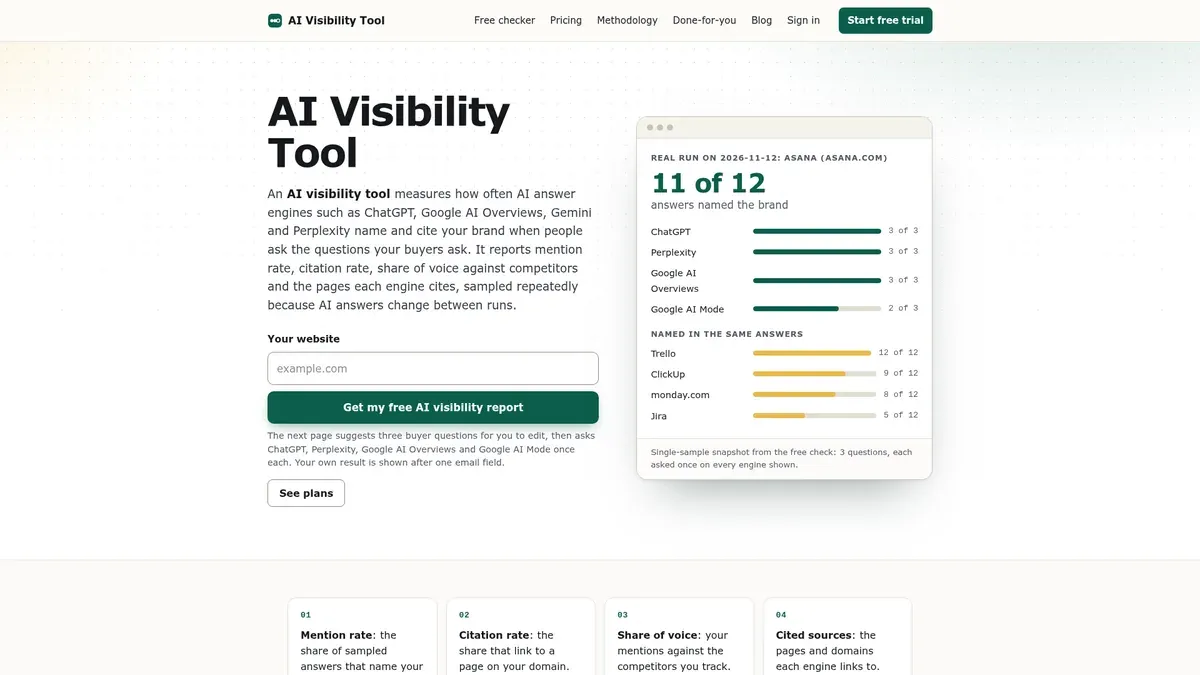
This tool is the clearest of the free checkers about the two outcomes. It defines mention rate, on its own site, as the share of sampled answers that name the brand, and citation rate as the share that link to a page on the brand's domain. It also reports share of voice against competitors. If your goal is to show a prospect, in the first conversation, that mentions and citations are different things, a report that spells that out is handy.
The workflow, as it is described, suggests three buyer questions and asks ChatGPT, Perplexity, Google AI Overviews and Google AI Mode once each. That is a single sample. What we could not establish is a recurring free plan, with a scheduled cadence, saved history, a trend view or a published paid tier. So we treat it as a checker.
That matters for the reason this article exists. A rate from one run on three questions is a thin sample, and a single sample cannot tell you whether the number is moving. It works well as a starting point and as a conversation opener. For client reporting over months, you would want something that repeats the prompts.
Limitation: It is an initial check, not a proven free plan for ongoing client reporting. Scheduled runs, saved history, exports and integrations were not established in the material we reviewed.
Best for: A no-signup snapshot across several AI platforms when you want a fast baseline and do not need recurring, separate-rate reporting.

Ahrefs offers a free checker that looks at ChatGPT, Google Gemini, Perplexity, Microsoft Copilot, Google AI Overviews and Google AI Mode. The report includes total AI mentions and mentions by platform. We could not confirm a separate citation-rate metric from the description, so it does not clearly meet the "two rates" test in the way the first three entries do. It is a limited preview, showing the top five results per section, and it needs no signup.
Ahrefs also separates this free, one-time check from its paid Brand Radar product, which is where ongoing monitoring sits. If you are weighing Brand Radar itself against a free tracker with your own prompts, the guide to a free alternative to Ahrefs Brand Radar goes through that. Ahrefs lists its paid options at $199 a month for select platforms and $699 a month for all platforms, and we mention those only so you can tell the free snapshot from the paid monitoring.
Limitation: It is a one-time snapshot with a trimmed preview, and a separate citation rate is not confirmed, so it cannot give you the trend or the second number.
Two tools came up that we left out of the table on purpose. DeepSmith clearly separates a mention from a citation, but the material we reviewed shows a seven-day free trial and not an ongoing free plan, so we would not call it a free tool for this job. AICarma lists a paid Essential AI plan at $29 a month, with Advanced Insights described as a 14-day free offer, and we could not confirm a perpetual free plan or separate mention-rate and citation-rate fields.
The general point is that a one-time checker, a time-limited trial and a no-expiry free plan are three different things. If you are trying to sort out which kind of offer you are looking at, the guide on which kind of free offer fits you lays out the difference.
Start with what you need to show, and when.
If you are tracking a real client over several months, and you want the two rates as separate numbers with no cap on prompts, AeoNut's Free plan is the one built for that, with the provider data cost to plan for. Before you settle on a prompt list, the guide to free AI prompt research tools helps you decide what is worth tracking.
If a small, fixed prompt set is enough and you are happy with a three-day check, GEOflux is worth a look. It keeps an answer history and records both mentions and cited sources, and you would read the two outcomes out of the answers instead of from two named rates. Check the live plan for engines and export before you commit.
If you only need a one-off report for a pitch and want the two rates defined clearly in it, the AI Visibility Tool does that. If you want a fast, no-account baseline across six platforms, the Ahrefs checker is quick. Neither replaces ongoing tracking, and both are better as a first look than as something to build a client report on.
Whatever you pick, a few habits help, and they matter more than the tool itself. A freelancer with three clients and no budget for a tracking line on the invoice can get a long way with a free plan, as long as the numbers are read carefully. The easiest mistake is to compare a mention rate from one tool with a citation rate from another, which is like comparing two different questions. Use the same prompts and engines when you compare two tools. Write down how each tool defines its rates. If you decide to track citation rates and brand mentions separately for a client, report the two numbers separately to them, and add a line explaining why they differ, so a gap does not look like an error. If you also want to cover tone, there is a guide to free brand sentiment tracking. For where in the answer a brand shows up, there is one on free tools to track your brand's position. And when an answer gets a fact about the client wrong, free tools that catch wrong facts can flag it.
If you want to see your client's mention rate and citation rate side by side, you can set up AeoNut's Free plan with one client project, add your own key, check the cost preview, and start tracking. Start free with AeoNut and run your first prompts today.
AeoNut is the clearest fit for ongoing free tracking. Its Free plan includes one client project and unlimited prompts, and its project overview lists Mention rate and citation rate as separate fields. The platform is free, and the AI answer data is billed by your own provider.
An AI answer can name a brand without linking to it as a source. Mention rate measures whether the brand is named, and citation rate measures whether the answer links to the brand's domain. They are independent outcomes, so the two rates can differ.
GEOflux's Free plan is described as ongoing, not a trial, with 15 prompts checked every three days and three competitors. Its materials record whether the brand is mentioned and which pages or domains were cited, but we could not confirm separate aggregate mention-rate and citation-rate fields. Its free engine list and CSV export are also described differently on different pages, so check the live plan.
No. A checker gives you a one-time report, while ongoing tracking repeats your prompts so you can see a trend. The AI Visibility Tool and the Ahrefs checker are documented as free checker offers, and recurring tracking is not established for either free offer.
Tools & Comparisons ·
Is a self-hosted AI visibility tracker worth your time? Compare setup, upkeep, data control and engine coverage with a managed free plan before you decide.

Tools & Comparisons ·
Which free AEO tracking tool keeps running, saves history and shows change? Compare five free options on schedule, trends and alerts to pick one for a client.

Tools & Comparisons ·
Looking for a free AI tracker that runs on your own API keys? Compare seven options, see the setup steps and engine keys each needs, and pick what fits you.