

Tools & Comparisons ·
Free Tools That Track Citations and Brand Mentions Separately
Compare free tools that report citation rate and brand mention rate as separate numbers, and see which are ongoing plans and which are one-time checkers.
Free AI visibility plans count prompts, engines and projects in different units. See six limits side by side and which one is likely to block your client work.
Avinash Saurabh · · 16 min read
If you're a freelance consultant and a client has asked whether they show up in ChatGPT, you've probably started looking at free plans before you spend anything. That's a sensible place to start, but the numbers on those plans are harder to compare than they look. One tool says five prompts, another says ten, another says two models, and none of them are counting quite the same thing. AI visibility free tier limits are written in each vendor's own units, so you have to read what a number actually measures before it tells you anything.
This guide compares the freemium AI visibility limits of six free plans on the three that decide most real jobs: prompts, engines and projects. It also answers the question you're probably typing into a search box, which AI visibility tool has the best free plan, with a fit-based answer instead of a single winner for everybody. For one client with a real question set, AeoNut's Free plan is the one I'd start with, and I'll show you why. For a few narrower jobs, a competitor is the better fit, and I'll say which.
Everything here comes from each vendor's published pricing and plan pages as of 12 November 2026. This is a read of published limits, not a hands-on test, so where a page doesn't say something, I say "not published" instead of guessing. Not published doesn't mean zero, and it doesn't mean unlimited.
These are the six criteria, in the order they tend to matter for a consultant with one client:
The order below is an editorial fit order for freelance consultants. It isn't a claim that every tool further down is worse. It just reflects how well each published free plan covers one client's full set of questions.
The table keeps each vendor's own unit, because turning everything into "number of prompts" would hide the differences that matter. AeoNut is first because it is the plan this guide is written around. The rest follow in fit order.
| Tool and free offering | Published prompt allowance | Engines or sources named for the free plan | Projects, brands or domains | Cadence and other limits |
|---|---|---|---|---|
| AeoNut Free | Unlimited prompts | 12 engines, including ChatGPT, Gemini, Perplexity, Google AI Overviews and Google AI Mode | 1 client project | Configurable frequency; every feature included, white-label reports too |
| RankBits Free | 5 prompts per scan; 1 tracked scan | ChatGPT, Google AI Overview, Google Search, Bing Search and Perplexity | 1 brand | Tracking every 7 days; 100 AI responses a month |
| AEObot Free | 5 "tracked prompts & pages" | ChatGPT and Perplexity | 1 brand workspace | Monthly scan |
| AIAttention Free | 5 prompts per project | 2 AI models per project (economy models, not named) | 1 active project | 1 monitoring run a week |
| Beacon Starter (free) | 10 tracked AI prompts | Free-plan engines not established | 1 project (one website or brand) | On-demand GEO tracking |
| Notion Cue Free | No custom-prompt number published | AEO score for 3 LLMs, not named on the plan card | 1 domain scan per day | 7-day history |
A few notes keep the table honest. RankBits' five sources aren't five AI answer engines, since Google Search and Bing Search sit beside the AI sources. AEObot's five is one label covering prompts and pages together, and its page doesn't say how the five are split. AIAttention counts models, which isn't the same as naming the answer surfaces your client cares about. And a daily scan at Notion Cue is a quota of scans, not a count of saved projects.
Before you read the entries, it helps to know what three words mean across these plans. This is where free AI tracker prompt limits get confusing.
A prompt allowance can mean the questions stored in your monitoring setup, the questions allowed in one scan, a combined allowance for questions and pages, or the answer requests used in a period. Five saved questions are not the same as five answer requests. RankBits gives a prompts-per-scan number and a separate 100 AI responses a month, which are two different things.
An engine allowance tells you where a question can be checked. The headline number matters less than which surfaces are named. ChatGPT, Gemini, Google AI Overviews and Google AI Mode are four separate places, and a generic "two models" doesn't tell you which of them you get.
A project allowance is how many separate client brands you can keep apart. A project is usually one brand or website with its own settings, but each vendor defines it a little differently. A competitor you track inside a client's report is not a second client project.
Vendors also label the same job differently, so which label means which tool is worth knowing. Cadence, history and reporting are the tie-breakers when freemium AI visibility limits look similar on paper. A report you can share by link is different from one you can download, and both are different from a white-label report in your own branding. Only call it white-label when the vendor says agency branding is supported.
Best for: a freelance SEO or AEO consultant who needs broad prompt coverage, the main engines clients ask about, and a report that carries their own brand.
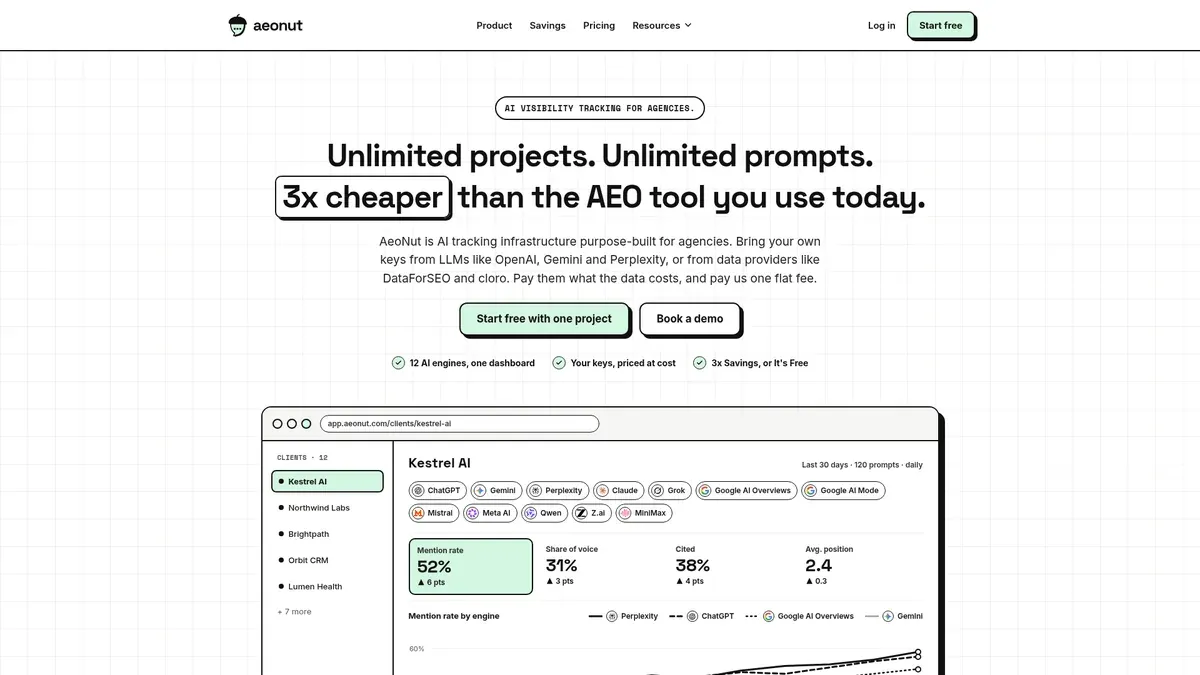
AeoNut's Free plan is free forever, with unlimited prompts and your own keys. It holds one client project, which means one client brand with its own prompts, competitors, settings and reports, and it includes every feature AeoNut has. No card is needed. That combination is why it comes first here: you scope the questions around the client, not around a five or ten prompt ceiling.
It tracks twelve engines: ChatGPT, Gemini, Perplexity, Claude, Grok, Google AI Overviews, Google AI Mode, Mistral, Meta AI, Qwen, Z.ai and MiniMax. That list covers all five surfaces a typical client brief names. For each project you choose which engines, which countries and how often tracking runs, and for each engine whether to use scraped data or API data. Unlimited team seats are included too.
You bring your own provider key, from OpenAI, Anthropic, Gemini, Perplexity or DataForSEO, and one key from a single provider is enough to start. The platform is free, and the AI answer data is billed by your provider at its own price. A cost preview shows you the estimate before tracking runs, and budget caps and alerts keep it from surprising you. That's the one cost to know about, and it's a fair thing to check before you add a long prompt list.
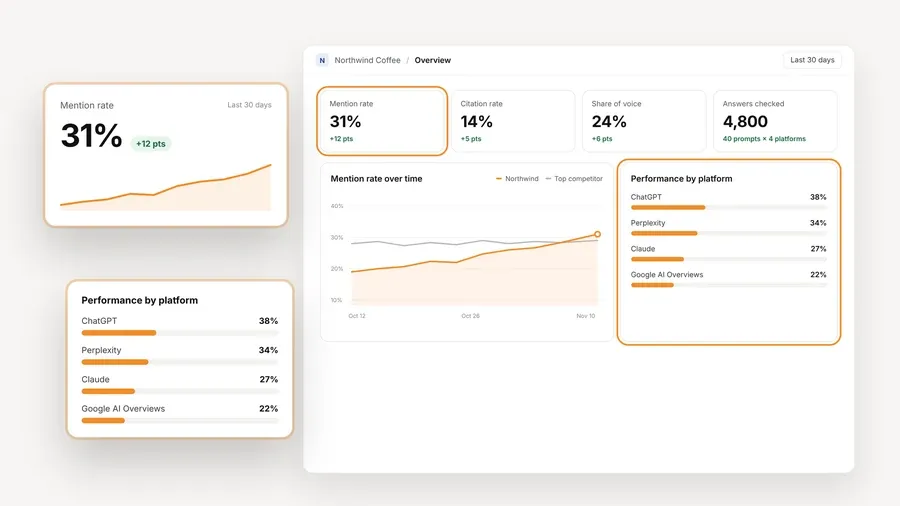
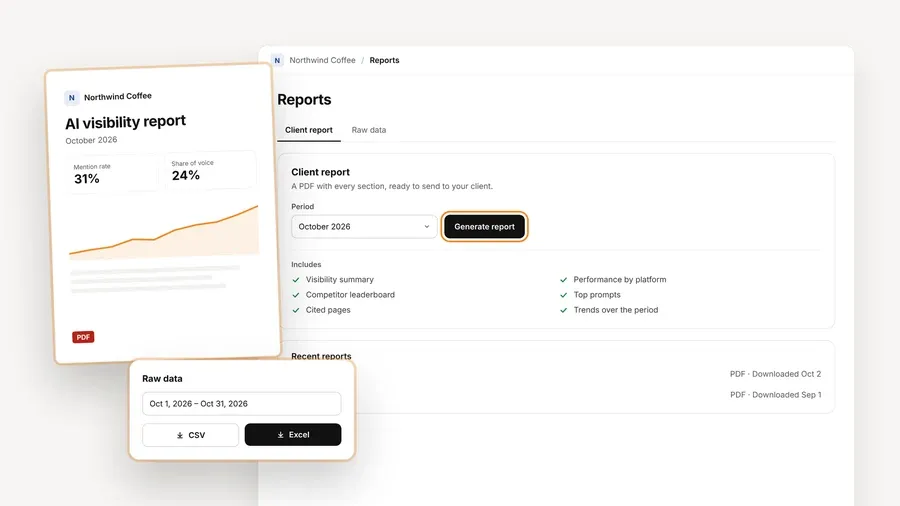
Free also includes the analytics a client actually asks about: mention rate, citation rate, average position in the answer, share of voice against competitors, sentiment, and trends by engine, prompt and country. White-label client reports carry your branding, not AeoNut's, and you can export CSV. The read-only MCP server and the API are part of the same plan, so an AI assistant can read the project's data when you want help writing the monthly summary.
The one boundary is the project count. Free holds one client project, so if you need separate workspaces for several client brands at once, you'd move to Pro, which holds up to 10 client projects on one flat fee. That doesn't touch the use case this plan is built for, which is tracking one paying client, one prospect or your own brand properly. If you're unsure when a free plan stops being enough, signals a free plan is no longer enough lists what to watch for.
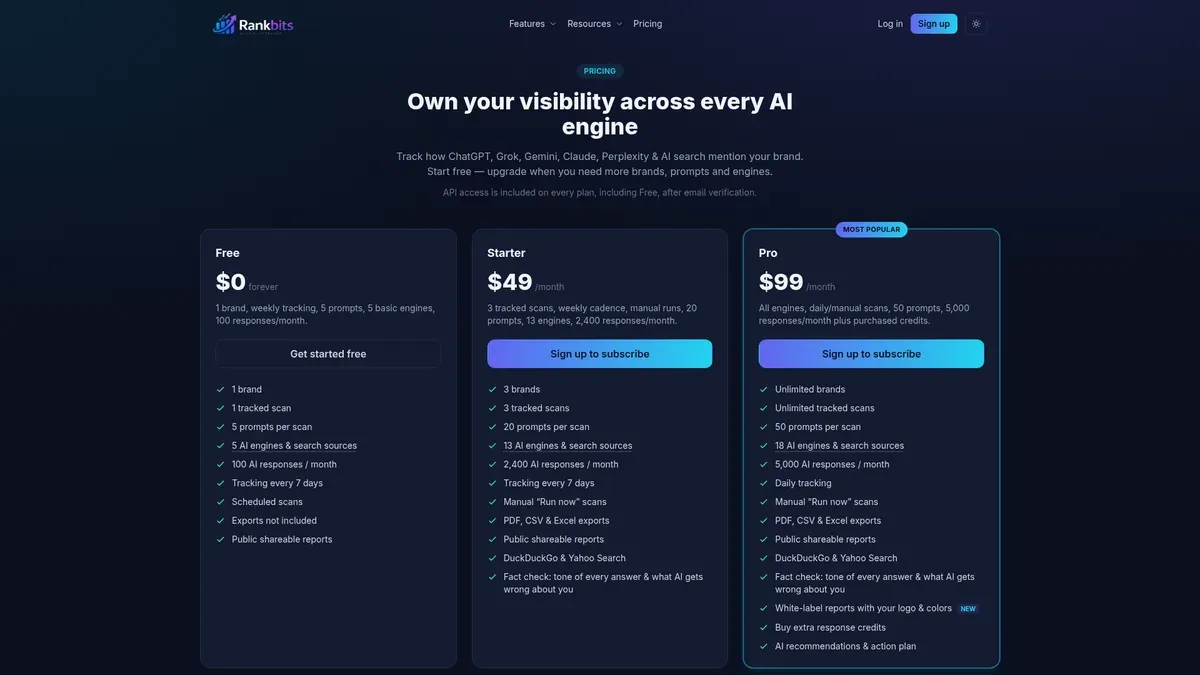
Best for: a consultant who can work with five questions and wants scheduled weekly checks across a clearly named mix of AI answers and conventional search.
From its pricing page as of November 2026, RankBits Free covers one brand with five prompts per scan, one tracked scan, tracking every seven days and 100 AI responses a month. Its named sources are ChatGPT, Google AI Overview, Google Search, Bing Search and Perplexity. The free offering also includes public shareable reports, and API access after email verification.
The strength here is that you can see exactly which sources are in the free plan, and the weekly schedule is stated plainly. For a narrow watchlist that's useful. The limit sits right next to it: five prompts per scan is a small question set, and it fits a short list better than a full client question map. The free source list also doesn't establish Gemini or Google AI Mode, and exports aren't included. A public report is a shareable link, which isn't the same as a white-label report in your branding.
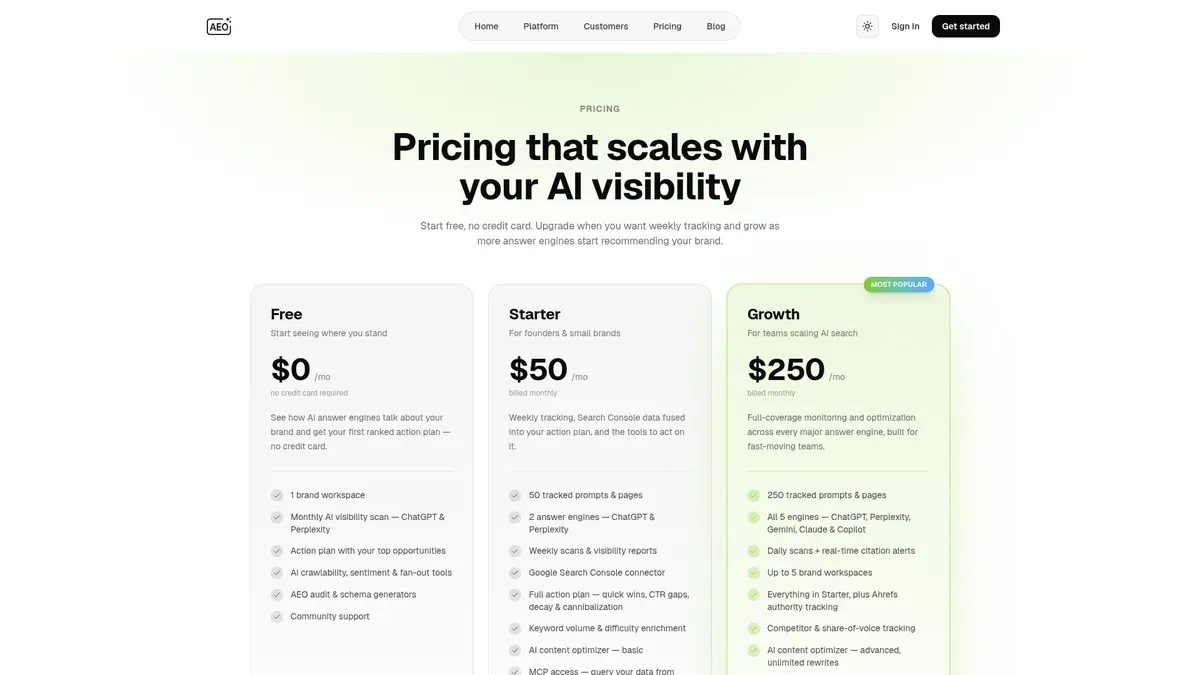
Best for: a founder, consultant or small brand that mainly wants a periodic ChatGPT and Perplexity baseline, plus tools that help interpret it.
AEObot Free runs one brand workspace with a monthly AI visibility scan across ChatGPT and Perplexity, and no card is required. Its comparison table lists five "tracked prompts & pages." You also get a preview of a ranked action plan, AI crawlability, sentiment and fan-out tools, an AEO audit and schema generators.
Naming the two engines clearly is more useful than a bare engine count, and the audit tools are a real extra if you want help acting on what you find. The limit is the cadence. A monthly scan is slow if your client expects weekly movement, though it can suit a light monthly baseline. The five-unit label combines prompts and pages without saying how they're shared, so it's safest not to read it as five of each. History length, free exports and white-label reporting weren't established in the free description.
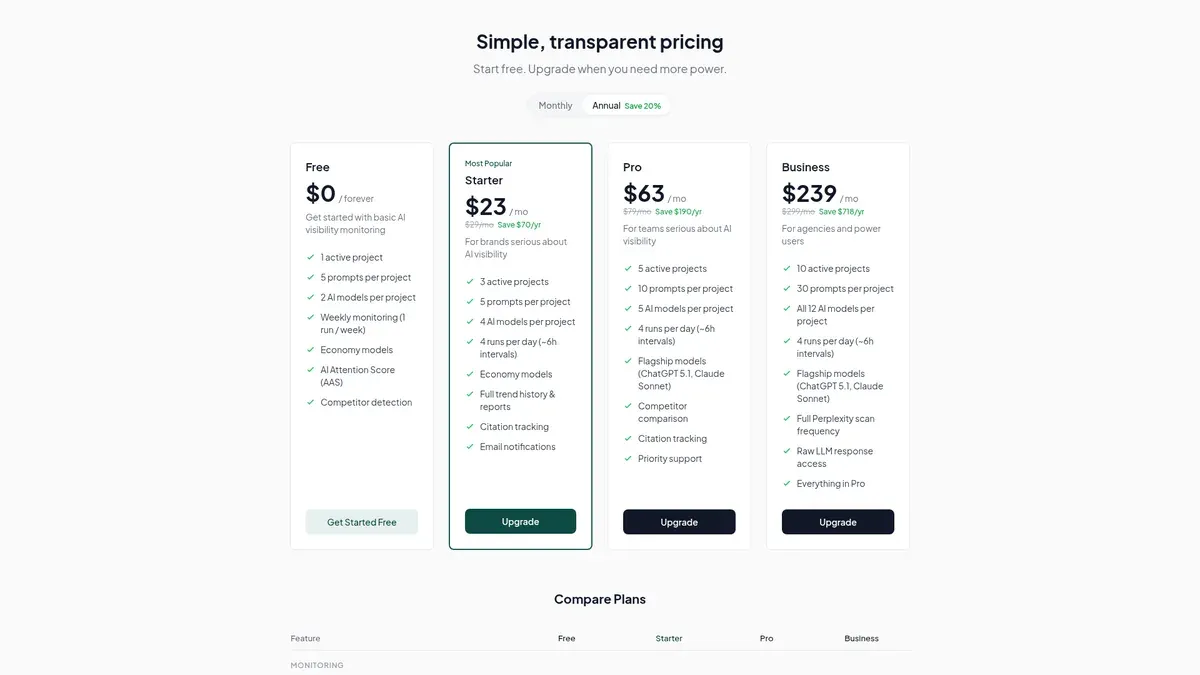
Best for: a consultant testing a five-question weekly brief, after first checking that the available models suit the client.
AIAttention's free tier covers one active project with five prompts per project, two AI models per project and one monitoring run a week. It also includes an AI Attention Score and competitor detection, which gives you a bit more than an isolated brand check. The recurring weekly schedule is clearly published, and that's its main strength.
The limit is what "two models" means. The pricing page describes them as economy models without naming them, so it doesn't establish that they reproduce what a user sees in ChatGPT, Google AI Overviews or Google AI Mode. For a client who asks about particular surfaces, that's not enough evidence. No free API, export, integration or white-label report was established, and history isn't published for the free tier.
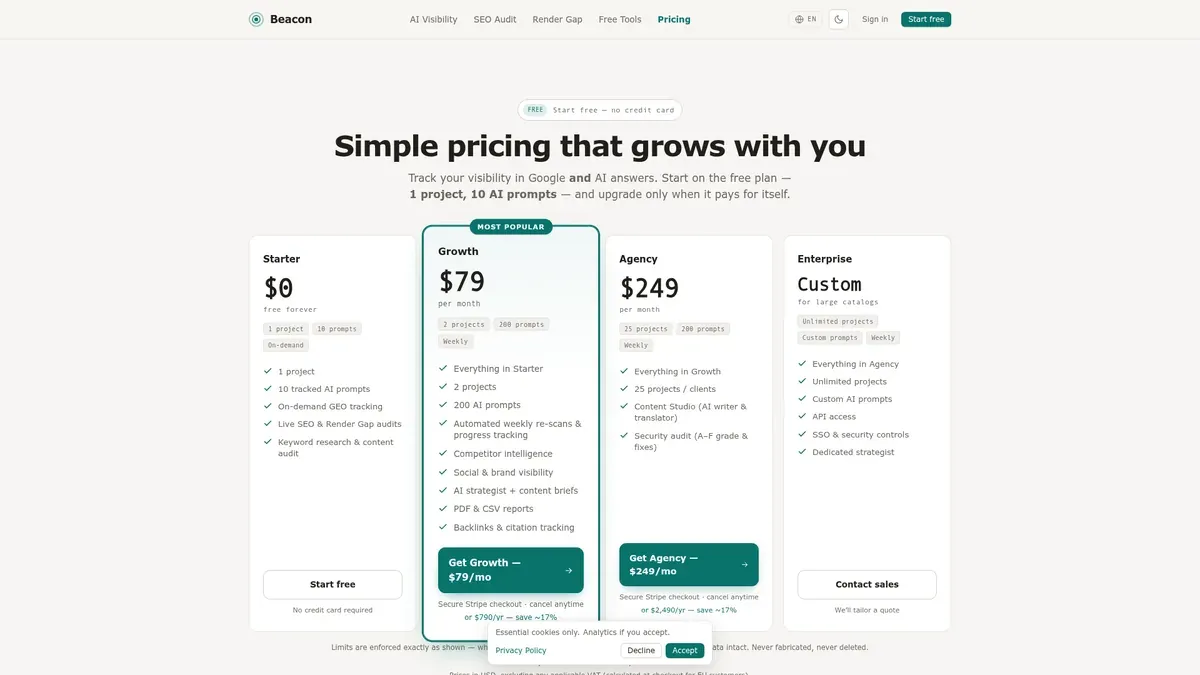
Best for: a consultant who runs checks during an audit or a client call and also wants website-level SEO analysis.
Beacon's free offering is called Starter. It publishes ten tracked AI prompts for one project, where a project means one website or brand. That's a larger number than the five-prompt plans above. Starter also includes live SEO and Render Gap audits, keyword research and a content audit.
The limit sits right beside the strength. Free GEO tracking is on demand, so you run it yourself, and no automatic free schedule is published. That suits a structured audit engagement better than an unattended monitoring brief. Beacon's feature page shows several AI surfaces, but the free pricing doesn't name which engines are included or how many, so those names aren't a confirmed free entitlement. Free exports and a fixed history period weren't established either.
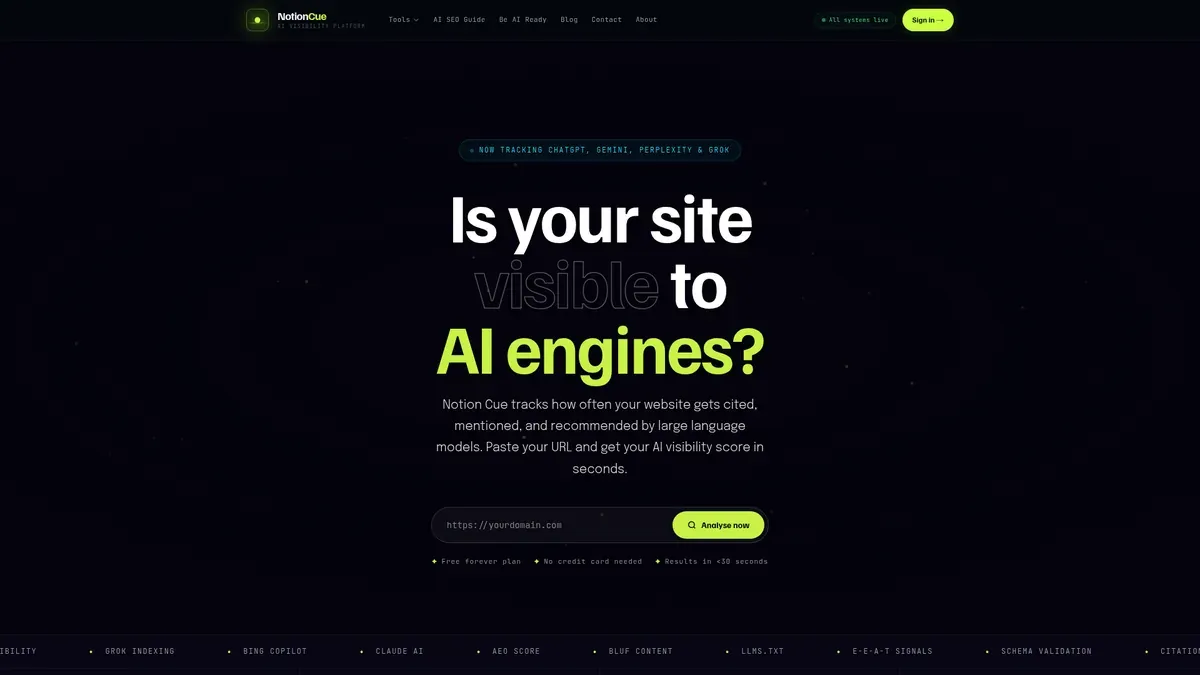
Best for: someone who wants a fast website-level indication and a basic citation count, not a prompt library they define themselves.
The Free plan card lists one domain scan per day, an AEO score for three LLMs, a basic citation count, an llms.txt validator and seven-day history. That's a different kind of service from a fixed set of questions monitored on named engines, and it's fine for a quick read.
The limit is that no custom-prompt number is published and the three LLMs aren't named on the card. There's also a mismatch worth knowing about: the separate checker page describes six LLMs and "no scan limits," while the homepage Free card lists three LLMs and one scan a day. They may describe different product surfaces, and the pages don't reconcile them, so it's safest to rely on the Free card. A daily scan quota doesn't tell you how many domains you can save, so it isn't proof of a saved project.
Two well-known free tools came up in this research, and both are checks, not tracking plans. Ahrefs offers a free AI visibility checker with no signup or card and no limit on how many brands you check. It queries ChatGPT, Gemini, Perplexity, Copilot and Google AI Overviews and reports mentions, platform breakdowns, topics and cited pages. HubSpot's AI Search Grader is a one-time diagnostic of how ChatGPT, Perplexity and Gemini describe a brand, and it says itself that it isn't continuous monitoring.
Both are handy for a first conversation with a prospect. Neither gives you a custom prompt set or a history you can show a client over three months, so they sit outside the numbered list on purpose. To match a free tool to a specific job such as competitor tracking or sentiment, see free tools by tracking job. Unlimited brand checks aren't the same as unlimited tracked client projects.
Here's a made-up brief to show how the limits bite. It isn't a benchmark. Say you want to track 12 client questions across ChatGPT, Gemini, Perplexity, Google AI Overviews and Google AI Mode for one brand. If each question gets one answer on each engine, one full pass is 60 answers. That's simple arithmetic, not a statement about how any vendor meters usage.
Now change the brief to five questions, one narrow source requirement and a weekly public report. RankBits becomes a sensible pick. Change it to a monthly ChatGPT and Perplexity baseline with audit tools, and AEObot becomes a sensible pick. The right tool moved because the client's needs moved, not because anyone's limits got bigger.
Start by writing down the client's actual questions, then list the answer surfaces they care about, count the separate client brands, and only then check cadence and reporting. That order stops you picking a big headline number whose unit you haven't checked. If you're still deciding between a plan, a trial and a one-off checker, which free offer to pick walks through that choice.
If you're replacing a paid tracker, what you keep and give up with free alternatives is worth a read, and how free tracking by reader and industry changes the setup is covered separately. Reporting is a tie-breaker, not the main event. Prompts, engines and projects come first, and then you check that an allowance that looks big enough can still produce something you can hand a client.
If one client's real question set is your job, start free with AeoNut and build the prompt set your first client actually needs. The platform is free, and you'll see the data cost in the cost preview before anything runs.
For one client with a full question set, AeoNut is the one to start with, because it combines unlimited prompts, twelve named engines and white-label reporting. A five-question weekly watchlist, a monthly two-engine baseline or an on-demand audit may fit a competitor better. Best depends on the work the client needs, not on how many free features are listed.
Not always the same thing. RankBits gives prompts per scan, AEObot gives one combined "tracked prompts & pages" number, AIAttention gives prompts per project, and Beacon gives tracked AI prompts. Notion Cue's Free card gives daily domain scans instead of a custom-prompt number. Keep each vendor's unit in mind when you compare.
No. Check the named free entitlements. AeoNut names ChatGPT, Gemini, Perplexity, Google AI Overviews and Google AI Mode. RankBits names a mix of AI and conventional search sources, and AEObot names ChatGPT and Perplexity. AIAttention's free models and Beacon's free engines aren't established, and Notion Cue's three LLMs aren't named.
Check the one you can't compromise on. Several client brands make project capacity the first filter, a client who asks about one specific surface makes named engine coverage the first filter, and a large question map makes prompt capacity the first filter. Then check cadence and reporting.
Tools & Comparisons ·
Compare free tools that report citation rate and brand mention rate as separate numbers, and see which are ongoing plans and which are one-time checkers.

Tools & Comparisons ·
Is a self-hosted AI visibility tracker worth your time? Compare setup, upkeep, data control and engine coverage with a managed free plan before you decide.

Tools & Comparisons ·
Which free AEO tracking tool keeps running, saves history and shows change? Compare five free options on schedule, trends and alerts to pick one for a client.