

Tools & Comparisons ·
Free Tools That Track Citations and Brand Mentions Separately
Compare free tools that report citation rate and brand mention rate as separate numbers, and see which are ongoing plans and which are one-time checkers.
Find the free AI visibility tracking setup that fits your role or industry, from freelancers and founders to local shops, SaaS, ecommerce and regulated firms.
Avinash Saurabh · · 18 min read

If you are tracking one brand and you want to know whether it shows up in ChatGPT and Google's AI answers, you can start today without paying for a platform. AeoNut's Free plan is a free AI brand visibility tracker for one brand: free forever, unlimited prompts, your own keys. The platform costs nothing, and the AI answer data is what your own provider charges you for. It is the only AI visibility tracker that is free forever with unlimited prompts, and some other tools offer credit-capped free plans or one-off checkers, which are not the same thing as ongoing tracking.
Once you have the free tool, the next question is what to point it at. A freelancer reporting to a client, a founder watching their own brand, a clinic, and an online shop all need different prompts, different engines and different reports. This guide walks through each of those situations so you can find yours and set up the free tracking that fits it. If you want the wider picture of how free offers differ first, the free AI visibility tools hub is the place to start.
This is a list of tracking setups, not a list of competing tools. I picked each one by asking the same six things, and you can use them to judge any setup you come up with yourself.
Your role and your industry also overlap. A freelancer with a local dental clinic as a client needs the freelancer reporting setup plus the local and healthcare considerations below. Read both parts that apply to you.
| Setup | Best for | Prompt emphasis | Report emphasis |
|---|---|---|---|
| AeoNut Free foundation | One person or team tracking one brand | The brand's real buying questions and competitors | Mention rate, Cited, Avg. position, Share of voice, raw answers, white-label reports |
| Freelance consultant | A first paid engagement or one prospect | Questions tied to the client's products and competitors | A branded summary backed by real answers |
| In-house marketer or founder | A team watching its own brand | Category, product fit and accuracy questions | Results by product or prompt category, plus an action list |
| Agency pitch or pilot | Proving the service on one prospect | A representative slice of the proposed work | A white-label evidence pack with scope and cost |
| B2B SaaS | Products chosen by use case and comparison | Audience, workflow, integration and alternative questions | Competitor citations and answer accuracy |
| Ecommerce | Product discovery | Category, attributes, budget and market | Mentions, owned-page citations, manual product checks |
| Local and service-area business | Location-dependent services | Service, place and customer need | Correct details and cited local sources |
| Healthcare, finance and legal | Answers where accuracy matters most | Services, eligibility and jurisdiction | Human-reviewed accuracy and source quality |
| Publishers and expert content | Being cited as a source | Questions the publication genuinely answers | Owned-page citations and topic gaps |
Best for: a freelancer, consultant, founder, in-house team or agency pilot that needs recurring tracking for one brand without a monthly platform fee.

Every setup below sits on top of this one, so it gets the most room. AeoNut's Free plan is a free AI visibility tool with a free plan that does not expire. You get one client project, unlimited prompts, every feature and no card to sign up. A project is one brand with its own prompts, competitors, engines, countries, schedule and reports.
The unlimited prompts matter for the reader this guide is written for. When you are a one-person shop scoping a real client, you can write down every question the client's buyers ask instead of picking a handful because a plan only allows a handful. You still decide how many are worth tracking, since every prompt and every engine adds to what your provider charges you.
On the Free plan, you track on any of the twelve engines: ChatGPT, Gemini, Perplexity, Claude, Grok, Google AI Overviews, Google AI Mode, Mistral, Meta AI, Qwen, Z.ai and MiniMax. For each project you choose the engines, the countries, the prompts and how often it runs: daily, twice a week or weekly. For each engine you also choose between scraped data, which is the answer a real person sees in the ChatGPT, Gemini or Google app, and API data, which is the answer from the exact model you pick. They are not the same measurement, so label which one you used when you report.
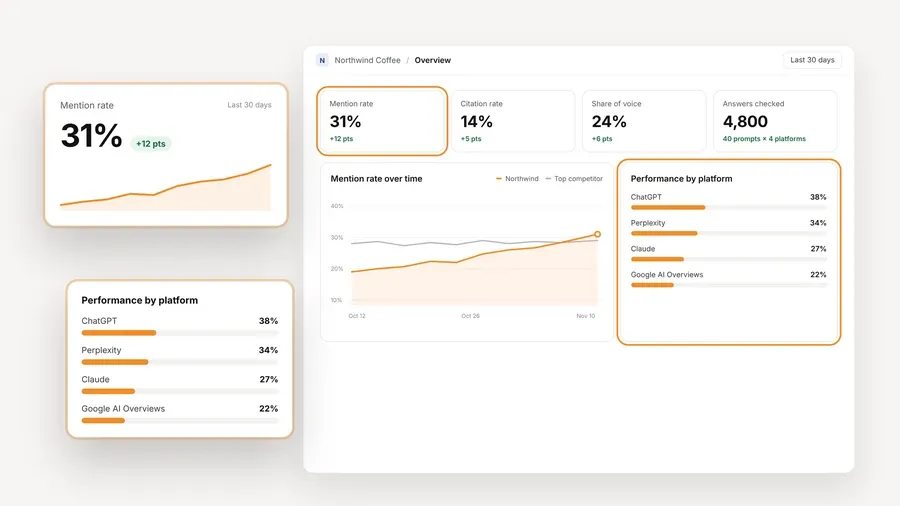
What you see for the project is the part a client cares about. AeoNut records Mention rate, Cited, Avg. position, Share of voice against the competitors you track, and Sentiment, with trends by engine, prompt and country. It also keeps the raw AI answer for every prompt, the pages that were cited and the sources behind them, so you can show a client what the engine actually said and not only a score. The numbers in the screenshot are demo data.

Reports come out as white-label PDFs, Excel and Markdown files, or shareable links under your own name, and the raw data exports as CSV. The read-only API and the MCP server are also there on Free, though you do not need either to get started.
You bring your own keys. AeoNut works with OpenAI, Anthropic, Gemini, Perplexity and DataForSEO, and one key from a single provider is enough to start. Keys are encrypted and not shown again after you save them, and AeoNut recommends restricted keys with a spending limit. Before tracking runs you see an estimated monthly cost, and you can set budgets and alerts per client.
The honest limit: Free covers one brand, and the provider's data charges are separate. That suits a freelancer starting with one client. If you end up with several client brands that each need their own settings and reports, Pro covers up to 10 client projects at $99 a month ($79 a month billed annually) with the same features, and Unlimited covers any number at $499 a month ($399 billed annually). Please do not squeeze unrelated clients into one project to avoid the limit, because the competitors and reports will blur together.
Best for: a consultant who has just been asked "are we showing up in ChatGPT?" and wants to hand back a recurring report instead of a screenshot.
Prompts. Write the questions the client's buyers ask before they buy. Your best sources are the client's sales team, the website's search box, support requests and any keyword research you already have. Keep two kinds apart. One kind asks something like "Which [category] providers suit [buyer type] with [constraint]?" without naming the client, which tells you whether the brand turns up on its own. The other asks "How does [client brand] compare with [competitor] for [use case]?", which tells you how the engine describes the brand when it is named. Scoring them together hides both answers.
Engines. Start with the engine the client asked about. Add a second one when it answers a different question. If the client asked about ChatGPT and Google AI Overviews, do not swap in a different model through an API and call the job done.
What to put in the report. Name the brand, its competitors, the exact prompts, the period, the engines, the countries and whether the data was scraped or API. Show Mention rate and Cited separately, add one or two real answers that explain a finding, and finish with one next step tied to the gap. That layout is my recommendation, not a prebuilt template.
Where it stops: one or two checks are not a trend. Keep the prompt set stable and repeat anything meaningful before you tell the client things improved or dropped. Free also holds one client, so it is the right place to start with your first client, and it does not cover your whole roster.
Best for: a business watching its own brand and deciding which product or content gaps to fix first.
Prompts. Organize the questions around buying situations and product categories, not your org chart. A category question such as "What is a suitable [product category] for [audience] trying to [outcome]?" tests whether you are discovered. A question such as "Does [brand] support [requirement], and what alternatives should I consider?" tests how you are positioned and whether the answer is correct. A product can show up for one use case and be missing from another.
Engines. Pick the engines your team has a reason to watch, and keep the results separate. A gain in Google AI Mode does not mean a gain in ChatGPT, and a combined score can hide the difference.
What to report. Show visibility by prompt category and product line, mentions next to citations of your own site, and a named owner for each important gap. The answers let you tell three cases apart: you are absent, you are mentioned but not cited, or you are cited and described wrongly. Each needs a different fix.
Where it stops: one brand's question set is not a census of the market, so avoid presenting it as one.
Best for: an agency that wants to prove an AI visibility service on one prospect or one client before it commits to a wider rollout.
Prompts. Use a representative slice of the work you are proposing: an important question where the prospect is not named, a meaningful comparison and an accuracy check. Do not choose only prompts that flatter the prospect, because a pitch that hides weak answers falls apart the first time the client runs one.
Engines. Match what you plan to sell. A pitch built on one engine should not be called full cross-platform visibility, and you should say whether each result came from an app-facing collection method or a model API.
What to report. Build a white-label evidence pack with the setup, the observed answers, the competitor sources, the limits and an estimate of what continuing would cost. Keep a one-time prospect demonstration separate from a recurring client baseline, because they answer different questions.
Where it stops: Free is a one-project pilot and not a free multi-client agency plan. When the pilot turns into several clients, give each one its own project so competitor lists, scope and report history stay clear, and look at Pro for up to 10 of them. The free plan, free trial or checker guide helps if you are deciding whether a pilot should run on a plan or on a short-lived offer.
Best for: software brands that are chosen by use case, by alternatives, by integrations and by team fit.
Now we move from who you are to what you sell. For free AI visibility tracking by industry, the biggest difference is the kind of question your buyers ask.
Prompts. The key is the gap between a broad category and a specific buying situation. A generic question about the best software in your category will miss the reasons you win or lose a deal. Try "Which [software category] works for a [team type] that needs [workflow or integration]?" and "What are alternatives to [competitor] for [use case] with [constraint]?" Add audience, team size, workflow, integration, buying stage or deployment only when it truly changes the answer. Rewording one generic question five times does not add coverage.
Engines. ChatGPT is a sensible candidate when it is in the brief. Google AI Mode is worth adding for complex comparisons, since Google describes it as built for further exploration and comparison. These are fit suggestions, not data on which engine software buyers use most.
What to report. Look at whether you appear on unbranded recommendations for each use case, your Share of voice against the competitors you track, which competitor pages and third-party sources get cited, and whether the answers state your integrations, pricing and features correctly. Notice, too, whether you are named without your own pages being cited.
Where it stops: showing up for "best [category] software" does not mean you cover every purchasing situation. Check what the answers say about integrations and pricing against your current product, because a positive Sentiment label does not confirm those facts.
Best for: brands and retailers who care about product discovery and how AI answers describe their products.
Prompts. Capture the product requirements that change a recommendation: intended use, attributes, budget, availability and market. "Which [product category] suits [use case] under [budget] in [country]?" works, and so does "Compare [product A] and [product B] for [requirement]." Keep brand-level discovery apart from named-product questions, since a brand mention, a product recommendation and a merchant listing are three different things.
Engines. ChatGPT is a good candidate because OpenAI documents shopping in ChatGPT search. Add Google AI Overviews or AI Mode when those surfaces matter to you. OpenAI says shopping results can use your query context and Memory, that not every product necessarily appears, and that prices can lag, so it tells shoppers to check final prices with the merchant. An answer you track is an observed answer under your setup, not what every shopper sees.
What to report. Mentions and citations of your own pages over time, which product or category pages get cited, and a manual check of named products, variants, prices and availability. That check is a job for a person, since AeoNut tracks the answers and does not validate your product feed, stock or SKUs.
Where it stops: tracking brand answers is not the same as monitoring every shopping carousel or merchant position, so do not report it as that.
Best for: businesses where location decides suitability, such as home services, clinics, professional offices and local hospitality.
Prompts. Put the service and the place in the prompt. "Near me" cannot be reproduced, so write the city or district. Try "Which [service] providers serve [city or district] for [customer need]?" and "What should I compare when choosing a [service provider] in [location]?" Include only constraints you can check, like the service area or the appointment type, and do not suggest that an AI answer has confirmed anything about availability.
Engines. Google AI Overviews and AI Mode are reasonable starting points when Google is where the business wants to be seen, with ChatGPT added if the owner asks. Keep Google Maps and the local pack out of your AI-answer numbers.
What to report. Record the location named in each prompt and the country the data was collected for. Look at mentions and citations for each group of location prompts, whether the answers get the address, service area and contact details right, and which business, directory or local news sources show up. Google says local results depend mainly on relevance, distance and prominence, and that complete and accurate Business Profile information helps match you to the right searches. That is a good reason to check your details, and it does not prove the same formula decides AI answers.
Where it stops: AeoNut works with country scope. A city in your prompt is a constraint on the question, and it does not show the data was collected from that city. An AI answer position is also not a Maps ranking.
Best for: organizations where a wrong description, eligibility claim or recommendation can have real consequences.
I group these three because they share one idea, which is putting accuracy ahead of visibility. They are not the same in regulation, and the guides for each should treat healthcare, finance and legal practice separately.
Prompts. Stick to factual service discovery, eligibility, jurisdiction and brand accuracy, not open-ended personal advice. For example, "Which clinics in [location] offer [service] for [patient group]?" or "Which firms handle [matter type] in [jurisdiction]?" These are made-up templates, so use invented scenarios and keep patient, client and account details out of your prompts.
Engines. Use the engines the engagement calls for and read each one separately. Nothing here shows that one engine is the most accurate for any of these fields.
What to report. Whether the organization is named or cited, whether the service descriptions and eligibility statements are right, whether the location and jurisdiction fit, and whether the cited pages really support what the answer says. Keep an issue log that a qualified person has reviewed, with absence, inaccuracy and possibly harmful advice listed as different things. Google's people-first content guidance puts extra weight on experience, expertise and trust for topics that affect health, money or safety, which supports reviewing accuracy first.
Where it stops: a visibility tracker is not a clinical reviewer, a legal adviser or a compliance check. Presence and Sentiment cannot tell you whether an answer is professionally correct, so have a qualified person review the answers that matter.
Best for: editorial, educational and expert teams who care whether their pages are used as sources, and not only whether their name appears.
Prompts. Choose reader questions your publication truly answers, such as "How does [topic or process] work for [audience]?" Do not write prompts whose only job is to get your name mentioned.
Engines. Google AI Overviews and AI Mode fit when Google is part of the goal, plus any other answer engine you want to monitor. Keep the results apart before drawing a cross-engine conclusion.
What to report. Citations to your own pages and how they trend, the topics where none of your pages get cited, the third-party sources or rival publications that are cited instead, and any mention that comes without a source link. Treat referral traffic and business results as their own evidence. Google says traffic from its AI features is counted in Search Console's overall Search traffic under the Web search type, and it does not describe a separate AI-only report, so do not label the whole Web report as AI Overview traffic.
Where it stops: a citation is not an impression, a click or revenue, because a page can be cited without anyone visiting it.
A free platform plan is not free AI answer data. AeoNut charges $0 for the Free plan, and the provider you connect charges for its data or model use at its own prices, which AeoNut does not mark up. More prompts, more engines and a faster schedule mean more collection, and the real charge depends on the provider, the model and the collection method.
To see how scope adds up, 20 prompts on 2 engines with 4 scheduled checks is 160 planned prompt-engine runs. That is arithmetic, not a recommended prompt count or an invoice estimate, because collection methods bill in different units. Use AeoNut's cost preview and your provider's current terms for the real number, and set restricted keys with spending limits plus budget caps and alerts.
Two habits keep the free setup honest. Spend prompts on real differences, such as a different audience, price limit or place, because unlimited prompts remove a platform cap and do not make every extra prompt worth running. And hold a stable core set of prompts, writing the change down whenever you alter the prompts, engines, country or schedule, so this month still compares with last month.
Match your situation to a setup and go from there.
A different approach fits better in a few cases. If you cannot spend anything on provider data or do not want a provider account, bring-your-own-keys is not for you. If you want data bundled into one bill, a bundled service may be easier to run. If what you really need is Maps rankings, live inventory checks or a compliance review, use the right specialist process alongside AI visibility tracking.
For the freelancer or consultant this guide is written for, with one brand to watch and a client waiting for an answer, AeoNut Free is where I would start, because its terms fit that job.
Start free with AeoNut. Track one brand with unlimited prompts, preview your provider costs and report under your own name.
Start with who you report to, then add what your industry's buyers care about. A freelancer needs client-branded evidence, an in-house team needs product or topic actions, a software business needs use-case questions, a local business needs a named place, and a healthcare or finance organization needs a person to review accuracy. AeoNut Free gives you the one-brand tracking foundation under all of those.
The Free plan is $0 forever for one client project, with unlimited prompts, every feature and no card needed. It is not a time-limited trial. Your provider bills separately for the AI answer data, so a free platform does not mean free data.
Begin with the engines your client asked about, or the ones you need to answer the question in front of you, and keep the results separate by engine. AeoNut supports 12 engines, including ChatGPT, Gemini, Perplexity, Google AI Overviews and Google AI Mode, but having them available does not mean every project should run all of them.
There is no set number. Cover distinct buyer situations instead of rewordings, keep a stable baseline and repeat important changes. A report can show the mentions, citations, positions, competitors and actual answers within the scope you set. It cannot prove total AI audience, what every user saw, conversions or professional correctness.
Tools & Comparisons ·
Compare free tools that report citation rate and brand mention rate as separate numbers, and see which are ongoing plans and which are one-time checkers.

Tools & Comparisons ·
Is a self-hosted AI visibility tracker worth your time? Compare setup, upkeep, data control and engine coverage with a managed free plan before you decide.

Tools & Comparisons ·
Which free AEO tracking tool keeps running, saves history and shows change? Compare five free options on schedule, trends and alerts to pick one for a client.