

Tools & Comparisons ·
Free Tools That Track Citations and Brand Mentions Separately
Compare free tools that report citation rate and brand mention rate as separate numbers, and see which are ongoing plans and which are one-time checkers.
Not sure whether to run separate free checks or one tracker across engines? Compare coverage, consistent metrics and setup time for your client work today.
Avinash Saurabh · · 15 min read

If a client asks whether they show up in ChatGPT and Google AI Overviews, you can answer it two ways. You can run a handful of free checkers and paste the results together, or you can set up one tracker that runs the same prompts across the engines your client cares about and keeps the results. Both are free to start, and the choice between them comes down to whether you need a quick look or a repeatable record. This guide walks through that choice as a freelance consultant would face it, with a free AI visibility tracker per engine on one side and one tracker for all AI engines on the other.
The short version is that separate checks work well for a first look, and one tracker works better once a client wants a trend. AeoNut's Free plan is built for the second case. It is free forever, with unlimited prompts, your own keys, and no card, for one client project. The platform costs nothing, and the AI answer data is what your own provider charges, which we cover below so the cost does not surprise you later.
Before the details, here is how the two approaches compare on the things that tend to decide it. The left column describes free checkers in general, and the right column describes AeoNut Free.
| Decision factor | Separate free checks or checkers | AeoNut Free, one cross-engine tracker |
|---|---|---|
| Best fit | A one-off question, early exploration, or a consultant who is fine collecting results by hand | A consultant tracking one client brand who needs a repeatable view over time |
| Coverage | Depends on the checker. Some already cover several AI platforms, so check the scope of each | 12 engines: ChatGPT, Gemini, Perplexity, Claude, Grok, Google AI Overviews, Google AI Mode, Mistral, Meta AI, Qwen, Z.ai and MiniMax |
| Ongoing measurement | You can rerun a checker, but you have to save and compare each result yourself | Tracked prompts run on a schedule, with trends by engine, prompt and country |
| Metrics | Vary by checker, so a score from one is not the same as a score from another | Mention rate, Cited, Avg. position, Share of voice, Sentiment, plus the raw answers and sources |
| Setup and effort | Quick to start, but you coordinate prompt wording and record keeping | Set up a project, prompts, engines, country and frequency, connect a key, review the cost preview |
| Cost | Free checkers can have daily or report limits | Platform free forever for one project, with data billed by your provider |
| Client reporting | Depends on the checker | White-label client reports included on Free |
Two things in that table are easy to miss. The first is that a free checker is not automatically a single-engine tool. The second is that "free" on the right side applies to the platform and not to the data. Both come up again below.
A checker answers one question: what did this tool find when I checked? It is not necessarily a tracker. A tracker keeps a comparable history, runs the same prompts on a schedule, and can show you the exact answer behind each data point. A checker may do none of that.
That matters because "free checker" and "single-engine tool" often get treated as the same thing, and they are not. Some free checkers report on several AI platforms in one go. So when you read single engine vs multi engine tracker comparisons, it helps to separate two questions. One is how many engines a tool covers. The other is whether it gives you a one-time snapshot or an ongoing record. The second question usually matters more for client work.
Two well-known examples show the range. Both cover several platforms, which is the reason they are useful to look at.

Ahrefs describes a free report that covers ChatGPT, Gemini, Perplexity, Copilot and Google AI Overviews. It needs no signup, returns results in seconds, and says there is no limit on the number of brands you can check. The report shows total mentions, mentions by platform, leading topics, cited domains and cited pages.
The limits are the part to read closely. Ahrefs calls the free report a limited preview, with the top five results in each section, and describes it as a one-time snapshot. Its page suggests rerunning the check now and then to build a baseline, and it does not describe saved history or scheduled tracking for the free checker. That is a fair design for a free tool, and it is useful for a first conversation. It is also a snapshot, so the baseline lives wherever you save it.
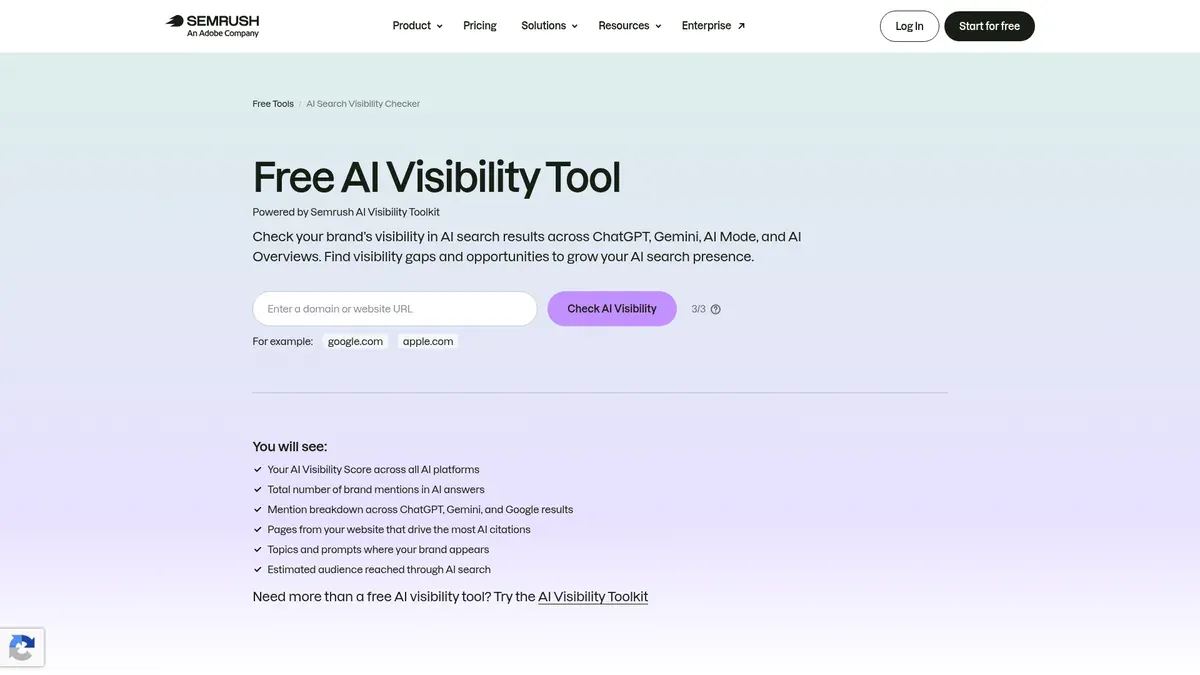
Semrush's free checker covers ChatGPT, Gemini, Google AI Mode and Google AI Overviews. It reports an AI Visibility Score, brand mentions, a breakdown by platform, the pages driving citations, the topics and prompts where the brand appears, and estimated audience reach. You can use it up to three times a day without registering.
Its page sends readers who want prompt tracking and ongoing monitoring to the broader Semrush toolkit, and it does not describe recurring history as part of the free checker. So the same pattern shows up again. You get a useful read on where a brand stands today, and anything beyond that is yours to build or to buy.
These two are examples of formats, not a ranking, and neither is the subject of this guide. They show why a free AI visibility tracker per engine is the wrong mental model. Many free checkers already span engines, and the real dividing line is limited checking against ongoing tracking.
Running separate checks has real strengths, and it is worth being fair about them.
Strengths. A quick check can answer a client's question this afternoon without any setup. Checking platforms one at a time can also show you differences between them that a single overall score might smooth over. If a brand does well in one engine and poorly in another, you see it directly. This approach suits a pitch conversation, an early baseline, or a consultant who is still testing which engines matter for a client.
Tradeoffs. You own the measurement process. You decide which prompts to ask, run them the same way each time, save the answers and the sources, and compare them later. If two checkers use different prompt samples or define a mention differently, their scores should not be set side by side as if they match. A spreadsheet can hold a history, but someone has to keep it up, and nothing about a free checker promises to do that for you.
Best for. A consultant who wants a fast first look, wants to experiment before settling on a tracking setup, or is happy to handle the repeat checks and the reporting by hand.
There is one more tradeoff that is easy to underestimate, which is consistency. A single result is not proof of lasting visibility, because AI answers can change from one run to the next, from one prompt wording to another, and over time. If you want to say anything about a trend, you need the prompt wording, the engines, the date and the evidence kept the same. If any of those change, it is more honest to call it a changed sample than a like-for-like trend. Doing that by hand across several checkers is where the time goes.
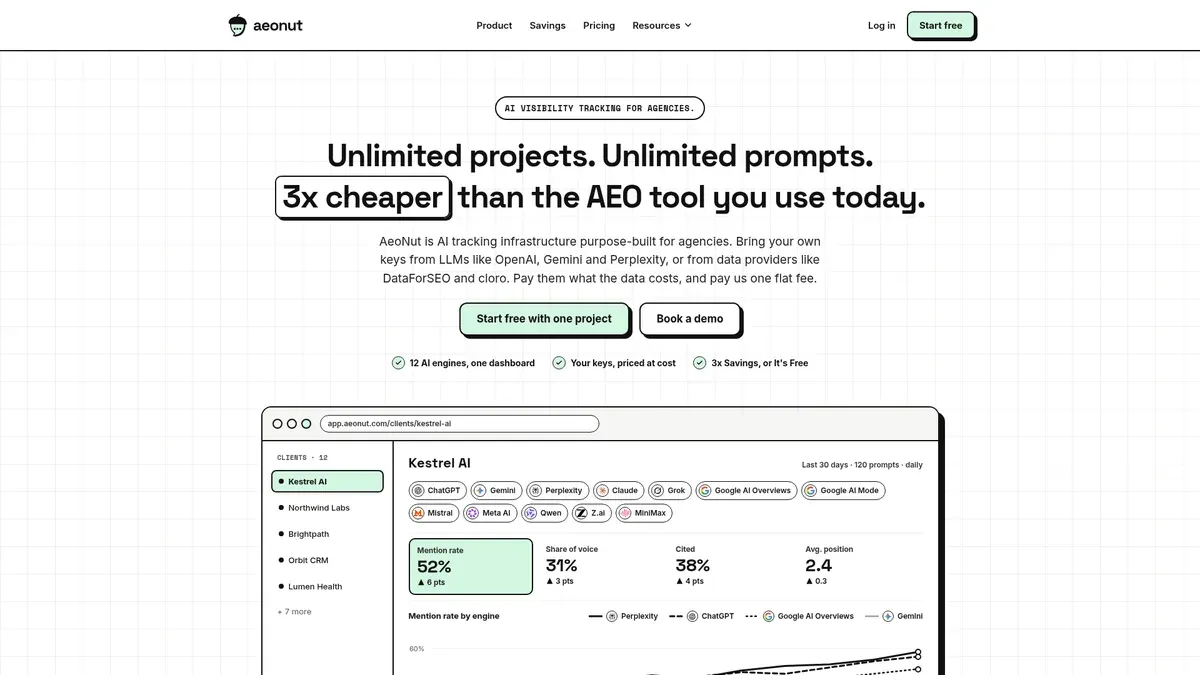
AeoNut is AI visibility tracking built for agencies, and its Free plan is the same product for one client project. It is free forever, needs no card, and includes unlimited prompts, team seats and every feature. Plans differ only in how many client projects they hold, so Free gives you one project, which is the right size for one client, one pitch prospect or your own brand. It is the only AI visibility tracker that is free forever with unlimited prompts, and the full wording matters because several tools offer credit-capped free plans or one-off checkers, which are not ongoing tracking.
A project is set up to the scope you choose. You pick the engines, the countries, the prompts and how often it runs, which can be daily, twice a week or weekly. AeoNut tracks twelve engines: ChatGPT, Gemini, Perplexity, Claude, Grok, Google AI Overviews, Google AI Mode, Mistral, Meta AI, Qwen, Z.ai and MiniMax. That is a long list, but it is not every AI engine that exists, and you do not need all twelve for any one client. Pick the ones your client's buyers use.
What you get back is organized by engine, so it answers the same question the separate-checkers route answers, only with the history kept. The analytics include Mention rate, Cited, Avg. position, Share of voice against the competitors you track, Sentiment, and trends by engine, prompt and country. You also get a competitor leaderboard, the pages cited for each competitor, your client's own cited pages, and the raw AI answer for every prompt.
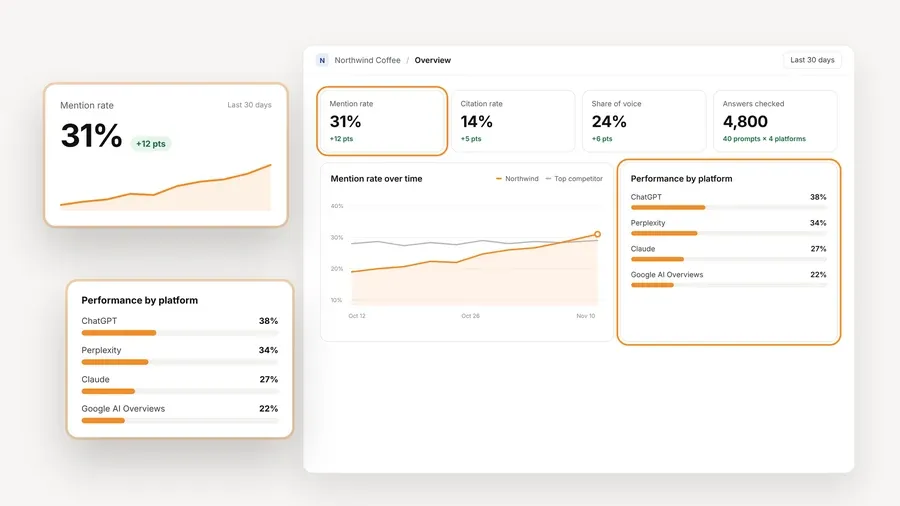
The screenshot above uses demo data, so the numbers are an example of the layout and not a result from a real client. What it shows is the per-engine view you would otherwise assemble by hand from several checkers, with the engines side by side and the trend over time on the same page.
Free includes white-label client reports, an agency overview, CSV export, an MCP server and API access. For a consultant, the practical difference is being able to show a client recurring, organized data under your own name, rather than a one-time score or a report carrying someone else's logo. That matters more as soon as a client asks how things have changed since last month.
Setup takes a little longer than pasting a brand into a checker, and it is fair to say so. You create the project, add prompts, connect a provider key and start tracking. The frequency is chosen per project. AeoNut also offers a free setup call if you would like help with the first one.
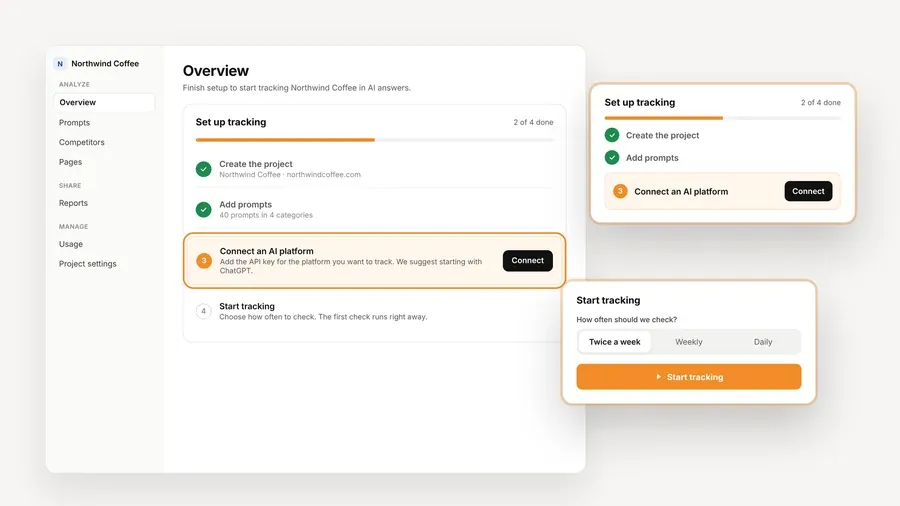
The setup checklist above shows the four steps. You spend that time once per client, and after that the prompts keep running on the schedule you chose, while the checker route asks for your time again on every check.
The platform fee on Free is $0 forever. The AI answer data is not free. You connect your own key from a supported provider, and that provider bills you directly at its own rates. AeoNut does not mark the data up. Supported providers are OpenAI, Anthropic, Gemini, Perplexity and DataForSEO, and these are where the data comes from, not the list of engines tracked.
To keep the bill predictable, AeoNut shows a cost preview before tracking runs, along with spend per client, budget caps and alerts. A restricted key with a spending limit is the safest way to connect, and AeoNut shows how to set one up. You can also choose the data route per engine. Scraped data reflects the answer real users see in the ChatGPT, Gemini or Google apps and is the lowest cost, while API data uses the exact model you select. You are not tied to one model or one schedule.
I would not call this free data or zero-cost tracking, because it is neither. It is a free platform with the data billed at the provider's price, and for one client project with a prompt set you chose yourself, that is usually a small and visible number.
The article's real question is which approach fits, so it helps to go through the three things that usually decide it.
With separate checks, your coverage is whatever the checkers you pick happen to cover, and the engines can overlap or leave gaps. In the examples above, Ahrefs includes Copilot and Semrush does not, while Semrush includes Google AI Mode and Ahrefs does not mention it. Neither is wrong, but if you use both you are reconciling two different engine lists. With one tracker, you choose the engines once and every prompt runs on all of them.
The counterweight is that a longer engine list is not a benefit by itself. A free AI engine tracking setup that covers twelve engines still only helps if you pick the engines your client's buyers use. The consistency of the prompt set and the history is the real gain, and the engine count is secondary. Start with the engines your client actually asks about. For many consultants that means ChatGPT and Google AI Overviews, and you add others when buyer evidence, geography, category or the client's own concerns point to them.
Metrics are where separate checkers cause the most quiet trouble. A score, a mention count, a citation list and an audience reach estimate are not automatically equivalent across providers. One tool might count a mention in a way another does not, or sample different prompts. If you put two scores from two checkers in the same client report, you are comparing things that were never designed to match.
One tracker applies one set of definitions to every engine and every run. That does not make the numbers perfect, since AI answers vary, but it makes the comparison fair from one month to the next. If a client's mention rate moves, you know the measuring stick stayed the same. Keeping the same prompt set over several months and looking at the overall direction is more reliable than reading any single result.
Checkers win on the first ten minutes. You paste a brand name and you have a result. A tracker asks for more up front, with the project, the prompts, the key and the schedule. The total effort over a few months tells a different story, because with checkers you repeat the work each time and also maintain the record, while with a tracker the work is front loaded. For a client who only needs one answer, the checker is less effort overall. For a client who wants monthly reporting, the tracker usually is.
Whichever route you take, the prompts decide how useful the result is. There is no public query log that shows exactly what real people ask ChatGPT or Perplexity, so a prompt list is a sample and not a census of what people type. Say so when you report it, and do not treat an overall score as a picture of every conversation in the category.
Start with evidence close to the client. Questions from sales calls, customer interviews and support conversations are the best seeds, along with the questions the client raises themselves. Search Console queries can suggest ideas, but they are starting points to turn into natural buyer questions, not proof of the exact words people use in AI products. Prompt research tools and AI brainstorming can add candidates, and you should check those against the client's audience and offer.
A small, well-chosen prompt set is more useful than a long list of near-duplicates. Give prompts separate slots when the buyer, the situation or the decision could change what the AI recommends or cites.
It also helps to keep a stable core set for trend comparisons, a separate set of exploratory prompts for new buyer language and gaps, and a few verification checks for any change that looks important. One methodology source gives an example split of 60% core, 25% explore and 15% verify. That is an illustration and not a rule, so treat the numbers as a starting point to adjust. When the product, market or buyer language changes enough that you replace a core prompt, note that the set is no longer a perfect like-for-like comparison.
Because AeoNut Free has unlimited prompts, the choice of how many prompts is yours and is not forced by a cap. That helps with the above, since you can keep a core set and an exploratory set in the same project without picking which questions to drop.
The evidence here is mostly about how the tools are built, and it does not tell us how any particular client's buyers behave, so match the choice to your situation.
Choose separate checks first if the need is an immediate snapshot, early exploration or a short list of questions, and you are fine saving and comparing the results yourself. A checker is a good way to answer a prospect in the first call, and some are free to use with no signup.
Choose one tracker across the engines if the client wants an ongoing report, if you need a prompt set you can rerun the same way, or if movement by engine matters. In that case the consistency of the prompts and the saved history is the main benefit, more than the length of the engine list.
Choose AeoNut Free if you want continuous tracking for one client project across the supported engines, with unlimited prompts and white-label reporting, and you accept that your provider bills the data. If you have more than one client, Free covers one project, and the paid plans exist for more projects.
Stay with manual checks for now if a client only needs an occasional spot check and does not need a managed trendline. Manual checks are not invalid. They depend more on your own process, which is fine when the stakes and the cadence are low.
Whichever you choose, do not promise a client that one tracker covers every platform or every buyer conversation. Confirm the supported engine list, and explain that tracking represents the prompt set you configured.
If you would like to try the tracker route on one client, start free with AeoNut. It takes a brand name, a few prompts and a provider key.
Use separate checks for occasional discovery or a quick answer. Use one tracker when the client needs recurring, comparable results across the engines that matter to its buyers. AeoNut Free is an option for one project if you are fine paying your provider for the data.
Not in AeoNut's case. The platform is free forever for one project, but you supply your own provider keys and pay those providers for the data they return. The cost preview shows the estimated spend before tracking runs.
No. The engines do not publish user query data. Build representative prompts from customer language, sales and support questions, Search Console queries and brainstorming tools, and describe them as a tracked sample rather than a full list of what people ask.
No. Start with the engines your client asks about and the ones their buyers and markets use, and add more when you have a reason. A pattern can differ by engine, so report meaningful differences for each engine instead of assuming one result applies everywhere.
Tools & Comparisons ·
Compare free tools that report citation rate and brand mention rate as separate numbers, and see which are ongoing plans and which are one-time checkers.

Tools & Comparisons ·
Is a self-hosted AI visibility tracker worth your time? Compare setup, upkeep, data control and engine coverage with a managed free plan before you decide.

Tools & Comparisons ·
Which free AEO tracking tool keeps running, saves history and shows change? Compare five free options on schedule, trends and alerts to pick one for a client.