

Tools & Comparisons ·
Free Tools That Track Citations and Brand Mentions Separately
Compare free tools that report citation rate and brand mention rate as separate numbers, and see which are ongoing plans and which are one-time checkers.
Looking for a free Peec AI alternative? See how a free-forever plan with unlimited prompts compares on engines, exports and switching, and what it costs you.
Avinash Saurabh · · 15 min read
If you track AI visibility for one client, or for your own brand, you have probably looked at Peec AI and then looked at the price. It's a solid tool, but a paid subscription before a client has agreed to pay for tracking is a hard sell when you're a one-person shop. So the question becomes whether there is a free Peec AI alternative that keeps running after a trial ends, and what you would actually give up by using it.
AeoNut's Free plan is built for exactly that situation. It is free forever, includes unlimited prompts for one project, needs no card, and runs on your own provider keys. This guide sets AeoNut's Free plan next to Peec AI on prompts, engines and exports, so you can decide whether you can switch without losing the reporting you rely on. We publish AeoNut, so it comes first, and we have tried to be fair to Peec on everything it does well. One thing to know up front: the platform is free, but the AI answer data is not. Your own provider bills you for it at its price, and AeoNut shows you the estimated monthly cost before anything runs.
A freelance consultant has different needs than a large marketing team, so we used six questions to weigh each option.
Peec AI is not a free alternative to itself, so it appears here as the paid benchmark. The point is to see what the free option covers and where Peec is the better fit.
| AeoNut Free (our pick) | Peec AI Starter (paid benchmark) | |
|---|---|---|
| Platform price | $0 forever, no card | $95 a month as displayed on its pricing page, as of November 2026 |
| Prompts | Unlimited | 50 active prompts |
| Cadence | Daily, twice a week or weekly, set per project | Daily |
| Engines | 12 tracked engines, chosen per project | Choose 3 models from its available list |
| Project scope | 1 project | 1 project, 1 country |
| Reporting | White-label client reports, shareable links, CSV export, API, MCP server | Automated reporting, shareable dashboards, custom CSV exports, MCP |
| Moving your history | Done-For-You Switch imports prompts, competitors and tracking history | Documented exports, plus a full CSV or JSON export on request |
| Cost model | Platform free, data billed by your provider, cost preview before runs | Paid subscription |
Best for: a freelancer or one-person consultancy that wants to keep tracking one client brand, or its own, without paying a platform subscription, and is comfortable connecting a provider key.
AeoNut is AI visibility tracking built for agencies. Each client brand is a project with its own prompts, competitors, engines, countries and schedule. The Free plan gives you one of those projects with every feature switched on, and it never turns into a trial that expires. If you want the wider picture of what free plans do and don't include, our guide to free alternatives to paid AI visibility trackers walks through it.

The biggest practical difference is the prompt limit. A client's buyers ask a lot of different questions, and a cap forces you to choose which ones to leave out. On the Free plan there is no cap, so you can track the questions their buyers actually ask, the ones that name their competitors, and the ones you only think of in month three. If you searched for a Peec AI alternative unlimited prompts can run on, this is the part that matters. Peec's Starter plan lists 50 active prompts, which is workable for a narrow first month and tight for a full client set.
Unlimited prompts apply to your one project. That is the honest boundary, and we come back to it below.
Here is what that looks like in practice. Say a client sells project software to mid-sized teams. You start with the twenty or thirty questions their sales team hears every week, add a handful that name their two biggest competitors, and run them on the two or three engines their buyers use. A month later you think of fifty more, such as questions about pricing, integrations and switching from a rival. On a capped plan you would archive some of the first set to make room. On AeoNut Free you just add them, and the earlier history stays in place. That is the sense in which AeoNut works as a Peec AI free alternative: you are not trading away coverage to avoid the platform fee.
Each project tracks the numbers a client asks about: Mention rate, Cited, Avg. position, Share of voice against the competitors you add, and Sentiment. You can look at them by engine, by prompt and by country, and over time, which is what turns a one-off score into a trend you can show a client. Each tracked prompt also keeps the raw AI answer per engine, so when a number moves you can open the answer and see why.
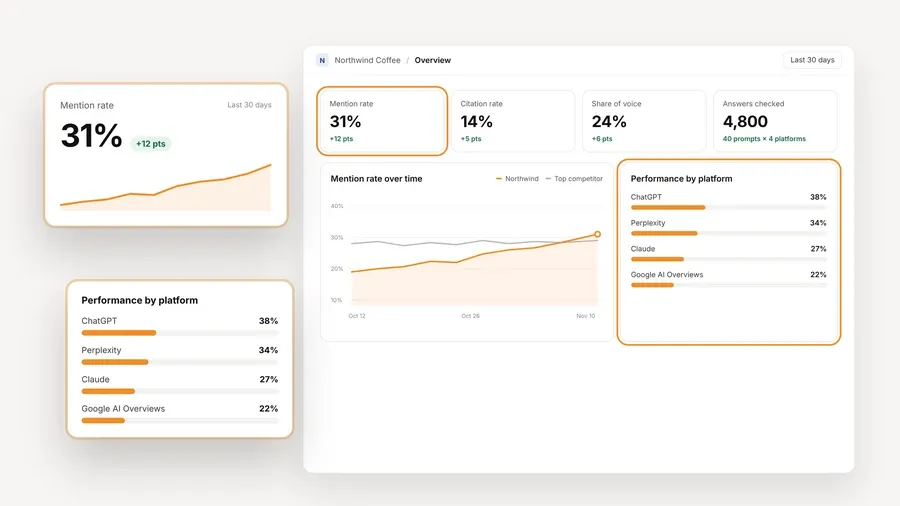
AeoNut tracks twelve engines: ChatGPT, Gemini, Perplexity, Claude, Grok, Google AI Overviews, Google AI Mode, Mistral, Meta AI, Qwen, Z.ai and MiniMax. For each project you pick the engines, the countries and how often it runs, which can be daily, twice a week or weekly. For each engine you can also choose scraped data, which is the answer real people see in the app at the lowest cost, or API data from the exact model you want.
You connect a key from OpenAI, Anthropic, Gemini, Perplexity or DataForSEO, and one key from one provider is enough to start. That provider bills you directly at its own price, and AeoNut never marks the data up. This is also where the "free" needs a careful reading. The platform is free. The data is what your provider charges.
If a surprise bill is what worries you about bringing your own keys, AeoNut has a few guards. A cost preview shows the estimated monthly data cost before tracking runs. You can see spend per client, set budget caps and get alerts, and AeoNut recommends restricted keys with spending limits and shows you how to set them. Keys are encrypted at rest and are not shown again after you save them.

White-label client reports and shareable links carry your branding, not ours, and that holds on the Free plan too. Reports export as PDF, Excel and Markdown, and CSV export is included. There is also a read-only API and a read-only MCP server, so an assistant such as Claude can read your workspace data and help draft a client summary. All of it is on Free, since every AeoNut plan includes every feature.
AeoNut's Done-For-You Switch imports your prompts, competitors and tracking history from your current tool, Peec included, and a free setup call comes with every plan. That means you don't have to rebuild a prompt list by hand. We would still treat the first imported results as something to check rather than assume, a point we cover in the switching section below.
The Free plan works best when the job is narrow and ongoing. A consultant who wants to show one prospect real AI answers in a first call can set up a project in the time it takes to connect a key and add prompts. A solo marketer tracking their own brand gets the same analytics a larger team would. And a freelancer who is not sure a client will pay for tracking can build a few weeks of trend data first, then decide whether the work is worth putting in a retainer. In each case nothing about the plan changes when the first month ends.
Free is one client project. If you only have one brand to track, that is no limit at all. If a second client signs on, you move to Pro at $99 a month, or $79 a month billed annually, for up to 10 projects. Your tracking history stays with you, and the platform fee is the only thing that changes.
Best for: a team that wants a hosted, daily view of what AI platforms show and is happy to pay for a defined Starter allowance of prompts and models.

Peec AI describes its tracking as daily and based on real-user journeys through the AI platforms' own interfaces. That is a genuine strength. For most platforms, Peec says the platform itself decides which model answers and whether a web search runs, so the results look like what a person would have seen rather than the output of a fixed API call. If that fidelity matters to you, it is a good reason to keep Peec.
From its pricing page as of November 2026, the Starter plan is listed at $95 a month, with 50 active prompts, a choice of three models, daily tracking, one project and one country. The page calculates 4,500 AI answers a month from that setup. It lists unlimited users, languages and competitors, along with automated reporting, shareable dashboards, custom CSV exports and an MCP server. The page uses a dollar sign without naming the currency.
Peec's current public pricing page lists paid plans and a "Start free trial" button. It does not list a permanent free plan. We could not find a published trial length, a card requirement or a trial prompt allowance on the pages we reviewed, so we won't guess at one. Its terms treat free or trial access as an evaluation that either side can end at any time, which is a different thing from a plan that stays free.
Active prompts run daily and count toward your limit. Archived prompts are paused, don't count, keep their history and can be turned back on. You can add prompts by hand, upload them in bulk from a CSV, accept suggestions or use prompt discovery, and prompt text is limited to 200 characters.
Engines are where a careful reader should slow down. Peec's documentation describes daily tracking across ChatGPT, Gemini and Copilot, while its pricing page lists a broader pool of models, and the pricing page versions we saw didn't match each other exactly. Starter lets you choose three models from what is available. So before you rely on a specific engine such as Perplexity, Google AI Overviews or AI Mode in a Starter plan, check it against your own account. This matters most if your client needs ChatGPT, Gemini, Perplexity, Google AI Overviews and AI Mode all at once.
Peec is not weak here, and it would be wrong to say otherwise. Starter includes automated reporting, shareable dashboards and custom CSV exports. Its documentation also covers overview PDF exports, exporting a chart from a chat as a CSV or an image, and exporting all the chats generated on an account from the Project tab. Starter does not include API access, and its Data Studio connector sits on higher plans.
The Starter allowance of 50 active prompts and three models may not cover a consultant's full prompt set or every engine a client asks about. If you prefer a paid, hosted tracker built on Peec's interface-based collection, that tradeoff may suit you fine. If you need uncapped prompts without a platform fee, it is the main reason to look elsewhere, and it is the gap a Peec AI alternative with unlimited prompts fills.
Yes, in most cases, as long as you do it in a deliberate order. Neither side makes switching impossible, and the main risk is assuming that old and new numbers will line up perfectly.
There is a second question hiding in the first one, which is how much of your reporting depends on the tool and how much depends on you. Most of what a client reads in a monthly report is the story you tell around the numbers: which prompts moved, which competitor gained, which cited pages are worth chasing. That part travels with you. What needs care is the raw trend line, because that is the piece a new tool has to rebuild or import.
Peec's terms list prompt sets and configuration, results, workspace settings and user data as Customer Data you can export. On request, Peec says it can provide a full export in a common machine-readable format such as CSV or JSON. It also says you can export Customer Data during your subscription and for 30 days after it ends or is terminated. Those terms don't clearly say the same 30-day window applies to a trial, so don't count on it. Peec's terms also say AI-generated responses can be transferred as data but can't be reproduced, so past answers will not be regenerated later.
Metric names can match while the math differs. Peec defines visibility as the share of relevant AI responses that mention your brand, and Share of voice as your mentions divided by all tracked-brand mentions. Position is the average ranking when you appear, where lower is better, and Sentiment is scored from 0 to 100. AeoNut reports similar-sounding measures, but similar labels aren't proof of identical calculations. That is why a short overlap period is worth the effort.
Here is an order that protects your reporting.
Overlap costs a month of Peec at $95, so if the reporting is tied to a client contract, it is cheap insurance. If the client is still in the early weeks and has no real trend yet, there is little history to protect, and you can switch straight away.
The right pick depends on your situation, and Peec is the better fit for some readers.
Choose AeoNut Free if you want a Peec AI free alternative and you track one client or your own brand, you want to keep running past any trial window, and you need more prompts than a fixed allowance gives you. It also suits you if you want white-label reports and an API or MCP server without a platform fee, and you're fine paying a provider for the data. Because the cost preview shows the monthly estimate first, you can decide whether the provider bill is acceptable before a single prompt runs.
Choose Peec AI if you prefer its interface-based, daily collection, you are happy to pay for a bounded Starter allowance, and 50 prompts and three models cover what you need. A team that already reports from Peec and has no reason to change its data collection may also reasonably stay put.
Consider the paid AeoNut plans if you expect to grow past one client. Pro covers up to 10 projects and Unlimited covers as many as you have, with the same features on every plan.
If you want to try AeoNut on one brand before you decide, you can start free with AeoNut. Connect one provider key, add the prompts your client's buyers ask, and look at the cost preview first.
AeoNut's Free plan. It costs $0 forever, needs no card, covers one project and includes unlimited prompts. The platform is free, and your AI data provider bills you separately for usage.
Peec's current public pricing page lists paid plans and a free-trial button, not a permanent free plan. The pages we reviewed don't state a standard trial length or whether a card is needed, so check the sign-up screen yourself.
With AeoNut Free, yes, for one project. Peec Starter lists 50 active prompts and three chosen models. Keep the one-project limit and your provider's data charges in mind when you compare what "free" covers.
Mostly. Peec provides in-product exports and a full CSV or JSON export on request, and AeoNut's Done-For-You Switch imports prompts, competitors and tracking history. Export first and check the imported results against your old reports, because past AI answers can be carried as data but not reproduced identically.
Tools & Comparisons ·
Compare free tools that report citation rate and brand mention rate as separate numbers, and see which are ongoing plans and which are one-time checkers.

Tools & Comparisons ·
Is a self-hosted AI visibility tracker worth your time? Compare setup, upkeep, data control and engine coverage with a managed free plan before you decide.

Tools & Comparisons ·
Which free AEO tracking tool keeps running, saves history and shows change? Compare five free options on schedule, trends and alerts to pick one for a client.