

Tools & Comparisons ·
Free Tools That Track Citations and Brand Mentions Separately
Compare free tools that report citation rate and brand mention rate as separate numbers, and see which are ongoing plans and which are one-time checkers.
Looking for a free MaxAEO alternative? Compare MaxAEO's 7-day trial with a free-forever multi-engine tracker, see what to check, and move your prompts.
Avinash Saurabh · · 16 min read
If you are looking for a free MaxAEO alternative, the first thing to know is that MaxAEO does not currently list a free plan for tracking. From its pricing page, as of November 2026, it offers a seven-day free trial with no card, and when the trial ends the monitoring pauses unless you subscribe. So what you are really weighing is a trial that expires against a plan that does not. AeoNut's Free plan is the only AI visibility tracker that is free forever with unlimited prompts, and it tracks one client project across twelve AI engines with your own provider key.
That last part matters, so here it is plainly. The AeoNut platform costs $0, but the AI answer data is billed by your own provider at its price, and AeoNut shows you the estimated cost before anything runs. The platform is free. The data is what the provider charges.
This guide is for a freelance SEO or AEO consultant who is tracking one client (or one prospect) and wants a free multi-engine AEO tracker that keeps running past a trial. It compares AeoNut Free with MaxAEO's trial and paid plans, shows you what to check before you switch, and walks you through setting up the replacement with the prompts you already have.
Two tools are on this list because the question is specific: can you leave MaxAEO and keep tracking a real client? That makes the criteria practical.
Free offers come as plans, trials and one-off checkers, and which kind of free offer fits depends on how long you need the tracking to run.
| Tool | Free tracking that keeps running? | Price and scope | Engines | Metrics and reporting |
|---|---|---|---|---|
| AeoNut | Yes, free forever, no card | $0 platform fee, 1 client project, unlimited prompts, every feature. Provider charges for data are separate. | 12: ChatGPT, Gemini, Perplexity, Claude, Grok, Google AI Overviews, Google AI Mode, Mistral, Meta AI, Qwen, Z.ai, MiniMax | Mention rate, Cited, Avg. position, Share of voice, Sentiment, trends by engine, prompt and country, white-label client reports |
| MaxAEO | No. A 7-day trial with no card, then monitoring pauses | Starter $19 a month, Growth $149 a month, Pro $399 a month, Enterprise custom | 8: ChatGPT, Gemini, Perplexity, Claude, Microsoft Copilot, Grok, Google AI Mode, Google AI Overview | Mentions, position, daily trends, competitor comparison, sentiment, citation sources, replayable answers. White-label reports and export formats are not specified in what we reviewed. |
Seven engines overlap: ChatGPT, Gemini, Perplexity, Claude, Grok, Google AI Mode and Google AI Overviews. AeoNut adds Mistral, Meta AI, Qwen, Z.ai and MiniMax. MaxAEO adds Microsoft Copilot, which AeoNut does not track as an engine. If your client's buyers ask Copilot questions, that is a real point in MaxAEO's favor, so check it before you move.
Best for: a freelance consultant who needs ongoing multi-engine tracking for one client or prospect before a monthly tool bill makes sense, and who is comfortable adding one provider key.
AeoNut is AI visibility tracking built for agencies, and each client brand is its own project with its own prompts, competitors, engines, countries and schedule. On the Free plan you get one of those projects, unlimited prompts, and every feature, with no card. That is the answer to the usual worry about building a client's tracking on a free tool and watching it get paywalled next month: there is no time limit on the plan, and the limit that does exist (one project) is stated up front.
The platform tracks twelve engines, and you choose which ones a project uses. For each project you pick the engines, the countries, the prompts and how often it runs (daily, twice a week or weekly). For each engine you can choose scraped data, which is the answer real people see in the ChatGPT, Gemini or Google apps at the lowest cost, or API data from a specific model.
On the measuring side you get Mention rate, Cited (the citation rate), Avg. position, Share of voice against the competitors you track, and Sentiment, with trends by engine, prompt and country. Behind those numbers sit a competitor leaderboard, the cited pages and sources (tagged as your client's, a competitor's or neither), and the raw AI answer for every prompt, so you can read what the engine actually said.
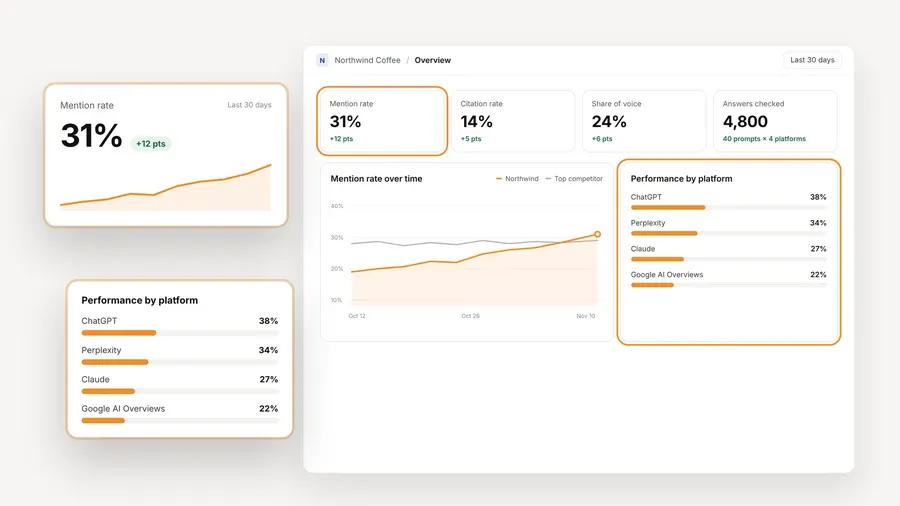
The numbers in that picture are demo data, so read it as a view of what the product reports for a client, not as a result anyone achieved.
You connect a key from OpenAI, Anthropic, Gemini, Perplexity or DataForSEO, and one key from one provider is enough to start. The provider bills you directly at its own price and AeoNut adds nothing on top. The site says scraped answers cost a fraction of a cent each, and its example is about $135 a month in data for ten clients with 100 prompts each, tracked daily on ChatGPT, Perplexity and Google AI Overview. That example is for ten clients, so do not read it as a quote for one. For a single project, the cost preview gives you the real estimate before tracking runs.
If a surprise bill from a provider is what worries you, there are controls for exactly that: the cost preview, spend per client, budget caps and alerts. AeoNut also recommends using a restricted key with a spending limit and shows you how to set one up. Keys are encrypted at rest and are never shown again after you save them.

A freelancer usually has a short list of problems: a client asks whether the brand shows up in ChatGPT, a free checker gives one score and then asks for a sales call, or a trial ends before there is anything worth reporting. Free forever answers the last two directly, because the tracking keeps going and you never talk to sales to see the price. The first one is answered by the data itself, since you can open a prompt, read the answer an engine gave, and show the client the real text in the first conversation. Because every feature is included on Free, you do not hit a locked report or a hidden prompt cap halfway through the month.
White-label client reports and shareable links carry your branding, not AeoNut's, and that holds on the Free plan as well. Reports export as PDF, Excel and Markdown, and CSV export is available too. There is a read-only MCP server with 19 tools, so an assistant such as Claude can read the project data and help you draft the monthly summary, and a read-only REST API at 120 requests a minute per workspace.
Free is one client project. If you are tracking three clients, you would move to Pro, which is $99 a month (or $79 a month billed annually) for up to 10 client projects, and every plan includes every feature. Unlimited is $499 a month for unlimited projects. The provider still bills you for data on every plan. For a consultant with one client, the single project is rarely the problem, and when a second client signs, you stay in the same tool and keep your history.
Best for: someone who wants to try daily tracking across all eight of MaxAEO's engines for a week without entering a card, or whose setup fits its paid prompt and brand allowances.
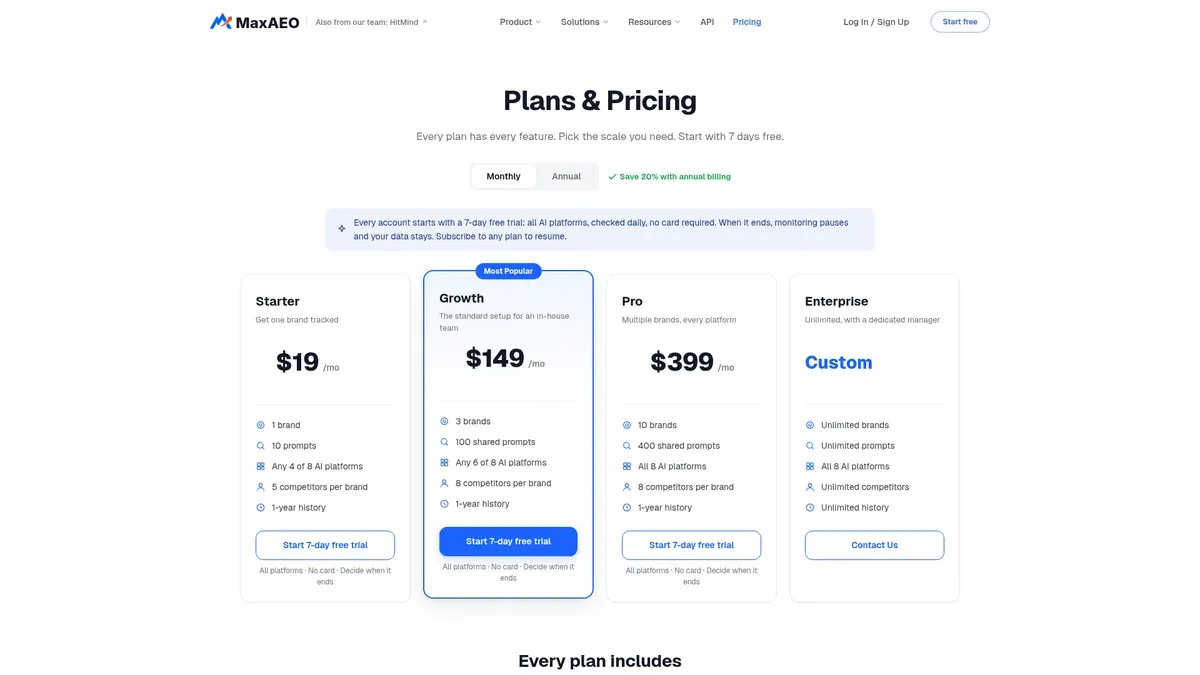
MaxAEO is a hosted AI visibility monitor. From its pricing page, as of November 2026, every account starts with a seven-day free trial, all platforms are checked daily, and no card is needed. When the trial ends, monitoring pauses and your data stays, and you subscribe to resume. The page says there is no long-term free plan, so the title's idea of a free MaxAEO plan does not hold up. A separate MaxAEO site on a different domain describes free website tools and a Pro waitlist, and we could not establish that it is the same product, so we have not counted it.
| Plan | Monthly price | Limits shown on the pricing page |
|---|---|---|
| Starter | $19 | 1 brand, 10 prompts, any 4 of 8 platforms, 5 competitors per brand, 1-year history |
| Growth | $149 | 3 brands, 100 shared prompts, any 6 of 8 platforms, 8 competitors per brand, 1-year history |
| Pro | $399 | 10 brands, 400 shared prompts, all 8 platforms, 8 competitors per brand, 1-year history |
| Enterprise | Custom | Unlimited brands, prompts, competitors and history, all 8 platforms, dedicated manager |
The page also advertises a 20% saving on annual billing without listing the annual prices. Paid subscriptions renew automatically, and you cancel by email before the billing period ends.
MaxAEO describes mention rate, position, competitive rank, daily trends, competitor comparison, sentiment and citation sources, and it stores the answers so you can replay them. Its documentation is clear about how it measures. Mention rate is the share of monitored responses that mention your brand, so 12 mentions out of 40 responses is 30%. Average position counts only the answers that mention you, with lower being better. The docs also warn against mixing branded prompts and open category prompts in one percentage, which is good advice on any tool. The Starter plan at $19 a month is a low entry price if you only need ten prompts on four engines.
The way it counts is worth borrowing even if you never use it. Each measurement is one prompt on one engine in one run, so the number you see depends on the prompts, the engines and the window you chose, and a single odd answer should not move your view of the client.
Starter's 10 prompts is a tight cap for a client with real questions, and the cap rises to 100 shared prompts on a plan that costs $149 a month. The trial pauses after seven days, which is shorter than the time most clients need to see a trend. We also could not find white-label reports or export formats in what we reviewed, which only means they are not specified, not that they are missing. Ask before you rely on them.
One more caution. MaxAEO's pricing page and its documentation do not agree on several limits. The docs list fewer brands for Growth and Pro, four engines on each paid tier, and shorter history on Starter and Growth. Check your own account's entitlements before you plan around a specific number. MaxAEO also has a developer platform with an API and an MCP server, but its calls are credit-based, and we could not confirm that those credits are part of a tracking subscription.
Before you move anything, spend ten minutes on what your client actually needs. A good free multi-engine AEO tracker is only useful if it covers the engines your client's buyers really use, and the metrics line up well enough that your old numbers still mean something.
If you want a wider view of how free plans differ before you commit, free AI visibility plan limits compared lays out prompts, engines and projects side by side.
It helps to picture the first month before you commit, because a trend is the thing a trial never gave you. Say you have one client and a list of prompts from the old tool. In week one you create the project, add the prompts and competitors, connect a key and read the cost preview. You pick two or three engines the client's buyers use, and you choose a schedule that fits the data budget, since daily runs cost more than weekly ones.
By week two the first answers are in, and you can read the raw AI answer for each prompt to see whether the client is named, where it sits and which sources are cited. By week four you have enough runs to show the client a trend by engine, and you can hand over a white-label report under your own name. If you want the same free tool to keep running while you decide about a second client, nothing has to be rebuilt, because the Free plan has no end date.
This is also where a maxaeo free alternative earns its keep for a consultant. A seven-day trial ends before the first trend line forms, while a plan that keeps running lets the data build up. If you want to see how the daily option behaves on other engines, free AI search rank tracking tools that run daily compares run cadence and prompt caps.
This is the step that worries people most, so here is a careful order that does not assume anything MaxAEO has not documented.
If an export is not possible, the fallback is simply retyping your prompt list into the new project. That takes longer, but it works, and with unlimited prompts you do not have to cut the list down to fit a cap. If you are not sure how many prompts to track in the first place, free AI prompt research tools can help you decide.
If you are tracking one client and want to see real answers across the engines they care about, you can start free with AeoNut and have a project running the same day. Start free with AeoNut.
Yes. AeoNut's Free plan is free forever for one client project and includes unlimited prompts, every feature and twelve engines. The platform fee is $0, and your provider may charge for the AI answer data.
From its pricing page, as of November 2026, MaxAEO offers a seven-day trial with no card and daily checks on all eight engines, and monitoring pauses after the trial unless you subscribe. Its documentation describes a low-quota free state, which conflicts with the pricing page, so check your account before you count on any ongoing free tracking.
AeoNut says its Done-For-You Switch can import prompts, competitors and tracking history exported from a current tool. MaxAEO's materials do not confirm an export format, so ask both companies to confirm the export and import before you promise a client that history will transfer. Saving your prompts in a spreadsheet first is a safe step either way.
Start with the engines your client's buyers use. Seven are covered by both tools, AeoNut adds five more, and MaxAEO adds Microsoft Copilot. Compare mention rate, position, citations and sentiment on the same prompts, engines and dates, and do not assume competitive rank and share of voice use the same formula.
Tools & Comparisons ·
Compare free tools that report citation rate and brand mention rate as separate numbers, and see which are ongoing plans and which are one-time checkers.

Tools & Comparisons ·
Is a self-hosted AI visibility tracker worth your time? Compare setup, upkeep, data control and engine coverage with a managed free plan before you decide.

Tools & Comparisons ·
Which free AEO tracking tool keeps running, saves history and shows change? Compare five free options on schedule, trends and alerts to pick one for a client.