

Tools & Comparisons ·
Free Tools That Track Citations and Brand Mentions Separately
Compare free tools that report citation rate and brand mention rate as separate numbers, and see which are ongoing plans and which are one-time checkers.
Looking for a free Bluefish alternative? See four self-serve ways to track your client's brand in AI answers, what each costs to run, and how to set one up.
Avinash Saurabh · · 14 min read
If you came looking for a free Bluefish alternative, you are probably a freelancer or a one-person shop, and a client has asked whether their brand shows up in ChatGPT. You went to look at Bluefish, saw a "Request a demo" button, and could not find a price. That is a fair reason to look around. It helps to start by sorting out what you need, because "free" and "run it yourself" can mean a few different things in this space.
This guide covers four ways to track a brand in AI answers without a sales call. One is a hosted, self-serve AI visibility tracker with a free plan, and three are open-source projects you install and maintain on your own machine. We also check what Bluefish publicly says about itself, so you can tell whether it is the right tool or whether you are better off with a Bluefish AI alternative you can start today.
We ranked each option on the questions a consultant has to answer before putting a client on it:
That last question matters more than people expect. Free software is not the same as free data, and every option below has some provider or infrastructure cost sitting behind it.
| Tool | Best for | Software price | Data and hosting cost | Engines named |
|---|---|---|---|---|
| 1. AeoNut | One client brand, hosted, with branded reports | Free forever, no card, 1 project, unlimited prompts | You pay your own data provider directly; cost preview before runs | 12, including ChatGPT, Gemini, Perplexity, Google AI Overviews and AI Mode |
| 2. OneGlanse | Technical users who want prompts run on the real AI websites | Free, MIT license | AI-product accounts, an analysis-model key, a server and possibly a proxy | ChatGPT, Perplexity, Gemini, Claude, Google AI Overview |
| 3. GEO/AEO Tracker | Developers who want a local dashboard and Google AI Mode | Free, MIT license | Bright Data, OpenRouter and Gemini charge per call | ChatGPT, Perplexity, Gemini, Google AI Mode |
| 4. Aperture | Developers who want an early open-source project to adapt | Listed as free, MIT license | Your own provider keys, cost not specified | ChatGPT and Perplexity supported; others planned |
Bluefish describes itself as an agentic marketing platform for enterprise brands. Its AI Monitoring Suite tracks how a brand appears in AI-generated answers, benchmarks competitors, and traces claims back to source URLs. Bluefish says it updates daily across 10+ models, and its homepage mentions 15+ provider integrations, static prompts, model-drift controls and MCP. It also says its claims are checked against verified brand facts. Those are Bluefish's own statements, and we have not tested them.
What the public pages do not show is a price. At the time of research there was no plan table, no free-plan terms, no trial terms and no prompt limit on the pages we reviewed, and the product page names a few engines plus "other leading LLMs" without a full list. "Request a demo" is the main call to action, although there is also a platform login. So we can say that public self-serve pricing and free-plan terms were not found, and we cannot say Bluefish has no free option or that it turns small customers away. If you want a firm answer, ask Bluefish.
Here is a practical way to decide. If you are an enterprise marketing team with a buying process, a need for claim checking against verified brand facts, and a budget that expects a demo, Bluefish may be a good fit. If you are a consultant who wants to see a price, start tonight and keep it running for one client, a self-serve AI visibility tracker is the easier first step. Either way, the title's idea of a free Bluefish alternative is a reasonable thing to ask for, as long as you remember the data still has a cost.
Best for: a freelancer or one-person SEO or AEO shop that wants ongoing tracking for one client brand, with a report under their own name, and does not want to maintain software.
AeoNut is hosted AI visibility tracking built for agencies, and its Free plan is the one that matters here. It is free forever, needs no card, covers one client project, and has unlimited prompts and every feature. You bring your own provider key and pay that provider directly for the data, so the platform costs nothing and the data is whatever your provider charges. AeoNut shows an estimated monthly cost before anything runs, so you see the number first. That makes it the only AI visibility tracker that is free forever with unlimited prompts, which is a claim worth checking against the credit-capped free plans and one-off graders you will find elsewhere.
Each client brand is a project with its own prompts, competitors, engines, countries and schedule. AeoNut tracks twelve engines: ChatGPT, Gemini, Perplexity, Claude, Grok, Google AI Overviews, Google AI Mode, Mistral, Meta AI, Qwen, Z.ai and MiniMax. You choose daily, twice a week or weekly runs, and for each engine you can pick scraped data, which is the answer real users see in the app, or API data from a specific model.
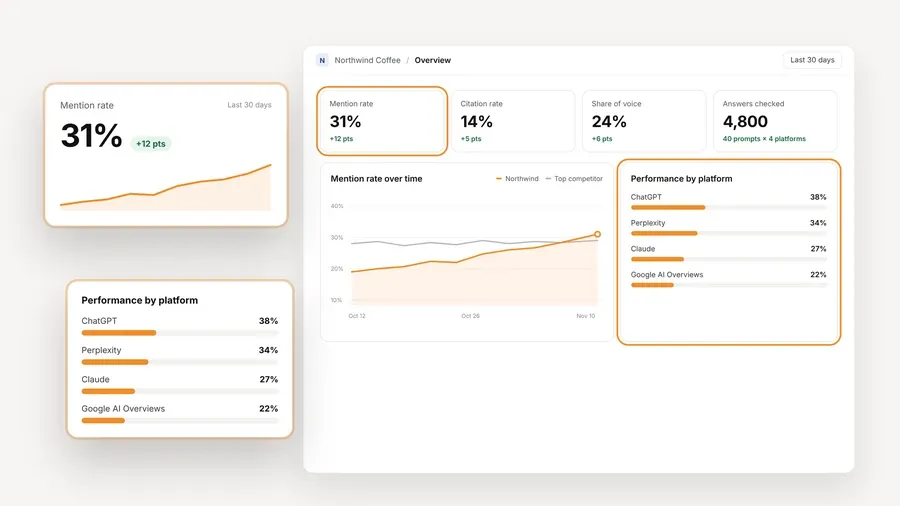
Inside a project you get Mention rate, Cited, Avg. position, Share of voice against the competitors you track, Sentiment, and trends by engine, prompt and country. You can read the raw AI answer for every prompt, see which pages and domains get cited, and see whether each source belongs to your client, a competitor or neither. White-label client reports and shareable links carry your branding, not ours, and export as PDF, Excel and Markdown, with CSV available too. A read-only MCP server lets an assistant such as Claude or Cursor read the project data, and there is a read-only API as well.
The setup is short enough to do in one sitting. You create the project, add prompts, connect a key from OpenAI, Anthropic, Gemini, Perplexity or DataForSEO, and start tracking. One key from a single provider is enough to begin. AeoNut recommends restricted keys with spending limits and shows how to make them, and you can set budget caps and alerts per client.
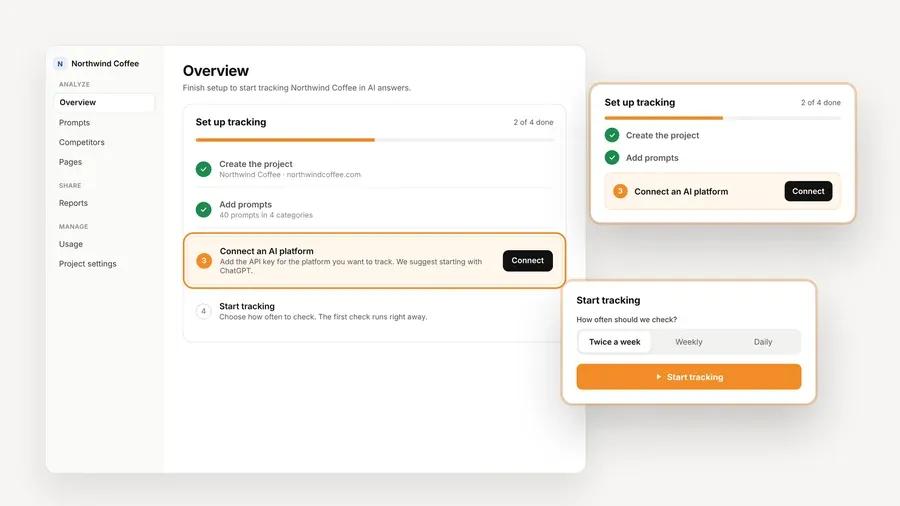
The numbers in these screens are demo data, not a customer result. They show what you would be looking at, and the layout is the point.
Where it fits and where it does not: the Free plan holds one client project, so a freelancer with three clients will want Pro, which is $99 a month for up to 10 client projects. It is also hosted, so if you specifically want the application running on your own server, look at the open-source entries below. For one client brand, with branded reports and no software to look after, it is where we would start.
Best for: a technically comfortable consultant who wants prompts run on the actual AI product websites instead of through model APIs, and who is willing to manage browser automation and deployment.

OneGlanse is MIT-licensed software with no subscription. It documents tracking on ChatGPT, Perplexity, Gemini, Claude and Google AI Overview by running your prompts on those products' websites. You add a brand, competitors and prompts, and the app saves the answers and citations and shows visibility, rank, sentiment, sources and changes over time. Local mode supports manual runs, and self-hosted mode uses Docker Compose and supports scheduled recurring runs.
The setup asks for more than a hosted tool does. You need Node.js 20+, pnpm 10+ and Docker, accounts for the AI products you want to track, and an API key for the analysis model, either OpenAI or Anthropic. The documented start is to clone the repository, copy .env.example to .env, set your key, and run pnpm local. An always-on setup may also need a server, a domain and a proxy. Browser automation needs a usable desktop session for signing in, and on Windows that means native Windows or WSL with WSLg.
Limitation: there is no OneGlanse fee, but model usage, provider plans, a server and a proxy can all add cost, and the maintenance is yours. Its own documentation warns that answers vary by account, location, prompt and time. We did not find a report export or white-label feature in the repository material, so plan to build your own client report.
Best for: a developer or technical marketer who wants an MIT-licensed dashboard with prompt management, Google AI Mode coverage and scheduled collection.

The repository lists four live engines, which are ChatGPT, Perplexity, Gemini and Google AI Mode. It includes brand and project settings, multi-workspace support, a 0 to 100 visibility score built from mentions, position, frequency, citations and sentiment, competitor analysis, CSV export, drift alerts and historical comparisons. The in-app scheduler can run hourly, every six hours, every 12 hours or daily while the browser tab stays open, and Vercel Cron and GitHub Actions are documented for runs that do not need a tab. There is also an AEO audit that needs no API key, though that is an audit and not the same thing as ongoing tracking.
You will need Node.js 20.9+, a Bright Data API key with AI Scraper dataset IDs, and an OpenRouter key for the analysis layer. Setup is npm install, an .env file and npm run dev. Bright Data, OpenRouter and Gemini bill per API call. There is a spend setting that defaults to $10 per hour, but the repository describes it as in-memory and best-effort off Vercel, so do not treat it as a hard billing limit.
Limitation: Google AI Overviews is not one of its four engines, and Google AI Mode is a different surface, so check which one your client cares about. A single deployment is single-tenant, and some server calls take 30 to 240 seconds. We did not find a white-label report feature.
Best for: a developer who wants to read and adapt an MIT-licensed tracker, can run it locally, and can keep it on a private network.
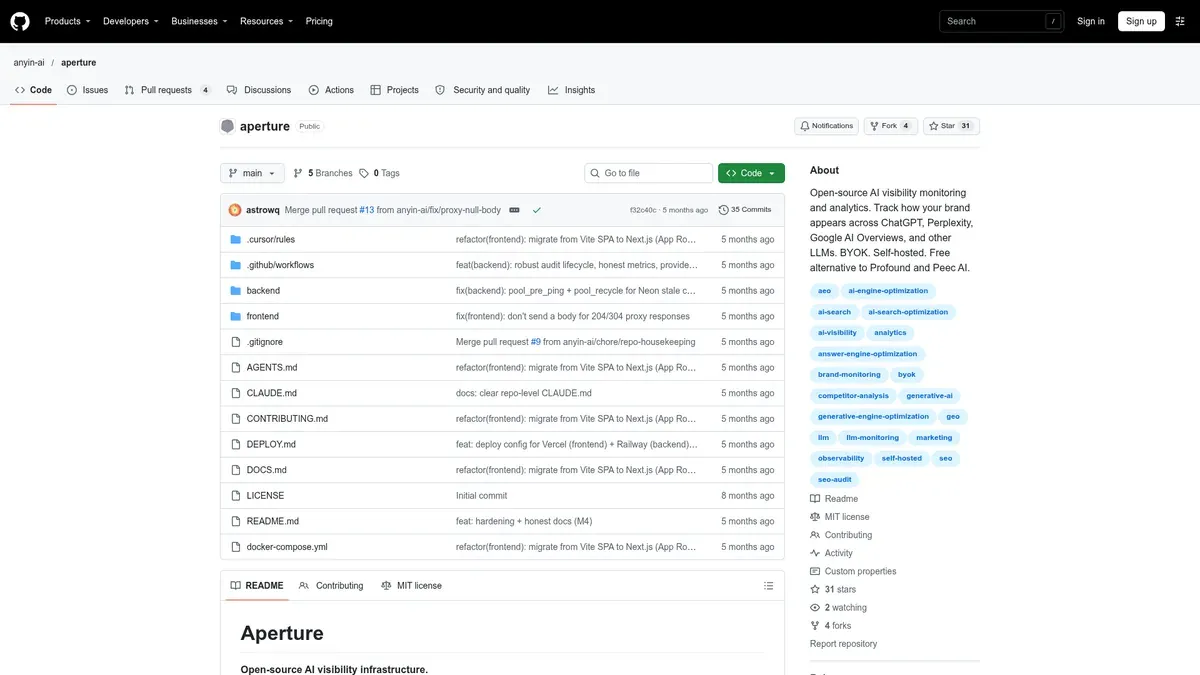
Aperture describes monitoring brand recommendations, competitor comparisons, structured visibility audits and changes over time. Its engine table lists ChatGPT and Perplexity as supported, with Google AI Overviews and Claude planned. Planned engines are not live, so we do not count them. It supports OpenAI and Perplexity as providers, with Gemini and Anthropic planned, and custom OpenAI-compatible endpoints such as Ollama or vLLM. The README does not give a usage-cost estimate, an export format list or a scheduler, and it points to a separate quick-start guide.
Limitation: the README warns that API keys are stored unencrypted in local SQLite and that the application has no authentication. It says to keep it on localhost or a private network, or behind a reverse proxy with authentication, and not to expose it publicly. That makes it a good local experiment and a poor choice for something you would show a client.
OtterlyAI comes up in a lot of "free" searches, so a quick note. Its pricing page lists Lite at €29 a month with 16 prompts and Standard at €189 a month with 120 prompts, and its help page confirms a seven-day free trial. We could not confirm the trial's prompt count or card requirement, or what happens when it ends. A seven-day trial is a way to test a paid tool, which is useful, and it is not tracking you can keep running for a client.
Whichever tool you pick, the work is similar. This is the order we would take it in.
If you want to see your client's numbers this week, start free with AeoNut. You get one client project, unlimited prompts and your own provider key. The platform plan is free, the provider charges for the data, and the cost preview shows that number before tracking runs.
Yes. AeoNut has a hosted self-serve Free plan with one project, unlimited prompts and no card, and you pay your provider for the data. OneGlanse and GEO/AEO Tracker are free open-source tools you run yourself, though their setup, hosting and data can cost time or money.
Yes. The Free plan includes every feature for one client project, including scheduled tracking and white-label reports. It is ongoing tracking, which is different from a one-off checker that gives you a single score.
AeoNut covers all five. OneGlanse lists AI Overview but not AI Mode, and GEO/AEO Tracker lists AI Mode but not AI Overviews. Aperture lists Overviews as planned. Check current engine status before you promise a client a coverage set.
No. It means you connect a provider account and pay that provider directly for the data. AeoNut shows an estimated cost before runs and offers budget caps, and the open-source tools can also need paid API calls, hosting or a proxy. Use restricted keys with spending limits where you can.
Tools & Comparisons ·
Compare free tools that report citation rate and brand mention rate as separate numbers, and see which are ongoing plans and which are one-time checkers.

Tools & Comparisons ·
Is a self-hosted AI visibility tracker worth your time? Compare setup, upkeep, data control and engine coverage with a managed free plan before you decide.

Tools & Comparisons ·
Which free AEO tracking tool keeps running, saves history and shows change? Compare five free options on schedule, trends and alerts to pick one for a client.