

Tools & Comparisons ·
Free Tools That Track Citations and Brand Mentions Separately
Compare free tools that report citation rate and brand mention rate as separate numbers, and see which are ongoing plans and which are one-time checkers.
Ran HubSpot's AEO Grader and want to see change over time? Compare free ways to track AI visibility on an ongoing basis, from a free plan to self-hosting.
Avinash Saurabh · · 16 min read
You ran HubSpot's AI Search Grader for a client, got a score out of 100, and now the client wants to know what happens next month. That is where most people go looking for a free HubSpot AEO alternative. The grader is a good first look, but it gives you one snapshot, and a snapshot can't tell you whether anything is getting better.
The short answer is that AeoNut's Free plan is the free HubSpot AEO Grader alternative that keeps running. It gives you ongoing AI visibility tracking free of a platform fee: free forever for one client project, with unlimited prompts, every feature, and no card. You bring your own provider key, and the platform costs nothing. The answers it collects are billed by your provider at its price, and we will be plain about that cost all the way through.
This guide covers what the grader shows and what it leaves out, how HubSpot's separate paid AEO product fits in, and five options for ongoing AI visibility tracking that you can start with little or no software cost. It is written for a freelance consultant, so it keeps coming back to what a one-client setup looks like in practice.
HubSpot's AI Search Grader is free, needs no account, and is described by HubSpot as a one-time diagnostic. You enter a company name, a location, an industry, and a product or service. HubSpot says the snapshot takes under two minutes, and the full report comes after a short form where every field is required.
It checks three engines: ChatGPT, Perplexity, and Gemini. The score is out of 100 and it adds up five parts: Sentiment Results at 40 points, Presence Quality at 20, Brand Recognition at 20, AI Share of Voice at 10, and Market Competition at 10. You get a composite score, a breakdown, and a written read of what it means. Because it takes any brand, you can also run it on a competitor, which is handy in a pitch.
What it doesn't do is just as useful to know. HubSpot's pages don't describe saved history or reruns, so you can't line up this month's grade against last month's. It uses preset queries, so you can't choose the prompts your client's buyers actually type. And a weighted score is not the same thing as a mention rate or a citation rate, so you can't drop it into a trend chart next to tracker numbers. If you want a hubspot aeo grader alternative, the gap you are filling is history, your own prompts, and a metric that stays the same from one month to the next.
Before you go looking elsewhere, it helps to get one thing straight. The grader is not HubSpot's only AEO offer. HubSpot sells a separate AEO product that does recurring tracking, and it deserves a fair look.
It comes with a 28-day free trial and no credit card. After that, from HubSpot's pages, the standalone price is $50 a month, or $45 a month when paid annually, and HubSpot says no other HubSpot subscription is required. The trial setup tracks 25 prompts across ChatGPT, Gemini, and Perplexity. HubSpot says tracked prompts run daily and the score updates daily. It offers visibility scoring, prompt tracking, citation analysis, and competitor share of voice.
HubSpot's support pages say Claude, Google AI Mode, and Google AI Overviews can be switched on through a multi-engine beta. Tracking six engines uses twice as many answers per prompt as three, so that takes more answer capacity. HubSpot also describes credit-based and answer-limit terms in some pricing programs, and those vary, so check which terms apply to you before you count on them.
So the honest picture is this. HubSpot does have an ongoing tracker. It is a trial and then a paid plan, and the published material doesn't show a permanent free AEO plan. If your search was for hubspot ai search tracking free of charge and ongoing, a trial that ends after 28 days doesn't quite get you there. If you are happy to pay $50 a month for a hosted HubSpot tool, it is a reasonable choice, and we list it in the "how to choose" section for that reason.
A consultant needs different things from a free tool than a big team does, so we ranked the options on these points:
One caution applies to everything below. A tool with no license fee is not automatically a tool with a zero-dollar bill. If it asks AI engines questions, someone pays for those answers, and it is usually you.
| Rank | Tool | What the free option gives you | Recurring tracking | Main trade-off |
|---|---|---|---|---|
| 1 | AeoNut | Free forever, one project, unlimited prompts and features, no card | Yes, daily, twice weekly or weekly | You pay your own provider for the data; one project on Free |
| 2 | Simple Prompt Tracker | Free open-source self-hosting | Yes, on a schedule | You run it yourself; documented engines are ChatGPT and Gemini |
| 3 | Essentras | $0 plan, no card, one domain, three suggested questions a month | Yes, if you sign in at least every 14 days | Public results, very few questions, no Google AI Overviews or AI Mode |
| 4 | Elmo | Free MIT-licensed self-hosting | Yes, its worker runs prompts several times a day by default | You host it and pay for infrastructure and provider keys |
| Companion | Ahrefs free AI Overviews Tracker | Free limited preview, no signup | You are told to rerun it yourself | Google AI Overviews only, not a configurable tracker |

Best for: a freelancer or small team that wants a hosted recurring tracker for one client or one brand, with its own prompts, trend reports, and client-ready exports, without paying a platform fee.
AeoNut treats each client brand as a project. A project has its own prompts, competitors, engines, countries, and schedule. Every few days, or daily if you choose, AeoNut runs those prompts and records whether the brand is mentioned and cited, where it shows up in the answer, and which sources were cited. That is the thing a grader can't give you: the same questions, asked again, with the answers kept.
The Free plan is the lead reason it comes first. It is free forever for one client project, with unlimited prompts, unlimited team seats, and every feature. That includes analytics, white-label reports, the MCP server, the API, and CSV export. It tracks all twelve engines: ChatGPT, Gemini, Perplexity, Claude, Grok, Google AI Overviews, Google AI Mode, Mistral, Meta AI, Qwen, Z.ai, and MiniMax. There is no card and no trial clock. It is the only AI visibility tracker that is free forever with unlimited prompts, and some other tools sit close to that line with credit-capped free plans or free one-off checkers, which are not ongoing tracking.
For each project you measure mention rate, citation rate, average position, share of voice against the competitors you name, and sentiment, with trends by engine, prompt, and country. You also get the raw answers per prompt, so when a number moves you can read what the engine actually said.
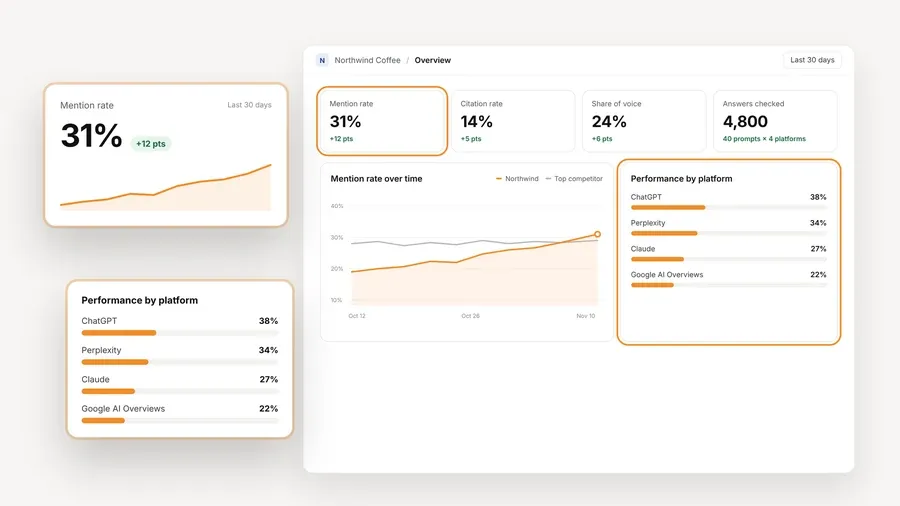
Now the part about cost, which we would rather say clearly than have you find out later. The platform is free, and the AI answer data is billed by your own provider at its price. You connect a key from OpenAI, Anthropic, Gemini, Perplexity, or DataForSEO, and one key from one provider is enough to start. AeoNut never marks the data up. Before anything runs, a cost preview shows what the tracking will cost, and you can set a spend limit per client, a budget cap, and alerts. We also suggest restricted keys with spending limits, and the app shows you how to make one. That is the answer to the fear of a surprise bill from OpenAI.
For each engine you also pick between scraped data, which is the answer a real person sees in the ChatGPT, Gemini, or Google apps and costs the least, and API data from a specific model. A small client with a tight budget can start on scraped data and a short schedule.

When a client asks for something to read, the white-label reports and shareable links carry your branding, not ours, and they export as PDF, Excel, Markdown, or CSV. If you use an AI assistant, the read-only MCP server lets Claude, Cursor, and other MCP clients read the workspace data, so you can ask which prompts a client lost to a competitor this month and get an answer from the real numbers.
Limitation: the Free plan holds one project. If you take on a second paying client, you move to Pro, which is $99 a month for up to 10 client projects, or $79 a month billed annually. For a one-brand pilot or a single client, that limit doesn't get in the way, and your history comes with you when you upgrade.

Best for: a technically comfortable consultant who likes open-source software and is happy to run it on their own server.
Simple Prompt Tracker runs prompts you supply on a schedule and stores the answers, so you can look at visibility, share of voice, position, and citations over time. The source describes unlimited projects for self-hosted use. Its documented engines are ChatGPT and Gemini, with web search and grounding turned on, plus a mock engine you can use to test the setup without paying for API calls. Setup means cloning the project and starting it with Docker Compose.
There are hosted plans too, if you decide you don't want to run a server. Starter is $19 a month for 30 prompts tracked a month, Growth is $49 a month for 60, and Pro is $99 a month for 150. The product lists MCP, API access, CSV export, and a UI scraper on those hosted plans. Check which of those a self-hosted copy includes before you promise any of them to a client.
Limitation: the free option is software you host, not a $0 hosted plan. You handle the server and the provider keys, and the documented engine list is shorter than what a consultant needs if the client cares about Google AI Overviews and AI Mode. It suits a reader who values control over convenience.
Best for: a consultant who wants a small, regular, public baseline across several assistants and can live with three questions a month.

Essentras has a $0 plan with no card. You get one domain per account, and the tool asks three suggested questions a month. It asks ChatGPT, Meta AI, Claude, Gemini, Perplexity, DeepSeek, and Grok. The questions come from Essentras, based on Google search volume, so you don't get the freedom to build a large prompt set of your own.
The dashboard keeps the full answers and sources. Results are delivered monthly, and the free dashboard is public. The service says tracking continues as long as you sign in at least once every 14 days. If you miss that check in, tracking pauses, but your data isn't deleted. The paid plan is $49 a month for up to 25 questions asked weekly, with a private dashboard and a Monday report, and the source lists extra domains at $29 a month each.
Limitation: three questions a month and a public dashboard are a real constraint for client work, and it doesn't read Google AI Overviews or AI Mode. Treat it as a light check for your own site or a client who is fine with public results, and not as a place for confidential reporting.
Best for: a technical team that wants an open-source tracker with a wide engine list and full control over where it runs.

Elmo is MIT-licensed and free to self-host. Its pricing page lists unlimited prompts and supported models for the self-hosted version, and you pay for your own infrastructure and the provider keys you choose. A Docker Compose setup runs the platform, and the documented install uses a command-line tool and a configuration step. A background worker runs your prompts several times a day by default, stores the answers and citations, and analyzes mentions, sentiment, and position.
The surfaces it lists are broad: ChatGPT, Google AI Mode, Google AI Overviews, Gemini, Perplexity, Copilot, Claude, Grok, Qwen, DeepSeek, Mistral, and Kimi. Which of those you can use depends on your provider and plan. You can share reports with people who don't have an Elmo account, and it lists a REST API, SDKs, and an MCP server.
If you would rather not host it, the cloud plans start at $29 a month, for one brand, 50 prompts, and ChatGPT only. The $99 Basic plan covers one brand with 50 prompts on any four platforms, and the $299 Pro plan covers two brands with 150 prompts. Annual billing is described as saving two months.
Limitation: free here means free software, not free hosting or free model access. You manage the infrastructure, the setup, and the provider bills, and white-label is described as a cloud feature, not something you should expect from the free self-hosted copy.
Best for: a quick, no-signup look at Google AI Overviews, when you don't need your own prompts or a schedule.

Ahrefs' free AI Overviews Tracker gives you a limited preview report. It shows how many of the tested AI Overviews mention a brand, mentions month over month, the top five topics, the top five cited domains, and the top five cited pages. Ahrefs tells you to run the check periodically, which means you do the repeating. The free tool doesn't document custom prompts, platform choice, date ranges, or an automatic schedule.
Ahrefs' paid Brand Radar is described as tracking AI Overviews daily with a daily-updated dataset. It is priced at $199 a month for selected platforms and $699 a month for all of them, and the all-platforms plan is described as including 2,500 custom-prompt checks a month. That is a different product from the free checker.
Limitation: it is a Google-only snapshot with no history you control. It works well beside a recurring tracker as a second opinion on AI Overviews, and it can't replace one.
If you already ran the HubSpot grader, you don't have to throw that work away. Here is a simple way to carry it over.
Pick AeoNut Free if you want a hosted tracker for one client or one brand, with prompts you choose, trend reporting, and white-label reports, and you are fine paying your own provider for the answers. It is the closest match to what a consultant needs, which is the grader's job done again every week.
Pick Simple Prompt Tracker or Elmo if you would rather run your own stack, you are comfortable with Docker, and control matters more than a managed setup. Elmo is the one to look at if you need a long engine list, and Simple Prompt Tracker is the lighter of the two.
Pick Essentras only if three questions a month and public results are fine for you, for example to watch your own site.
Pick Ahrefs' free checker for a quick Google AI Overviews look, next to whatever you use for tracking.
Pick HubSpot AEO if you want its hosted product and are happy to move from the 28-day trial to $50 a month, or $45 a month annually. That is a fair choice for someone already working inside HubSpot, and the grader remains a nice free first look either way.
If you want a free hubspot aeo alternative that keeps tracking after the trial clock would have run out, start free with AeoNut. Add one client, set up prompts, check the cost preview, and you will have a real trend in a few weeks.
Yes. HubSpot describes the AI Search Grader as a free, one-time diagnostic that needs no account. It is not the same product as HubSpot AEO, which has a 28-day trial with no card and then costs $50 a month, or $45 a month when paid annually.
AeoNut's Free plan is a hosted tracker that is free forever for one project, with unlimited prompts and daily, twice-weekly, or weekly schedules. The platform is free, and you pay your own data provider for the answers.
AeoNut doesn't charge for it and doesn't mark it up. You connect your own supported keys and pay the provider directly. A cost preview shows the estimated cost before tracking runs, and you can set spend limits, budget caps, and alerts.
Not as the same score. The grader gives a weighted one-time score across five parts, while a tracker reports recurring measures such as mention rate, citation rate, position, and share of voice. Treat the grade as context, then compare the same prompts over time.
Tools & Comparisons ·
Compare free tools that report citation rate and brand mention rate as separate numbers, and see which are ongoing plans and which are one-time checkers.

Tools & Comparisons ·
Is a self-hosted AI visibility tracker worth your time? Compare setup, upkeep, data control and engine coverage with a managed free plan before you decide.

Tools & Comparisons ·
Which free AEO tracking tool keeps running, saves history and shows change? Compare five free options on schedule, trends and alerts to pick one for a client.