

Tools & Comparisons ·
Free Tools That Track Citations and Brand Mentions Separately
Compare free tools that report citation rate and brand mention rate as separate numbers, and see which are ongoing plans and which are one-time checkers.
Looking for a free ZipTie alternative? See which free AI search tracking options keep running after a trial, what you give up, and how to set up checks.
Avinash Saurabh · · 17 min read
If you are looking for a free ZipTie alternative, the first thing to know is what ZipTie's free offer actually is. The current ZipTie product, at ziptie.ai, gives you a seven-day trial with up to 25 prompts checked daily, no card and no automatic billing. After the seven days you either start a paid subscription or stop. That is a fair way to try a product, but it is not ongoing tracking, and a week is rarely long enough to show a client a trend.
So the question most consultants are really asking is this: what can I run for free, week after week, for AI search tracking free of a time limit, that tracks my client's brand in ChatGPT, Perplexity and Google's AI answers? This guide goes through the options as they stood in November 2026, says what each one gives you and what you give up, and finishes with a short routine for setting up comparable checks across engines. If you want one answer up front, AeoNut's Free plan is the one that keeps running with no prompt cap, and the rest of this piece explains why and where it falls short.
A few things decide whether a free tool is useful to a solo consultant, so these are the criteria used to order the list.
"Free" means different things here. It can be a free-forever plan, a capped plan that keeps scanning, a one-off checker, or a time-limited trial. These are not the same offer, and the list below keeps them apart. If you want the wider map of free offers, the guide on which kind of free offer fits you sorts them the same way.
| Tool | What you get free | Ongoing tracking | Engines on the free offer | Best fit |
|---|---|---|---|---|
| AeoNut Free | $0 forever, no card, 1 client project, unlimited prompts, every feature | Yes | 12 engines | One client or brand tracked properly, with your own provider key |
| AEObot Free | $0 a month, no card, 5 tracked prompts and pages | Yes, monthly | ChatGPT and Perplexity | A very small monthly check |
| Ahrefs AI Visibility Checker | Free, no signup or card | No, a one-off check | ChatGPT, Gemini, Perplexity, Copilot, Google AI Overviews | A quick snapshot before a pitch |
| HubSpot AI Search Grader | Free, no account | No, a one-time grade | ChatGPT, Perplexity, Gemini | A free read on how AI describes a brand |
| ZipTie (for comparison) | 7-day trial, up to 25 prompts daily, no card | Paid after the trial | Up to seven engines | Testing ZipTie's paid monitoring briefly |

Best for: a freelancer or one-person consultancy that needs lasting tracking for one client brand, wants to choose the prompts, and is fine bringing a provider key.
AeoNut is AI visibility tracking built for agencies, and the Free plan is the full product for one brand. You set up one client project with its own prompts, competitors, engines, countries and schedule. AeoNut runs those prompts, records whether the brand is mentioned and cited, where it appears in the answer, and which sources the engine cites. It is free forever, it needs no card, and it has unlimited prompts. It is the only AI visibility tracker that is free forever with unlimited prompts, which matters because other free offers are capped by prompts, credits or time, or are one-off checkers that give you a single snapshot.
People who search for ZipTie AI search free usually mean this: a plan, not a trial. Here is how the free ZipTie alternative question plays out in practice. ZipTie's trial lets you try up to 25 prompts for a week. AeoNut Free lets you track as many prompts as your client has questions, and it keeps tracking after week one. You can start with the twenty or thirty questions that the client's buyers really ask, add a few that name their competitors, and grow the list whenever you learn something new. Nothing in the plan makes you choose which questions to drop.
You also get the whole feature set, not a trimmed one. Every plan includes every feature, and the plans differ only in how many client projects they hold. On Free that includes:
The one thing to be clear about is the data. AeoNut's platform is free, but the AI answers are billed by your own provider, at the provider's price. You connect a key from OpenAI, Anthropic, Gemini, Perplexity or DataForSEO, and one key from one provider is enough to start, and the guide to free trackers that use your own API keys walks through how that works. AeoNut does not mark the data up, and it shows a cost preview before anything runs, with budget caps and alerts if you want a ceiling. As a published example, ten clients with 100 prompts each, tracked daily on ChatGPT, Perplexity and Google AI Overview, comes to about $135 a month in data. That is a ten-client agency number, so for one client it will be a small fraction of that, and the preview will tell you the real figure for your setup. If a surprise bill is your worry, a restricted key with a spending limit is the safe way to start.

That screen is the part that makes the plan free on the platform side: you connect your own keys once, and every project can use them. The numbers and names in AeoNut's screenshots are demo data, not customer results.
What does the reader get from the tracking itself? Each project shows mention rate, citation rate and share of voice over time against a competitor, with a breakdown by platform, so you can tell a client how often they are named and how often they are cited, with real data behind it.
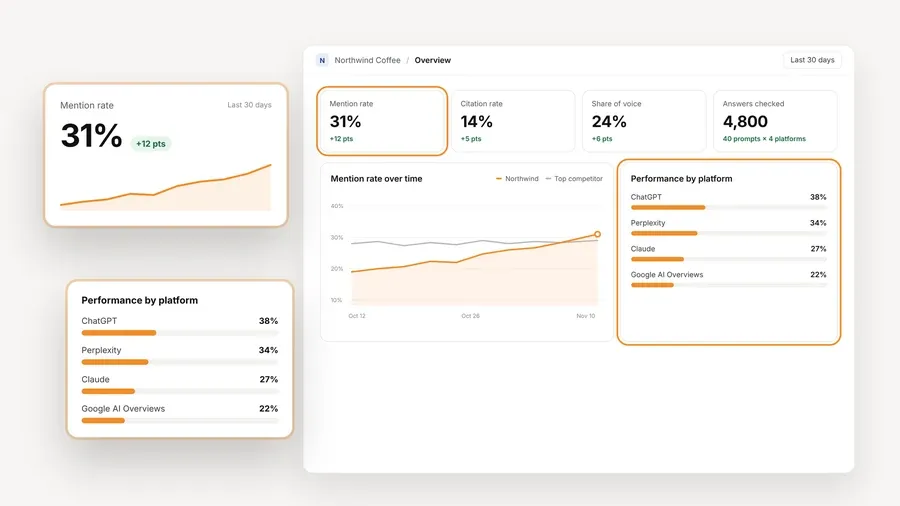
Limitations worth knowing: Free holds one client project. That suits one brand, whether it is a freelancer's client, an in-house team's own site or a pitch prospect (the guide to free tracking by reader and industry shows how that looks for different roles), but if you have several clients you will want Pro, which is $99 a month for up to 10 client projects ($79 a month billed annually), or Unlimited at $499 a month ($399 billed annually). Features are the same on every plan, so moving up changes the project count and nothing else. AeoNut also does not list Microsoft Copilot or Bing AI Overview among its tracked engines, and ZipTie does, so if one of those surfaces is the whole point for your client, that is a real scope difference. Everything else ZipTie lists is covered.

Best for: a consultant who needs only a small, recurring monthly check on ChatGPT and Perplexity.
AEObot has a free plan that keeps running, which already puts it ahead of a trial. It costs $0 a month, needs no card, covers one brand workspace, and allows five tracked prompts and pages combined, scanned monthly on ChatGPT and Perplexity. The free plan includes a monthly AI visibility scan and a preview of a ranked action plan. AEObot counts a tracked prompt as a question monitored across engines and a tracked page as a URL watched for citations and mentions, so those five slots are shared between both.
Paid plans are Starter at $50 a month (billed monthly) with 50 tracked prompts and pages, weekly scans, ChatGPT and Perplexity, Google Search Console connection and MCP access, and Growth at $250 a month with up to five workspaces, 250 prompts and pages, daily scans and Gemini, Claude and Copilot added. Annual billing is offered at a discount, but the pricing page does not say by how much.
Limitation: five slots checked once a month is a thin sample. It will show you whether a client appears for a handful of questions, but it will not give you a daily or weekly view, and two engines is narrower than most clients ask about. The pricing page does not say whether the free plan includes exports, white-label reports or history, so check that before you build a client report on it.

Best for: a fast, free baseline before you decide whether an ongoing tool is worth paying for.
Ahrefs offers a free AI Visibility Checker that needs no signup, no card and has no stated limit on how many brands you check. It queries ChatGPT, Gemini, Perplexity, Copilot and Google AI Overviews using search-backed prompts. The report shows total AI mentions, a platform breakdown, topics, and the domains and pages that were cited. For a first conversation with a prospect, that is a handy thing to be able to show.
The ongoing version is a different product. Ahrefs' Brand Radar AI Visibility Index starts at $199 a month, and Custom Prompts, where you choose your own questions, starts at $50 a month as an add-on, and is also included within quotas on paid Ahrefs plans from Lite up. Ahrefs says Brand Radar is the route to full data, historical tracking and competitor comparison.
Limitation: the free checker is a snapshot. It cannot show a prompt-by-prompt trend over time, and its search-backed prompts are not the fixed list of client questions you would want to track. Use it to open a conversation, then move to a tool that repeats the checks.

Best for: a free read on how AI engines characterize a brand, when you need a quick perception check rather than a tracker.
HubSpot's AI Search Grader is free, needs no account and returns a one-time snapshot of how ChatGPT, Perplexity and Gemini describe a brand. Its score is built from five parts: Sentiment Results (40 points), Presence Quality (20), Brand Recognition (20), AI Share of Voice (10) and Market Competition (10). That makes it a good conversation starter about reputation in AI answers.
HubSpot also sells a standalone paid product, HubSpot AEO, at $50 a month ($45 a month billed annually) for 25 prompts across ChatGPT, Gemini and Perplexity, with more prompts available to buy. A free trial of 25 prompts on the same three engines needs no card, though the length of the trial is not stated in what was reviewed. The standalone product does not need HubSpot's CMS or another HubSpot subscription, and tracking a second brand is a separate instance at the same price.
Limitation: the grader is a single grade, not ongoing tracking, and it covers three engines. The pricing information reviewed does not say whether the AEO product offers exports, API access or white-label reports, so confirm those before you rely on it for client work. If you want a closer look at moving past the grader, see the free HubSpot AEO alternative guide.

ZipTie is not on the list above because it is the free option. It is the baseline the rest are measured against, so it helps to know what you would be giving up.
First, a quick clarification, because the name causes confusion. ZipTie runs two separate products. The original ziptie.dev is still running, with its own accounts and pricing. The current product is at ziptie.ai, and everything here is about that one. Do not mix the two when you look up prices.
Here is what the current ZipTie offers:
What you give up by choosing a free ZipTie alternative is mostly Copilot and Bing AI Overview coverage, and ZipTie's own way of scoring. ZipTie's scores do not have a published formula in the material reviewed, so do not assume its AI Success Score lines up with AeoNut's mention rate or share of voice. If you switch partway through a client contract, the numbers may look a little different at first because each tool runs prompts its own way. Tell the client before the first report, and compare actual answers and citations rather than the headline scores.
Two caveats on ZipTie's trial. Its own pages disagree on which engines the trial includes: the pricing page and terms name ChatGPT, Google AI Overviews and Microsoft Copilot, while the FAQ and product pages name ChatGPT, Google AI Overviews and Google AI Mode. Check the sign-up flow before you plan around either. And a pricing calculator showing $0 is just the state with no prompts and no engines, not a free plan. The guide on a free trial or a free forever plan for ChatGPT monitoring goes deeper on that difference.
None of this makes ZipTie a poor product. If you want configurable prompts, engines and refresh rates and are happy to pay for volume, it is worth testing for its seven days. This piece leaves out ZipTie's content suggestions and classic rank tracking, which are a separate decision.
If you decide to move to a free setup, this is a routine that keeps your results comparable. It works whether you are replacing ZipTie or starting from nothing, and for the wider picture of what you keep and give up when you replace a paid tool, see the guide to free alternatives to paid AI visibility trackers.
If you want to keep a client report going through the switch, a free reporting tool for client updates is worth a look, and the guide to tracking tools that keep your history covers what is kept and for how long.
Pick based on the job in front of you, and it is fine to use more than one.
If you want to see your client's real AI answers this week, set up the Free plan with one client project, connect one provider key, add your first batch of prompts and check the cost preview before it runs. There is no card to enter and no time limit. Start free with AeoNut and you can have the first answers in front of your client at the next call. If you want a wider look at how free plans compare on limits, the free plan limits compared guide lines up prompts, engines and projects side by side.
AeoNut's Free plan is the closest fit for ongoing tracking. The platform costs $0 forever, covers one client project, allows unlimited prompts, needs no card and tracks twelve engines. You pay your own AI provider for the answer data, and AeoNut shows an estimated cost before a run.
The current ziptie.ai product offers a seven-day trial with up to 25 prompts checked daily, no card and no automatic billing. The pages reviewed do not show a free-forever plan. The separate ziptie.dev product has its own pricing and trial, so do not mix the two.
The AeoNut platform fee on the Free plan is $0 forever. The AI answer data is billed by your own provider at that provider's price, and AeoNut does not mark it up. The cost preview shows the estimate before anything runs, so the platform is free and the data is what the provider charges.
Not quite. AeoNut tracks ChatGPT, Gemini, Perplexity, Google AI Overviews and Google AI Mode, which ZipTie also lists, but it does not list Microsoft Copilot or Bing AI Overview. The two tools also capture answers differently, so matching prompts will not give identical results.
Tools & Comparisons ·
Compare free tools that report citation rate and brand mention rate as separate numbers, and see which are ongoing plans and which are one-time checkers.

Tools & Comparisons ·
Is a self-hosted AI visibility tracker worth your time? Compare setup, upkeep, data control and engine coverage with a managed free plan before you decide.

Tools & Comparisons ·
Which free AEO tracking tool keeps running, saves history and shows change? Compare five free options on schedule, trends and alerts to pick one for a client.