

Tools & Comparisons ·
Free Tools That Track Citations and Brand Mentions Separately
Compare free tools that report citation rate and brand mention rate as separate numbers, and see which are ongoing plans and which are one-time checkers.
Looking for a free Writesonic alternative? Compare AeoNut, GEOflux, Essentras and Prompt Monitor on prompts, engines and data costs, then move your tracking.
Avinash Saurabh · · 15 min read

If a client has asked whether they show up in ChatGPT, you have probably looked at Writesonic's GEO tracking and then at the price. The cheapest self-serve plan on its pricing page is $79 a month billed annually, which is a lot to carry for a client who has not paid you for tracking yet. Searching for a free Writesonic alternative GEO tracking tool turns up plenty of names, but only a few keep running after the first week, and fewer still let you track the questions your client's buyers really ask.
This guide compares Writesonic's GEO tracking with four free options so you can pick a free GEO tracking tool that fits one client. I ranked them on six things: whether the free access lasts, how many prompts you can track, whether it covers the engines your clients ask about, whether it repeats the check so you get a trend, whether you can hand the client a report, and whether you know what the data will cost before it runs. AeoNut Free comes first because it is the only AI visibility tracker that is free forever with unlimited prompts, and I'll show where each of the others fits better.
For one client brand, AeoNut Free is the closest free match to a paid tracker, and it works as a Writesonic AI visibility alternative that never turns into a bill for the platform. It costs $0 for the platform, has no prompt cap and tracks twelve engines. You bring your own key, so your data provider bills you for the answers. GEOflux, Essentras and Prompt Monitor are also free and ongoing, but each one limits prompts or how often it checks. Ahrefs and Semrush offer free checkers, which give you one snapshot and no trend, and which kind of free offer fits depends on what you need to show a client.
| Tool | Free option | What it tracks | Main catch |
|---|---|---|---|
| AeoNut Free | $0 forever, 1 client project, no card | Unlimited prompts on 12 engines, repeat runs, every feature | You pay your own provider for the data |
| Writesonic GEO | Free trial route, length not stated | Paid plans from 50 to 200 prompts, daily | Lower plans list three engines |
| GEOflux Free | $0 forever, 15 prompts | Refresh every three days, three competitors | Its pages disagree on which engines Free tracks |
| Essentras Free | $0, three questions a month | Seven assistants, public dashboard | Monthly, and you must sign in every 14 days |
| Prompt Monitor Free | $0, ten prompts and five keywords | Daily position tracking | It does not name the AI platforms |
Partly. Writesonic sells GEO tracking on paid plans, and its pricing page shows a "Start free" route with no credit card needed. That page does not say how long the trial lasts or what happens when it ends, so it would be a mistake to call it a permanent free plan, and just as wrong to say Writesonic has no free access at all. If you are looking at free alternatives to paid AI visibility trackers, you are really asking whether something free will keep working after a trial would have run out. The answer is yes for the four tools below, with different limits on each.

Writesonic presents its tracker as AI Search Visibility, or GEO. Its pricing page lists three self-serve tiers, all showing annual-billing prices. Starter is $79 a month billed annually, with 50 prompts and 150 answers tracked daily, one user and one project. Basic is $199 a month billed annually, with 100 prompts and 300 answers, two users and one project. Growth is $399 a month billed annually, with 200 prompts and 600 answers, three users and two projects. Enterprise is custom and demo-led.
The page headline says self-serve starts at $99 a month, while the visible Starter card shows $79 on annual billing. A separate monthly Starter price is not clearly stated, so treat $79 as the annual-billing figure and check the page again before you quote it to anyone. Starter, Basic and Growth list ChatGPT, Gemini and Google AI Overviews. Enterprise lists eight platforms, including Perplexity, Claude, Grok and Google AI Mode.
You get visibility, citations, sentiment and share of voice, with prompt-level data, full answer text and filters by competitor, market, language and date. Writesonic also connects to Google Search Console and WordPress on the listed tiers, and it has a Looker Studio connector that needs a Business API key. That connector does not support queries older than seven days, so it works as a reporting window and not as a full archive, which matters if you care about tools that keep your tracking history.
Writesonic is a good fit when you want GEO tracking next to the rest of its SEO and GEO platform and you are happy to pay for a fixed prompt allowance. Its writing and optimization tools are a separate buying decision, and this guide doesn't review them. You can measure mentions and citations without them.

Best for: A freelancer or one-person consultancy tracking one client brand over time, with enough prompts to cover the client's real questions and no platform fee.
AeoNut is AI visibility tracking built for agencies, and the Free plan gives you the whole product for one client project. It is free forever, needs no card, and has unlimited prompts, which is a limit that other free plans cap in different places. Every feature is on Free, including analytics, white-label reports, the MCP server, the API and CSV export. Plans differ only in how many client projects they hold, so nothing is held back to push you toward an upgrade.
Each client is a project with its own prompts, competitors, engines, countries and schedule. You choose daily, twice a week or weekly checks, and you choose scraped or API data per engine. Scraped data is the answer a real person sees in the ChatGPT, Gemini or Google app, and it is the lowest-cost option. API data comes from the exact model you pick. AeoNut tracks ChatGPT, Gemini, Perplexity, Claude, Grok, Google AI Overviews, Google AI Mode, Mistral, Meta AI, Qwen, Z.ai and MiniMax.
For every project you see Mention rate, Cited, Avg. position, Share of voice and Sentiment, with trends by engine, prompt and country. You can open the raw answer for any prompt, see which sources were cited, and see which cited pages belong to the client and which belong to a competitor.
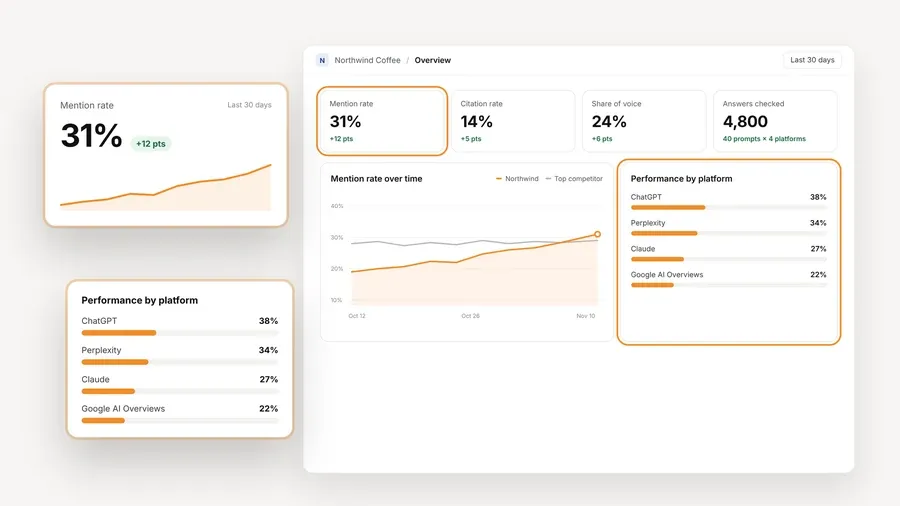
The data cost is the part to read carefully. The platform is free and the answers are not. You connect a key from OpenAI, Anthropic, Gemini, Perplexity or DataForSEO, and that provider bills you directly at its own price. AeoNut does not mark it up. One key from a single provider is enough to start, and the setup is the one described in trackers that use your own keys. A cost preview shows the estimated monthly data cost before anything runs, and you can set spend per client, budget caps and alerts. AeoNut also recommends restricted keys with spending limits and shows you how to set them. For scale, AeoNut's own example is about $135 a month in data for 10 clients with 100 prompts each, tracked daily on ChatGPT, Perplexity and Google AI Overview. That example is not a Free plan price. A single client on a handful of prompts will cost far less, and the preview tells you before you commit.

White-label client reports and shareable links carry your branding, not AeoNut's, and reports export as PDF, Excel and Markdown, which makes them usable as free client reporting. The read-only MCP server lets an assistant such as Claude read the workspace data, with 19 read-only tools, so you can ask it to draft the client summary from the real numbers.
One honest limit applies. Free holds one client project. If you take on a second client, Pro is $99 a month, or $79 a month billed annually, for up to 10 projects, and Unlimited is $499 a month, or $399 a month billed annually, for unlimited projects. Each plan has the same features, and paid plans carry the "3x Savings, or It's Free" guarantee. For the first client, or a prospect you want to impress before they sign, one project is usually all you need.

Best for: Someone who wants a hosted free tracker with a small prompt set, repeat runs and basic client sharing.
GEOflux's Free plan is $0 forever. It gives you 15 prompts, which it counts as 45 credits, refreshed every three days. You get three competitors, CSV export, email digests, three shareable reports and unlimited seats. Paid plans are Starter at $99 a month and Growth at $199 a month, both refreshing daily. GEOflux counts one credit as one AI answer, and credits vary by engine. ChatGPT, Gemini, Google AI Mode and Google AI Overviews cost one credit per answer, while Perplexity, Copilot, Claude and Grok cost three. Its page also says free accounts are limited to 500 for now.
The catch is the engine list. GEOflux's free-plan details name ChatGPT, Gemini and Google AI Mode, while its free tracker page says every plan tracks ChatGPT, Gemini and Perplexity. Those two statements don't match, and its product copy also lists several engines as coming soon, so read the plan's time limits and caps closely. Check what the Free plan covers on the day you sign up, and keep that in mind if your client cares about one engine in particular. It is a fair hosted choice for a small, repeated sample, and it is not an uncapped substitute.

Best for: A solo consultant who wants a no-cost monthly pulse across several assistants and can live with three suggested questions.
Essentras Free covers one domain with three suggested questions a month, tracked across seven assistants: ChatGPT, Meta AI, Claude, Gemini, Perplexity, DeepSeek and Grok. It keeps each answer word for word and records names, position, cited sources and changes. Results arrive by email each month, and the dashboard is public. Pro is $49 a month for up to 25 questions in your own words, checked every Monday, with a private dashboard. The first domain is $49 a month and each extra domain is $29 a month.
The limits matter for client work. Three questions once a month will not show a trend you can discuss on a call. Tracking pauses if you do not sign in at least every 14 days, though nothing is deleted. And because the free dashboard is public, it is not the place for sensitive client work or prompts you have not agreed with the client. It is a decent way to take a light look at a prospect, and it is not a replacement for weekly tracking of custom prompts.

Best for: A user who cares most about daily monitoring and can work within ten prompts and five keywords.
Prompt Monitor's Free plan is $0 a month with five keywords and ten prompts, monitored daily, with position tracking and competitor analysis. The paid plans are $49 a month for 20 keywords and 50 prompts, and $199 a month for 50 keywords and 100 prompts. Daily checks are the useful part, because a daily run gives you a trend sooner than a monthly one.
The pricing page describes monitoring across leading AI models but does not say which ones, and it does not describe reports, exports, integrations or a trial. I would not choose it for a client who asks about a specific assistant, or for one who wants a branded report, until you have confirmed those points with the company.
Two big names offer free checkers, and they are worth knowing about for a first conversation. They are not ongoing tracking.
The Ahrefs free AI Visibility Checker needs no signup and queries ChatGPT, Gemini, Perplexity, Microsoft Copilot, Google AI Overviews and Google AI Mode. You get total AI mentions, mentions by platform, related topics and the domains cited alongside the brand. It is a one-time snapshot, so it will not show you history. Ahrefs describes Brand Radar as its ongoing product, with historical trends and custom prompt tracking, which is a separate purchase.
Semrush's free AI Search Visibility Checker looks across ChatGPT, Gemini, AI Mode and AI Overviews, and shows a competitor comparison with a visibility score, mentions and estimated reach. The pages I reviewed do not describe ongoing tracking or a durable free plan.
Both help when a prospect asks "are we in there at all?" and you want to answer in the first meeting. Neither gives you a line on a chart next month.
Whichever tool you pick, the prompts do most of the work, and free prompt research tools can help you decide what to track. A prompt is a natural-language question run against an AI platform. It is not a record of what one real person typed into ChatGPT, because AI search engines do not publish query data, so every tool builds or suggests representative questions instead. A single answer is also a sample, not proof of a stable trend.
Start with a small core set of real buyer questions, the ones the client's sales team hears every week, plus a few that name their main competitors. Run the same questions on the engines that matter to that client. Keep the wording the same from one period to the next, and write down any change you make, because a changed prompt set is no longer a like-for-like comparison. When a result moves a lot, repeat the prompt and look across engines before you tell the client anything.
It also helps to keep the signals apart. A brand mention means the answer names the brand, which is why vendors' AEO, GEO and LLM labels are worth reading carefully. A citation means the answer links to a page on the brand's site, and citation source analysis shows which pages and domains get used. Position tells you where in the answer the brand shows up. A brand can be mentioned without being cited, so don't report them as one number.
If you are weighing a Writesonic GEO alternative, here is how I would sort it. Pick AeoNut Free if you have one client, or one prospect you want to win, and you want to track every question that matters without a prompt cap or a trial clock. It suits you if you are comfortable adding one provider key and watching a cost preview.
Pick Writesonic if you want GEO tracking inside a wider SEO and GEO platform that you will use for more than visibility, and a fixed allowance of 50 to 200 prompts is enough for you.
Pick GEOflux if you want a hosted tracker with no keys to manage and a small prompt set is fine, as long as its free-plan engines cover what your client needs.
Pick Essentras for a light monthly look at a brand where a public dashboard is acceptable. Pick Prompt Monitor if daily position checks on ten prompts are all you need and you have confirmed the platforms it covers.
If you want to try the setup without spending anything on the platform, start free with AeoNut and connect one key.
AeoNut Free is the closest fit for one ongoing brand project. It is free forever, has unlimited prompts, includes every feature and needs no card. You pay your chosen provider for the data. GEOflux, Essentras and Prompt Monitor also have free ongoing plans, with tighter limits on prompts or how often they run.
Its pricing page offers a "Start free" trial route and says no credit card is needed. It does not state how long the trial lasts, and it does not show a permanent free GEO plan. Check the page before you sign up so you know what happens when the trial ends.
No. Tracking and writing are separate decisions. If you only need to monitor mentions and citations, compare the tracker's engines, prompts, how often it runs, reports and data costs. Choose Writesonic's wider package when you also want what else it offers, not because tracking requires it.
Not always. With AeoNut, the platform is free, and you supply a provider key and pay that provider for the answers. The cost preview shows the estimate before tracking runs, and restricted keys with spending limits keep a large daily prompt set from surprising you.
Tools & Comparisons ·
Compare free tools that report citation rate and brand mention rate as separate numbers, and see which are ongoing plans and which are one-time checkers.

Tools & Comparisons ·
Is a self-hosted AI visibility tracker worth your time? Compare setup, upkeep, data control and engine coverage with a managed free plan before you decide.

Tools & Comparisons ·
Which free AEO tracking tool keeps running, saves history and shows change? Compare five free options on schedule, trends and alerts to pick one for a client.