

Tools & Comparisons ·
Free Tools That Track Citations and Brand Mentions Separately
Compare free tools that report citation rate and brand mention rate as separate numbers, and see which are ongoing plans and which are one-time checkers.
Looking for a free Knowatoa alternative? Compare AeoNut, RankBits and Knowatoa on prompts, engines and reports, then move your checks over in an afternoon.
Avinash Saurabh · · 15 min read
If a client asked whether they show up in ChatGPT and you have been checking with a Knowatoa trial, the clock is probably what is bothering you. A seven-day window rarely shows a trend, and the paid plans start at a monthly price that is hard to fit into a small retainer. The good news is that a free Knowatoa alternative exists, and it keeps running after the first week. It is AeoNut's Free plan, and it is the only AI visibility tracker that is free forever with unlimited prompts.
This guide compares three options for replacing Knowatoa for ongoing AI visibility tracking: AeoNut, RankBits and Knowatoa itself. We ranked them on six things: whether free access continues, how many prompts you can track, how often the tracking runs, which engines are covered, whether you can hand a client a report, and how clear the cost is before you start. We are AeoNut, so we put ourselves first, and we tried to be fair about where the others are the better fit. Every Knowatoa and RankBits fact below comes from their own pricing and product pages as of November 2026.
| Tool | Ongoing free use | What free covers | Paid plans | Best fit |
|---|---|---|---|---|
| AeoNut | Yes, free forever | One client project, unlimited prompts, every feature, twelve engines. You pay your own data provider. | Pro $99 a month ($79 billed annually), up to 10 projects. Unlimited $499 a month ($399 billed annually) | A consultant tracking one client who needs many prompts and a branded report |
| RankBits | Yes, listed as $0 forever | One brand, 5 prompts, weekly tracking, 100 responses a month, five sources. No exports. | Starter $49 a month. Pro $99 a month | A consultant who can follow five questions on a weekly cycle |
| Knowatoa | No permanent free plan on its pricing page, a seven-day trial instead | Trial only | Starter $59 a month. Growth $199 a month. Enterprise is custom | A team that will pay for a wider monitoring and reporting workflow |
Notice that only the first two rows keep tracking after a week. That is the main reason this list starts where it does, and it is also why a search for ai visibility tracking free so often ends in a trial that expires before you have seen a trend. A free plan that never ends is a different thing from a free trial, a free checker or a free audit, and it helps to know which kind of free offer you are looking at. A one-time scan can tell you where a brand stands today. It cannot tell a client whether things are getting better. If you want the wider picture of what you keep and give up when you leave a paid tracker, our guide to free alternatives to paid AI visibility trackers goes through it tool by tool.
Best for: an independent SEO or AEO consultant who wants to track one client properly, build a report from repeat observations, and avoid a platform bill before the client has agreed to pay for tracking.
AeoNut is AI visibility tracking built for agencies, and the Free plan gives a single consultant the same product an agency uses. Each client brand is a project with its own prompts, competitors, engines, countries and schedule. AeoNut runs those prompts on the AI engines and records whether the brand is mentioned and cited, where it appears in the answer, and which sources the engines cite. The Free plan is not a trial. It is $0 forever, needs no card (other free GEO tracking tools with no time limit are worth a look too), covers one client project, and has unlimited prompts and every feature.
Plans differ only in how many client projects they hold, so nothing is held back on Free. Here is what matters when you are replacing a tracker.

This is the part to read carefully. The platform is free, and the AI answer data is not. You connect your own keys from providers such as OpenAI, Anthropic, Gemini, Perplexity or DataForSEO, and those providers charge you directly at their prices. AeoNut never marks that data up. One key from a single provider is enough to start, and our guide to free trackers that use your own keys explains how that setup works.
Because a surprise bill is a real worry when you bring your own keys, AeoNut shows a cost preview before tracking runs. You can also see spend per client, set budget caps and alerts, and use restricted keys with spending limits, which we recommend. For a sense of scale, our own published example is 10 clients with 100 prompts each, tracked daily on ChatGPT, Perplexity and Google AI Overview, which comes to about $135 a month in data. That is an example for those exact settings, not a quote for one client on the Free plan, which will be much smaller.
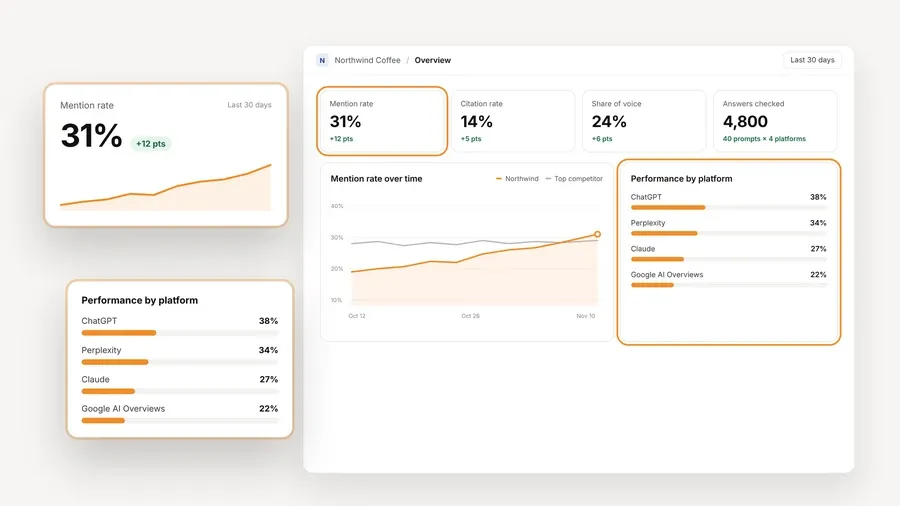
The screen above uses demo data, but it shows the kind of view you build a monthly client conversation around: where the brand stands, how that has moved, and which engines are driving it.

A freelancer usually has one client who asked the question and a small budget to answer it. With AeoNut Free you can set up that client's real prompts, name their main competitors, pick the two or three engines their buyers use, and let it run on a schedule. After a few weeks you have a trend to show on the next call, and the report carries your name. If the client later agrees to pay for tracking, you have not built anything on a tool that might get paywalled, because the Free plan has no time limit and the same features exist on every plan.
The setup is short. You create the project, add prompts, connect a provider key and start tracking, and the check frequency is chosen per project. You do not need a sales call to find out what anything costs, since the plan prices are public and the cost preview shows the data estimate before a single prompt runs.
Free covers one client project. If you take on a second client, you move to Pro, which is $99 a month for up to 10 client projects, or $79 a month billed annually, and your history stays. Until then, the one project is a good fit for a freelancer who is proving the value of tracking on a single client, or tracking their own brand.
Best for: a solo consultant who wants to keep a small weekly set of questions running for no monthly platform charge, and who can work inside five prompts.
RankBits lists its Free plan at $0 forever, so it is a genuine ongoing option, which is more than you can say for a trial. The plan covers one brand with weekly tracking, five prompts and 100 responses a month. Our look at free AI visibility plan limits shows how a cap like this compares with other free plans. Its five Free sources are ChatGPT, Google AI Overview, Google Search, Bing Search and Perplexity. That is a mix of AI answer services and regular search sources, so it is not five separate AI engines. Free reports are shareable and API access is included after email verification.
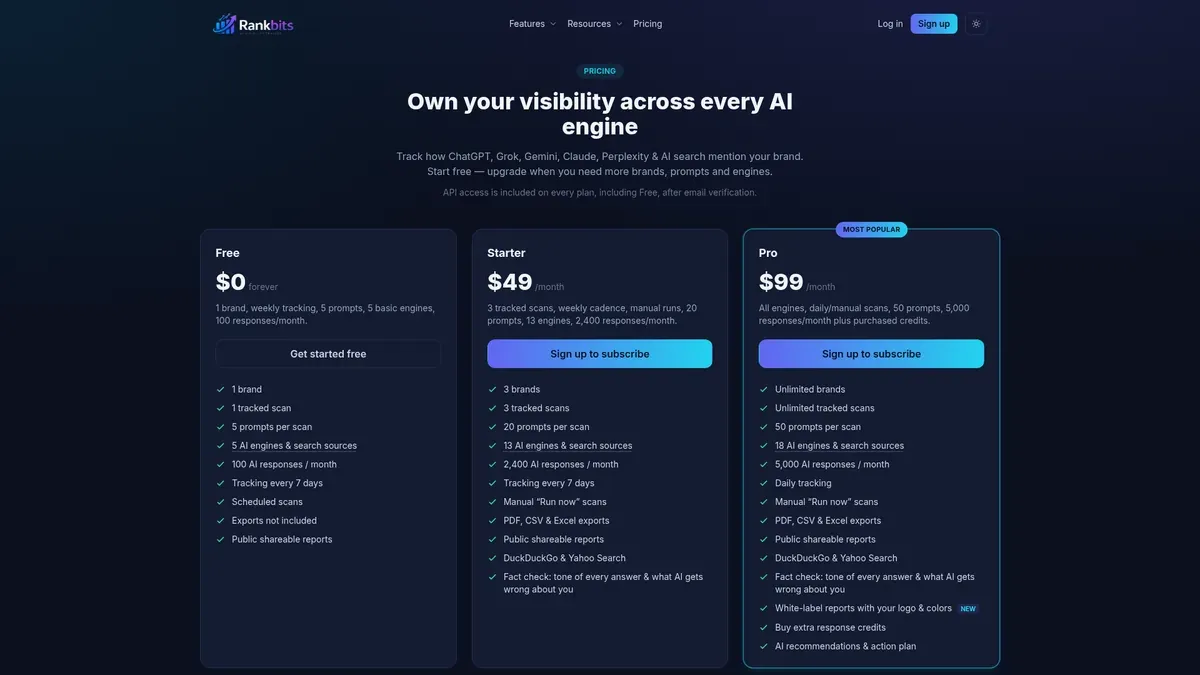
The paid tiers show where the product goes. Starter is $49 a month for 3 brands, 20 prompts and 2,400 responses a month, with PDF, CSV and Excel exports. Pro is $99 a month with unlimited brands, 50 prompts and 5,000 responses a month plus purchased credits, daily scans and white-label reports. Credit top-ups are $30 per 1,000 credits.
The limit to weigh: five prompts and 100 responses a month is a small set. It works if you only need to follow a handful of priority questions. It is a poor match if the client expects broad coverage, since Gemini and Google AI Mode are not among the Free sources and exports are not included on Free. White-label reports arrive only on the $99 Pro plan, so at that point it is no longer a free replacement. If a five-prompt weekly check is truly all you need, RankBits is a sensible and honest pick.
Best for: a team that is ready to pay for a wider AI search workflow, with recurring visibility data plus audit and reporting extras, and that wants a short trial to test it first.
Knowatoa is a capable product, and it is worth being clear about what it is. Its pricing page lists Starter at $59 a month, Growth at $199 a month, and a custom Enterprise plan. Prices are in USD and you can cancel at any time. It mentions annual pricing but does not show annual amounts. There is no permanent free plan on that page, so a search for knowatoa free leads to a seven-day trial, not a tracker that keeps running. Its agency pricing calculator also offers a free AI Search Audit that leads into a seven-day Starter trial, and that is a way in, not continuing free monitoring.

It also has two tools that sit beside tracking. A Keyword Audit sorts a site's existing keywords by intent, topic, funnel stage and brand presence. The AI Search Console is a separate monitor of whether more than 15 AI bot types can reach your site. Neither of those is the same as asking whether an AI answer mentions or cites a brand, which is the job of a tracker.
The sign-up offer is a seven-day trial, and the pricing page does not say whether a card is needed. You can track unlimited sites, but they all share one question limit, and no number for that limit is published on the pricing page. Cadence is also described two ways: the visibility page talks about daily queries, while the pricing and homepage material labels appearance tracking weekly, so it is worth confirming the cadence for your plan before you rely on it. If daily runs matter to you, see our comparison of free AI search rank tracking tools that run daily. We could not confirm from the pages we read whether Knowatoa offers white-label client reports, so check that directly if branding matters to you.
Switching does not mean copying everything over. Some things are the backbone of a trend line and some are extras for a different job.
Keep these, because they are what let you compare like with like: the recurring question list, the client and site, the priority competitors, the location and language settings, the AI services that matter to that client, how often it runs, and how often you report.
You may be able to drop these, if they are not part of what you deliver to the client: the Keyword Audit and the AI bot access checks. Those are separate jobs from recurring answer visibility. We would not say an audit is unnecessary for every client. It is simply not a stand-in for the tracker, and this guide is only about replacing the tracker.
If you pick RankBits Free, you will need to narrow the list to five questions and accept weekly scans, the 100-response monthly ceiling and no exports. If you pick AeoNut Free, the prompt limit is not the thing that holds you back. The two practical limits are the single client project and the separate data bill from your provider.
You can move a client over in an afternoon. Here is a simple order that works.
Tell the client before the first report that the numbers may look a little different, since each tool runs prompts its own way. After two or three months on the new setup you will have a clean trend again. If you want help choosing which questions to start with, our guide to free AI prompt research tools is a good place to begin.
Pick the one that matches your situation, and be honest about the limits. Our guide to free AI visibility tracking by reader and industry goes further if your case is unusual.
If you want to see your first client's mentions and citations without a time limit, you can start free with AeoNut. It takes a few steps: create the project, add prompts, connect a provider key and start tracking.
AeoNut is the closest fit for a consultant who needs ongoing tracking without a platform subscription. Its Free plan is free forever for one client project with unlimited prompts, and you pay your own provider for the data. RankBits is another recurring free option, with a limit of five prompts and 100 responses a month.
Knowatoa's pricing page lists paid Starter and Growth plans and a custom Enterprise plan, not a permanent free plan. Its sign-up page offers a seven-day trial, and the free AI Search Audit leads into a seven-day trial too, not into tracking that keeps going.
A one-time check gives you a first snapshot, but it cannot show a trend. If you need to tell a client how things change over time, you need a tool that keeps running on a schedule, such as a free plan that does not expire.
Save your questions, competitors, client and site scope, language and location, the AI services you track, how often you run, and your past responses if you can export them. Match those settings in the new tool before you compare any trends.
Tools & Comparisons ·
Compare free tools that report citation rate and brand mention rate as separate numbers, and see which are ongoing plans and which are one-time checkers.

Tools & Comparisons ·
Is a self-hosted AI visibility tracker worth your time? Compare setup, upkeep, data control and engine coverage with a managed free plan before you decide.

Tools & Comparisons ·
Which free AEO tracking tool keeps running, saves history and shows change? Compare five free options on schedule, trends and alerts to pick one for a client.