

Tools & Comparisons ·
Free Tools That Track Citations and Brand Mentions Separately
Compare free tools that report citation rate and brand mention rate as separate numbers, and see which are ongoing plans and which are one-time checkers.
Find out which free GEO tracking tools have no time limit, how to spot a trial renamed as free, and a five-question check you can run before you trust a plan.
Avinash Saurabh · · 14 min read

If you have ever set up a tracker on a Monday and found a "your trial has ended" email by the following Monday, you already know why this question comes up. A lot of tools say "free," and only some of them mean it in a way that lets you keep tracking a client for months. For a consultant, a geo tracker free forever is only useful if it is still running when the third monthly report is due. This guide is about free GEO tracking tools with no time limit, and how to tell them apart from a trial that has been renamed.
GEO stands for generative engine optimization, and a free generative engine optimization tracker does one job: it asks AI engines the questions your client's buyers ask, on a schedule, and records whether the brand shows up. The "on a schedule" part matters most. A one-off score is a snapshot, and a snapshot can't show a client a trend.
Here is how I ranked the three tools below. I looked at five things:
This is a curated comparison of three named products. It is not an audit of every free plan in the market, and the claims below come from each vendor's public pages.
| Rank and tool | Free offer and time-limit evidence | What Free meters | Ongoing tracking evidence | Best fit |
|---|---|---|---|---|
| 1. AeoNut | $0 forever, no card | 1 client project, unlimited prompts, you pay your own AI provider for answer data | Daily, twice-weekly or weekly schedules, with trends and reports | A consultant tracking one client across many engines who needs client-ready reports |
| 2. FoxRadar | "Free Forever" label, €0 a month, no card | 15 monthly AI calls, ChatGPT only | Daily updates and history are advertised, but how they fit 15 calls is not explained | A small ChatGPT-only test |
| 3. AI1stSEO | AEO Rank Tracker advertised as free forever, $0 a month, no card to start | 1 site, 100 queries | Daily refresh and delta alerts on the main page, a free scan and weekly score on the tracker page | A site owner who also wants a free audit and scanner |

Best for: freelance SEO and AEO consultants who want to track one client properly before paying anyone a platform fee, and who want the same workflow to carry over if more clients arrive.
AeoNut is the only AI visibility tracker that is free forever with unlimited prompts. Its Free plan costs $0, needs no card, and holds one client project. Every feature is on it, so the one limit you will notice is the number of projects, not a prompt quota or a countdown. That is the main reason it is first here. The question this guide asks is whether a plan will still be there in the fourth month, and a project limit is a fair answer to that question in a way a trial end date is not.
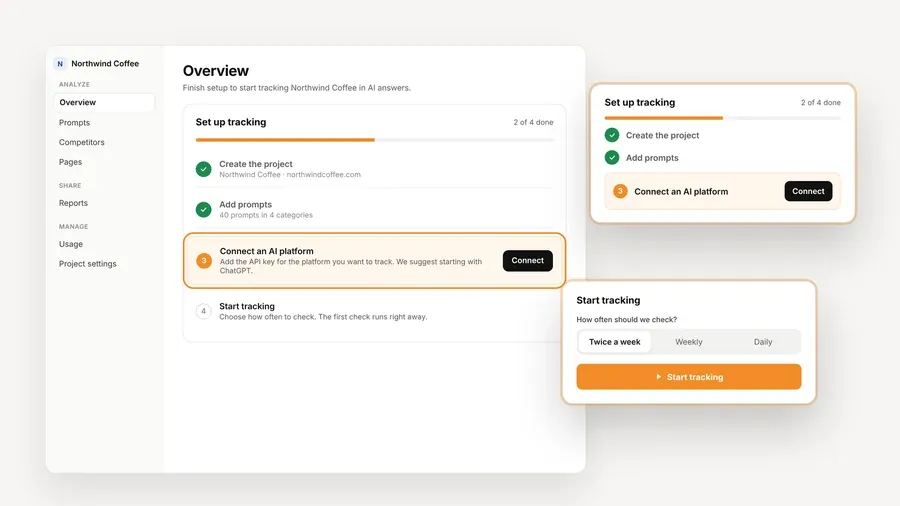
Each client brand is a project with its own prompts, competitors, engines, countries and schedule. You pick whether it runs daily, twice a week or weekly, and you can change that later. AeoNut tracks twelve AI engines: ChatGPT, Gemini, Perplexity, Claude, Grok, Google AI Overviews, Google AI Mode, Mistral, Meta AI, Qwen, Z.ai and MiniMax. For each engine you choose between scraped data, which is the answer a real user sees in the app and the cheaper option, and API data, where you pick the model.
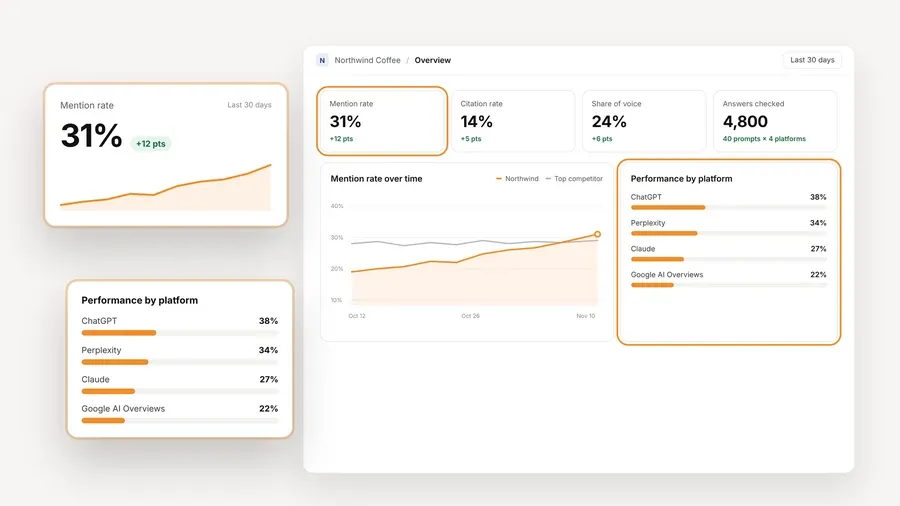
Once it is running, each project reports mention rate, citation rate (shown as "Cited"), average position in the answer, share of voice against the competitors you track, and sentiment, with trends by engine, prompt and country. That is the part that gives you something to show a client month after month.
White-label client reports and shareable links carry your branding, not ours, and they export as PDF, Excel and Markdown, with CSV export as well. The Free plan also includes the read-only API and a hosted MCP server, so an assistant like Claude can read your visibility data and draft a summary for you.
The platform is free, and the AI answer data is not. You bring your own key from OpenAI, Anthropic, Gemini, Perplexity or DataForSEO, and that provider bills you at its own price. AeoNut does not mark it up. One provider key is enough to start, and AeoNut shows an estimated monthly cost before any tracking runs, along with spend per client, budget caps and alerts.
For a sense of scale, the site's example is 10 clients with 100 prompts each, tracked daily on ChatGPT, Perplexity and Google AI Overview, which comes to about $135 a month in data. That is a ten-client example and not the cost of one Free project, so use the cost preview for your own numbers.
One thing worth knowing about those budget controls: a budget alert tells you about spending, and it doesn't always stop it. OpenAI's help page on managing your costs says a monthly project spend limit can act as a soft threshold. Its spend limits guide covers the setting, and a hard stop has to be set up separately. AeoNut recommends restricted keys with spending limits and shows you how to set them, and it's worth doing before the first run.
The Free plan covers one client project. If you take on a second client, the next step is Pro at $99 a month, or $79 a month billed annually, for up to 10 client projects, with the same features and your history kept. The ladder after that is Unlimited at $499 a month, or $399 billed annually. Many freelancers never go past the Free plan, because one well-tracked client is a real engagement.

Best for: someone who wants to try AI visibility tracking with no card and unlimited project and question setup, and whose first use fits inside a small ChatGPT-only allowance.
FoxRadar labels its €0 tier "Free Forever." Its terms don't set a scheduled expiry for the Free tier, and it asks for no card. The strength here is the setup: Free allows unlimited projects and unlimited questions, and it lists an AI Advisor that suggests what to fix, plus free email reports delivered daily, weekly or monthly.
The catch is in how usage is counted. Free includes 15 AI calls a month, and a call is one prompt asked of one AI model. Free is limited to ChatGPT. So 15 calls is 15 prompt checks on one engine across the whole month, which is a small number if you track a client properly. Paid tiers raise it: Starter is €29 a month for 150 calls, Growth is €79 for 500 calls, and Agency is €199 for 1,500 calls, with ChatGPT, Gemini and Grok on the paid plans.
FoxRadar also advertises daily tracking updates and position history. The pricing page doesn't explain how daily tracking works against a 15-call monthly allowance, and it doesn't say what happens when the Free calls run out, or when the allowance resets. Those are the questions to ask before you build a client's tracking on it. Its terms also reserve the right to update the terms, as most do, and they don't state a retention period for free accounts.
Unlimited projects can look generous on paper, and that is a real strength if you manage several small brands. The 15-call allowance is what sets the practical ceiling, though, so it helps to count your prompts first. If all you want is a small ChatGPT-only test, and unlimited project setup matters more to you than volume, FoxRadar is a reasonable fit. For a client who asks about Gemini, Perplexity or Google AI Overviews, the Free tier won't cover it.

Best for: a founder or small site owner who wants a free site audit and GEO scanner alongside a modest tracker, and who will confirm the exact free tracker workflow before using it for recurring client reports.
AI1stSEO's GEO tracker page says its Free plan includes a 100-query AEO Rank Tracker, and it describes daily refresh and delta alerts. The Free plan costs $0 a month, needs no card to start, and is limited to one site. It also bundles a 236-point audit, a GEO Scanner and PDF export. Paid plans are cheap: Pro is $5 a month for five sites, and Expert is $15 a month for unlimited sites, with API access, webhooks and white-label reports listed on Expert only.
The pages don't line up on every point, and it's better to see that before you rely on it. The main page says live tracking covers four major AI engines in one place, while another section says the workflow probes seven, and the FAQ names ChatGPT, Gemini, Claude, Perplexity, Grok, Bing Copilot and Google AI Overviews. It isn't clear which set applies to the 100 free queries. The separate AEO Rank Tracker page describes a no-signup free scan and a GEO score tracked weekly, which is a different experience from daily refresh.
The 100-query figure isn't defined either. It could mean saved prompts, executions or a monthly allowance, and no reset rule, overage price or history period is stated. A scan on its own is a snapshot, so the free scan can't prove ongoing tracking. That doesn't make AI1stSEO a trial. It means the free tier is a bundle worth testing yourself before you promise a client a trend.
"Free" can mean four different things, and mixing them up is how people get caught out.
A time limit is different from a usage quota. A plan can have no end date and still cap projects, calls, queries, sites or engines. A cap isn't a trial. It also works the other way around: "unlimited projects" doesn't mean unlimited checks, as FoxRadar's call count shows.
Ongoing tracking is different from a free checker. A one-off scan is useful for a first look, but it can't show a trend by itself. Look for a recurring schedule, stored history or change alerts. If you want to go deeper on this, our guide to free AI search monitoring tools that keep your history covers how long each tool keeps your results.
A free platform is different from free data. With bring-your-own-key tools the platform fee can be zero while your provider charges for every answer. That's why AeoNut never calls its data free, and why the cost preview matters.
A marketing claim is different from a promise. "Free forever" tells you the vendor advertises no scheduled expiry. It isn't a legal guarantee that pricing, features or access will never change, so treat it as the vendor's current offer.
Before you build a client's tracking on any free plan, run through these five questions. They take about ten minutes and they save you from re-doing the setup later.
How often a tool re-checks the answers matters too, and our roundup of free AI search rank tracking tools that run daily covers it.
Picking the tool is half of it. The other half is setting it up so that after a few weeks you have something worth showing a client. Here is a sequence that works on any of the three.
Start with the questions, not the tool. Ask the client for the questions their buyers ask before they buy, the kind their sales team hears every week, and add a few that name their main competitors. A short list of real questions will tell you more than a long list of guesses. On a plan with unlimited prompts, like AeoNut's Free plan, you can add more later without choosing what to drop. On a plan that meters calls or queries, the short list is also the only way to stay inside the allowance.
Next, choose how often it runs and which engines it covers. Weekly is a calm place to start, because a weekly trend is easy to explain on a call and it keeps the data bill small. If your client's buyers mostly use one or two engines, track those first and add others once you've seen the first results.
Then look at the cost before you press start. If you bring your own keys, open the cost preview, check the estimate against what you're willing to spend, and use a restricted key with a spending limit. Whatever tool you use, write down the date you started tracking, so that when a client asks "is this working?" you can point to a trend that began on a known day.
Finally, check in after two or three weeks. If the tool still runs on schedule, the history is building up and the report looks the way you want it to, you have a plan that is behaving like a long-term one. If the tool has quietly stopped, asked for a card or cut your history, you found out early and it cost you very little to switch.
Pick AeoNut if you are tracking one client over months, you need engines beyond ChatGPT, and you want a report with your branding on it. The tradeoff is that you set up your own provider key, and you pay that provider directly for the data. That's a feature for most consultants, since you see the cost before it runs, but it is one more setup step than a tool that bundles the data.
Pick FoxRadar if you want a small, ChatGPT-only test and the unlimited project and question setup matters more to you than call volume. Check what happens when the 15 calls are used up before you tell a client you're tracking them.
Pick AI1stSEO if the free audit and GEO scanner are the main reason you're there, and the 100-query tracker is a bonus. Confirm which engines and which schedule apply to the free tier first.
If you only need one snapshot to start a conversation with a prospect, any of the three can give you one. If you need a trend for a client who pays you every month, that is the case the first plan is built for.
Ready to try it on one client? Start free with AeoNut, add the client's real questions and a couple of competitors, and let it run for a few weeks before the first report.
Yes. AeoNut advertises a $0 forever plan for one client project with unlimited prompts. FoxRadar labels its €0 tier "Free Forever" but limits it to 15 monthly calls and ChatGPT. AI1stSEO says its 100-query AEO Rank Tracker is free forever, though its pages are less clear about the exact schedule and engine set. These are vendor plan claims, and none of them is a guarantee that terms can never change.
No. A scan gives you a point-in-time result. For a trend, look for recurring refreshes and stored history. AI1stSEO's main page advertises daily tracking while its separate tracker page also describes a free scan and a weekly score, so check which one you're using. FoxRadar advertises daily updates, but how they fit the 15-call Free allowance isn't explained.
No. The platform is $0 on Free, and your own AI provider bills you for the answers at its price. AeoNut shows an estimated monthly cost before tracking runs and doesn't mark up provider data.
For one client, unlimited prompts, a choice of engines, a cost preview and branded reports, AeoNut is the strongest fit of the three. FoxRadar suits a small ChatGPT-only test, and AI1stSEO suits someone who wants a free audit and scanner first.
Tools & Comparisons ·
Compare free tools that report citation rate and brand mention rate as separate numbers, and see which are ongoing plans and which are one-time checkers.

Tools & Comparisons ·
Is a self-hosted AI visibility tracker worth your time? Compare setup, upkeep, data control and engine coverage with a managed free plan before you decide.

Tools & Comparisons ·
Which free AEO tracking tool keeps running, saves history and shows change? Compare five free options on schedule, trends and alerts to pick one for a client.