

Tools & Comparisons ·
Free Tools That Track Citations and Brand Mentions Separately
Compare free tools that report citation rate and brand mention rate as separate numbers, and see which are ongoing plans and which are one-time checkers.
Hall is now part of Tracksuit. See how a free Hall alternative compares on pricing, engines and reporting, and get a checklist to move your tracking at no cost.
Avinash Saurabh · · 15 min read
If you track AI visibility for a client and your reports have leaned on Hall, you may be wondering what a free Hall alternative would look like and whether it can keep your core reporting intact. That question has a timely reason behind it. In July 2026 Hall's website announced that Hall is now part of Tracksuit, with a link to a waitlist for a Tracksuit AI visibility product. The notice doesn't say Hall is closing, and it doesn't give a date or explain what happens to existing customers' data. So the careful way to plan is to find out what you actually use, work out what it would take to rebuild that elsewhere, and make sure the rebuild doesn't add a monthly bill.
This page walks through that plan. It compares Hall's documented reporting with AeoNut's Free plan, which is the only AI visibility tracker that is free forever with unlimited prompts, and it ends with a checklist you can follow whether you move this month or just want a backup ready.
If you search for a Hall AI visibility alternative, most results either ask for a sales call or hand you a one-time score. A useful free Hall alternative has to do more than that, so the criteria are set around ongoing work.
A cost-sensitive consultant tracking one brand has a short list of things that matter, so those are the criteria here:
Hall's details below come from its own current pages, and where a page doesn't say something, this article says that too instead of guessing.
| Tool | Best fit | Published price and terms | Scope and reporting | Main caveat |
|---|---|---|---|---|
| AeoNut Free | A consultant tracking one client brand on an ongoing basis without a platform subscription | $0 forever, no card, one client project. You pay your own data provider for answer data. | Unlimited prompts, every feature, twelve engines, white-label client reports | The platform is free. Provider data charges vary with engine, volume and frequency. |
| Hall | An existing Hall user who values its visibility, citation and sentiment reporting and still has access | Starter, Business and Enterprise, all "Contact sales". No public numeric prices. | Starter and Business list project, question, answer-volume and contributor limits, with daily updates | Part of Tracksuit as of the July 2026 announcement. Current standalone access and any free plan are unconfirmed. |

Best for: A freelance SEO or AEO consultant who needs an ongoing, configurable tracker for one brand before adding a paid software line, and who is comfortable adding a provider key.
AeoNut treats every client brand as its own project, with its own prompts, competitors, engines, countries and schedule. For each project it runs your prompts on the AI engines and records whether the brand is mentioned, whether it is cited, where it appears in the answer, which competitors show up and which sources get cited. The Free plan gives you one of those projects, free forever, with no card, and with unlimited prompts and every feature. Plans only differ by how many client projects they hold, so nothing you rely on is held back on Free.
The measures are the ones most client reports end up needing: Mention rate, Cited, Avg. position, Share of voice and Sentiment, with trends by engine, prompt and country. If you want to see where you are on a given prompt, every tracked prompt keeps the raw answer from each engine, so you can read what the AI actually said instead of trusting a score. AeoNut tracks twelve engines: ChatGPT, Gemini, Perplexity, Claude, Grok, Google AI Overviews, Google AI Mode, Mistral, Meta AI, Qwen, Z.ai and MiniMax. For each engine you can choose scraped data, which is the answer a real user sees in the app, or API data, which lets you pick the exact model.
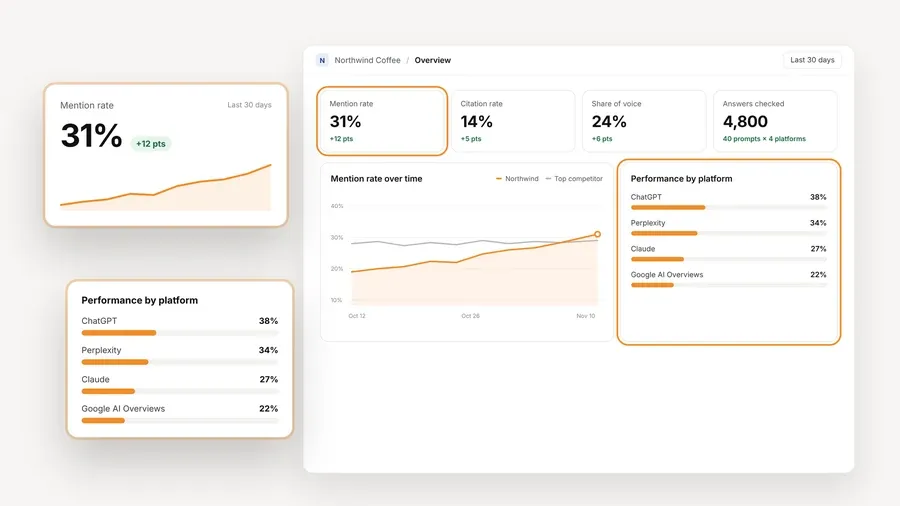
The screen above is demo data, not a customer result. What it shows is the shape of the reporting: one project, with mention rate and share of voice trended over time, set against the top competitor and split by engine. That is the kind of view a client call usually turns on, and it is available on the Free plan.
The part to understand clearly is the cost. The platform is free, but the AI answer data is not. You connect your own key from OpenAI, Anthropic, Gemini, Perplexity or DataForSEO, and you pay that provider directly at its price. AeoNut doesn't mark the data up, and one key from a single provider is enough to start. Before any tracking runs, a cost preview shows what the run is expected to cost, and you can set spend limits per client, budget caps and alerts. AeoNut also recommends restricted keys with spending limits, and it shows you how to set them up, which takes most of the worry out of a surprise bill. For a sense of scale, AeoNut's own published example is ten clients with 100 prompts each, tracked daily on ChatGPT, Perplexity and Google AI Overview, at about $135 a month in data. That is an example, not a quote, and your number depends on your engines, prompt count and how often you run them. A single brand on a weekly schedule will usually sit well below a ten-client daily setup, and the preview will tell you before you commit.

Reporting is where a freelancer's own name matters. AeoNut's white-label client reports and shareable links carry your branding instead of AeoNut's, and that is true on Free too. Reports export as PDF, Excel and Markdown, and there is a CSV export as well. If you use an AI assistant for your client summaries, the free MCP server lets assistants like Claude read the workspace data, read-only, so the summary is drafted from the real numbers.
One limitation worth knowing: Free covers one client project. If you pick up a second client, you'll want Pro, which is $99 a month, or $79 a month billed annually, for up to 10 client projects. Unlimited is $499 a month, or $399 a month billed annually, for unlimited projects. Moving up doesn't change what you can do, only how many projects you can hold, and your history stays with you. Until then, the free plan is a real working setup for one brand, and that is how most freelancers start.
If you're moving from another tool, AeoNut's Done-For-You Switch imports prompts, competitors and tracking history from the tool you use now. Nothing public confirms a Hall-specific connector, so ask what can come across from your Hall data before you count on it.
This section is the one to read if you want a fair view of what a Hall analytics alternative has to match.

Best for: An existing Hall user who can still get into their account and values Hall's AI brand visibility, citation and competitor reporting. If you're thinking about a new Hall subscription, confirm availability, price and plan terms with Hall or Tracksuit first.
Hall describes its product as generative answer insights, a way to see how your brand shows up in AI conversations. Its materials point to sentiment, share of voice and positioning, plus citation insights that show which pages are referenced in AI answers. Competitive benchmarking compares your brand's visibility with competitors. Hall's product updates add more depth, including position reports for mentions and citations, citation reports grouped by page type and domain type, and topic and regional views. Topics can be assigned to several questions so you can filter a project's reporting and still keep the overall picture, and Hall says customers can contact its team about enabling extra regions. Its search-demand report estimates monthly how often people ask about related topics across conversational AI platforms. Treat that last one as demand context, since it isn't a count of how often your client is mentioned.
On engines, Hall's marketing pages name ChatGPT, Google AI Overviews, Google Gemini, Claude, Microsoft Copilot, Perplexity, Meta AI and DeepSeek, and another passage also names Google AI Mode. Those are platforms named in its marketing, so they aren't confirmation that each one is on every plan today.
Hall's pricing page lists three tiers, and none shows a number:
| Tier | Public price | Published limits |
|---|---|---|
| Starter | Contact sales | 20 projects; 500 tracked questions; 45,000 answers analyzed per month; daily updates; 2 contributors; unlimited viewers |
| Business | Contact sales | 50 projects; 1,000 questions; 120,000 answers analyzed per month; daily updates; 5 contributors; unlimited viewers |
| Enterprise | Contact sales | API access; enterprise-grade security; access management and audit log; unlimited historical data; custom usage and contract terms |
The page counts "questions" and separately counts answers analyzed each month, and it doesn't say how one maps to the other, so a tracked question shouldn't be read as a set number of prompt runs or engines. It also doesn't show a current free plan or trial terms. Some older Hall material still says "Free forever plan" and "No credit card required", but with the acquisition notice and a sales-led pricing page in front of you, that older wording doesn't prove a free plan is on offer today. Ask Hall or Tracksuit directly.
Hall's acquisition announcement makes one point worth taking seriously, which is that a visibility score on its own tells you little unless you read it next to what real people think. That is Hall's view on brand health, and it's a fair thing to keep in mind, though it isn't a reason to stop measuring visibility. It means a mention rate belongs in a report alongside other context.
The honest limitation: Hall publishes no numeric prices, the current standalone free or trial terms are unclear, and the Tracksuit announcement leaves access, deadlines and data export unanswered. That doesn't make Hall a poor product. It means the questions that matter for a freelancer, what it costs and whether it will be there in a few months, don't have public answers right now.
Switching tools is easier when you know which numbers your client reads. A single metric rarely answers "are we showing up in AI?", so most useful reports carry a short set of measures, trended over time.
If you're not sure your prompt list is the right one, free AI prompt research tools can help you decide what to track before you set anything up.
You can work through this at your own pace, and the first two steps are worth doing even if you stay where you are.
If you want the wider picture of what you keep and give up when you leave a paid tracker, the guide to free alternatives to paid AI visibility trackers covers it, and which kind of free offer fits helps you tell a free plan from a trial or a one-off checker.
If you're looking for a Hall alternative free of a platform fee, pick AeoNut Free when what you need is a continuing tracker for one brand, you're fine adding a provider key and paying the provider for answer data, and you'd rather not add a platform subscription before the client pays for one. It also suits you if you want white-label reports under your own name and the option to grow into Pro without changing tools, and free AI visibility reporting tools for client updates compares what each free option lets you send a client. If your free plan limits worry you, free AI visibility plan limits compared lays out the prompt, engine and project limits side by side, and free AI search monitoring tools that keep your history covers what happens to your trend lines.
Stay with Hall, or contact Tracksuit, if your account is still accessible and its reporting is a better fit for what you do. That could be the regional and topic views, citation grouping by page type, or reporting you've already built around Hall's structure. If you run many brands, Hall's published Starter and Business limits are at a scale a single free project won't match, so ask for pricing before you decide.
If you end up choosing a Hall analytics alternative, or a Hall alternative free of cost for one brand, confirm three things before changing anything: that your access is secure, what the price is, and whether you can take your data with you. For client reporting, that order of questions saves the most trouble.
When you're ready to try the free route, start free with AeoNut. It takes a brand name, a provider key and your first prompts, and the cost preview shows what the data will cost before the first run.
As a Hall AI visibility alternative, AeoNut Free is a practical option for one brand. The platform is free forever, includes unlimited prompts and every feature, and needs no card. You still pay your chosen provider for the AI answer data. Hall's current standalone availability is uncertain after the Tracksuit announcement, so confirm your account and data access before you plan a switch.
No. The AeoNut platform is free on the Free plan, but the answer data is billed by your own provider at its price. Costs depend on your engines, prompt count and schedule, and AeoNut shows a cost estimate before tracking runs.
Hall's pricing page lists Starter, Business and Enterprise with "Contact sales" and no public numeric prices, and it doesn't list a current free plan or trial terms. Older Hall material includes "Free forever plan" wording, but that doesn't establish that one is available now. Confirm with Hall or Tracksuit.
AeoNut's Done-For-You Switch imports prompts, competitors and tracking history from a current tool. Nothing reviewed confirms Hall-specific export steps or which historical fields would transfer, so save your Hall reports first and confirm compatibility before relying on one unbroken trend line.
Tools & Comparisons ·
Compare free tools that report citation rate and brand mention rate as separate numbers, and see which are ongoing plans and which are one-time checkers.

Tools & Comparisons ·
Is a self-hosted AI visibility tracker worth your time? Compare setup, upkeep, data control and engine coverage with a managed free plan before you decide.

Tools & Comparisons ·
Which free AEO tracking tool keeps running, saves history and shows change? Compare five free options on schedule, trends and alerts to pick one for a client.