

Tools & Comparisons ·
Free Tools That Track Citations and Brand Mentions Separately
Compare free tools that report citation rate and brand mention rate as separate numbers, and see which are ongoing plans and which are one-time checkers.
Moving past a one-time AI visibility audit? You can compare four free trackers that run on a schedule, see their limits and set up a trend for one client.
Avinash Saurabh · · 15 min read

If you ran a free audit on your own site or a client's, you probably got a useful snapshot of where the brand shows up in ChatGPT and Google AI Overviews. The next question usually comes a week later, when the client asks whether anything has changed and you have nothing to compare the snapshot to. That gap is why people go looking for an Am I On AI alternative that keeps running on a schedule. This guide covers the free options that do that, starting with what Am I On AI actually offers so you can judge the switch fairly. It is one slice of a wider look at free alternatives to paid AI visibility trackers.
We looked for a free AI visibility checker alternative that tracks over time, not one that gives you a single score. Each tool was ranked on five things, in this order.
That last question matters more than it sounds. Many free AI visibility tools are free for the software and then bill you, through your own keys, for each answer they collect. We say so for every tool below. If you want the bigger picture on how free offers differ, the guide on which kind of free offer fits you sorts free plans, trials and one-off checkers.
| Rank | Tool | Free recurring path | Free allowance or price | Engines and main trade-off |
|---|---|---|---|---|
| 1 | AeoNut | Free plan, schedule set per project | $0 forever, 1 project, unlimited prompts, no card. Provider data charges are separate. | Twelve engines, reports and scope controls. One project on Free. |
| 2 | RankBits | Free accounts track weekly | $0 forever, 1 brand, 5 prompts per scan, 100 AI responses a month | Five engines or sources on Free, not named on its pricing page. Small allowance. |
| 3 | Vigie | Daily or weekly while the app is open | Free open-source software. You pay AI providers. | ChatGPT, Claude, Gemini and Perplexity. Local setup and your own keys. |
| 4 | Simple Prompt Tracker | Scheduled runs, cadence not specified | Self-hosted free. Hosted from $19 a month. | ChatGPT and Gemini today. Self-hosting is on you. |
First, a correction to the idea that Am I On AI is only a one-time checker. Its product pages describe weekly brand monitoring, visibility changes, competitor ranking, citation and source analysis, sentiment and weekly growth tracking. So it does ongoing tracking. The question is whether you get that part for free.
The free entry point is a separate AI Visibility Audit. You enter a website, an email and a platform, with ChatGPT and Google AI Overview shown, and it says it shows where you rank, flags current citation gaps and gives action items. No card is mentioned for the audit. The pages we reviewed do not say whether you can rerun the free audit, how long it keeps results, or whether it schedules future runs, so we can't tell you it tracks over time.
The recurring product is paid. From its pricing page, as of November 2026, Pro is $100 a month for up to 150 prompts on ChatGPT and Google AI Overview, with a seven-day free trial. Prism is $349 a month for up to 750 prompts across five audience segments, and GEO Council is $2,500 a month and described as fully booked. If a one-client consultant budget is the issue, that is where a free option starts to look attractive. If you are leaving a different grader behind, there is a separate guide on moving beyond the HubSpot AEO grader.
The rest of this guide is for the person who liked the snapshot and wants ongoing AI visibility tracking free of a monthly bill, which is what an Am I On AI free alternative has to deliver.

Best for: A freelancer or in-house marketer who wants a hosted tracker for one brand that never expires, with room to add as many prompts as the client's buyers really ask.
AeoNut is AI visibility tracking built for agencies, and the Free plan gives a single brand the full tool. It costs $0 forever with no card, and you get one client project, unlimited prompts and every feature. The plan is free forever, with unlimited prompts and your own keys, which makes it a real ongoing option and not a trial that ends before you have anything to report.
Each client brand is a project with its own prompts, competitors, engines, countries and schedule. You pick whether it runs daily, twice a week or weekly, and you can change that as the client's needs change. AeoNut records whether the brand is mentioned and cited, where it appears in the answer and which sources the engines cite. Then it shows how those numbers move over time, which is exactly the thing a one-time audit can't do.
It tracks twelve engines: ChatGPT, Gemini, Perplexity, Claude, Grok, Google AI Overviews, Google AI Mode, Mistral, Meta AI, Qwen, Z.ai and MiniMax. For each engine you choose between scraped data, which is the answer a real user sees in the ChatGPT, Gemini or Google apps at the lowest cost, and API data from a specific model.
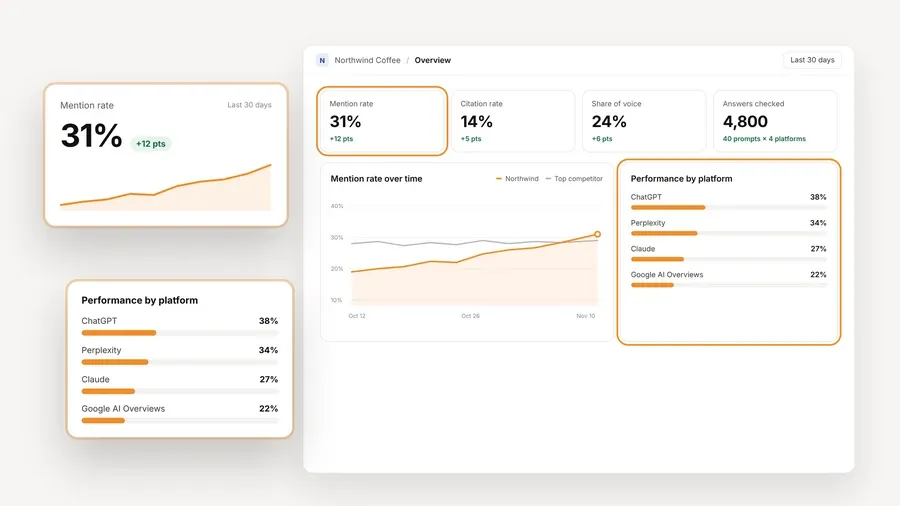
The overview above is what a trend looks like once the schedule has run for a few weeks. It reports Mention rate, Cited, Avg. position, Share of voice and Sentiment, with trends by engine, prompt and country, plus a competitor leaderboard, the cited sources and the raw AI answer for every prompt. The numbers on that screen are demo data, shown to illustrate what the product reports and not a result anyone achieved.
The second thing a consultant needs is something to send. AeoNut makes white-label client reports and shareable links in your branding, not ours, on the Free plan too. Reports export as PDF, Excel and Markdown, and CSV export is available as well. There is also a read-only MCP server and a read-only API on every plan, so an assistant can draft a summary from the real data.

Now the cost, stated plainly. The platform is free, and the AI answer data is not. You connect a key from OpenAI, Anthropic, Gemini, Perplexity or DataForSEO, and that provider bills you directly at its own price. AeoNut does not mark the data up. One key from one provider is enough to start. AeoNut shows a cost preview before tracking runs, along with spend per client, budget caps and alerts, and it recommends restricted keys with spending limits to keep the bill in check. Keys are encrypted at rest and never shown again once saved. For a sense of scale, the site's own example is about $135 a month in data for 10 clients with 100 prompts each, tracked daily on ChatGPT, Perplexity and Google AI Overview. That is a large setup, and a single client on a weekly schedule will cost far less, which the cost preview shows before you commit.
Where it stops: Free covers one project. If you take on a second client you move to Pro, which is $99 a month, or $79 a month billed annually, for up to 10 client projects. Every plan includes every feature, so you do not lose anything when you upgrade. For the one-client trial this guide is about, that is rarely a limit you will hit.

Best for: Someone who wants a hosted, weekly scan and is happy to start with a small prompt set.
RankBits has a Free plan that is listed as $0 forever. It covers one brand with one tracked scan, five prompts per scan and 100 AI responses a month. Free accounts track every seven days, and scheduled scans and public shareable reports are included. Its pricing page lists five engines or search sources for Free but does not say which five, so check the account before you build a client's scope around it.
It also has an API and a remote MCP server. According to its API documentation, an API token is available to registered users once the email is verified, including Free accounts, and the API can start scans, check plan and credit usage and pull detailed results.
Paid plans scale up from there. Starter is $49 a month for three brands, 20 prompts per scan and 2,400 responses a month. Pro is $99 a month for unlimited brands, 50 prompts per scan and daily tracking. Exports in PDF, CSV and Excel start at Starter, not on Free.
RankBits also gives some advice worth borrowing whatever tool you use. It warns that you can only compare runs that use the same questions, the same engines and the same location, and that small score movements can be noise.
Where it stops: Five prompts per scan and 100 responses a month is a pilot, not a client library. A consultant with a long list of buyer questions may outgrow it quickly or need to buy credits, and Free has no exports. "$0 forever" here does not mean unlimited scans.

Best for: A technical consultant who prefers local storage and control over a hosted service and doesn't mind managing provider keys.
Vigie is free, open-source software under the MIT license that runs on your own computer. There is no account, subscription or cloud service. It asks ChatGPT, Claude, Gemini and Perplexity your questions through their official APIs with web search on, then measures how often the brand is named, where it sits against competitors and which websites are cited. The Vigie README on GitHub explains the setup. You create a project with a brand, website and competitors, add customer prompts and connect at least one engine key, and any engine without a key is skipped.
The schedule is the part to understand before you rely on it. Automatic analysis can be set to daily or weekly in project settings, but it runs only while Vigie is open. If your computer is asleep, nothing runs. A separate command-line and cron route is documented for a machine that stays on.
Results stay local, and you can reread past analyses when you add a competitor. Reports include a client-ready PDF in six languages with charts, prompts, sources and method, and exports cover CSV and JSON. The README suggests about 10 to 30 prompts for a reliable picture and starting with about 10 to see what the requests cost. It describes request volume as prompts multiplied by engines multiplied by repetitions, and says web search is the main cost beyond text.
Where it stops: You install it, keep it running, pay the providers and protect the folder, since keys are stored in plain JSON files locally. It measures API answers with web search, which can differ from what a person sees in the consumer ChatGPT or Gemini app, so it is not an exact copy of what your client's customers see.
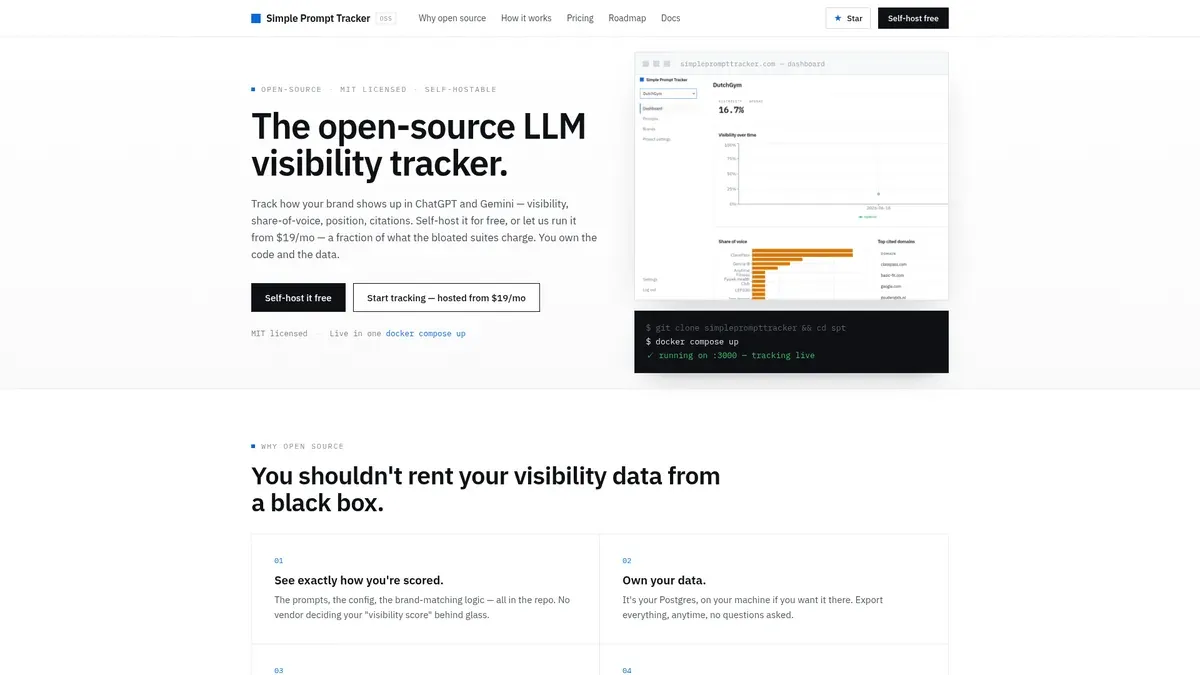
Best for: Someone comfortable with Docker who wants an open-source tracker for ChatGPT and Gemini, or a low-cost hosted plan with a fixed monthly prompt budget.
Simple Prompt Tracker is MIT-licensed, and self-hosting it is free, using your own infrastructure and keys. You enter your customer prompts and the brands and competitors to track, and it runs them on a schedule and reads the answers for visibility, share of voice, position and citations. The engines it names as available today are ChatGPT and Gemini, with web search and grounding.
Hosted plans start at $19 a month for 30 tracked prompts a month, then $49 for 60 and $99 for 150. All three list unlimited projects and seats, MCP, API access and CSV export. The pages we reviewed do not say how often scheduled runs happen or exactly how the monthly prompt count is used up. Its homepage also lists a UI scraper as a hosted feature while its roadmap shows UI-accurate adapters as a future item, so confirm that before you depend on it.
Where it stops: Self-hosting trades a platform fee for your own time on setup and upkeep, and two engines is a narrower view than a client asking about Perplexity or Google AI Overviews will expect. Hosted plans cap prompts each month.
Whichever tool you pick, the steps for ongoing AI visibility tracking free of charge are the same, and they are what turns a snapshot into something you can show a client.
A mention is the brand being named in an answer, and a citation is the answer linking to the brand's site as a source. A tool that reports one is not always reporting the other, so check which you are looking at.
The right pick depends on your situation, and AeoNut is not right for everyone.
If you want to keep tracking more than one brand over time, the guide on how to monitor your brand over time covers more free options.
If you want the trend and not just a snapshot, set up one project on AeoNut Free, add your client's real prompts, connect one provider key and let the schedule run. Start free with AeoNut, no card needed, and check the cost preview before the first run.
AeoNut Free tracks one project continuously with unlimited prompts, and you pay your own AI data provider separately. RankBits Free also tracks weekly, with one scan, five prompts per scan and 100 responses a month. Vigie can run daily or weekly on your own computer, with provider usage billed to you.
No. Its free AI Visibility Audit is a scan-style starting point, but its product pages also describe weekly monitoring on paid plans. The pages we reviewed do not say whether the free audit can be rerun or keeps history.
No. AeoNut's Free plan costs $0 for the platform, and the provider you connect bills for the answer data. Vigie is free software and you pay your providers. RankBits Free instead caps you at 100 responses a month. Check platform fees, usage charges and limits separately.
Use the same prompts, engines and location across runs and look at several observations in a row. Compare mentions, citations, position and share of voice when the tool reports them. A small change between two answers can be ordinary variation, so one score swing is not proof of a lasting change.
Tools & Comparisons ·
Compare free tools that report citation rate and brand mention rate as separate numbers, and see which are ongoing plans and which are one-time checkers.

Tools & Comparisons ·
Is a self-hosted AI visibility tracker worth your time? Compare setup, upkeep, data control and engine coverage with a managed free plan before you decide.

Tools & Comparisons ·
Which free AEO tracking tool keeps running, saves history and shows change? Compare five free options on schedule, trends and alerts to pick one for a client.