

Tools & Comparisons ·
Free Tools That Track Citations and Brand Mentions Separately
Compare free tools that report citation rate and brand mention rate as separate numbers, and see which are ongoing plans and which are one-time checkers.
Adobe LLM Optimizer is now Brand Visibility. Here is what it offers and four free ways to track your brand in AI answers, from one ongoing tracker to checkers.
Avinash Saurabh · · 15 min read
If you came looking for a free Adobe LLM Optimizer alternative, the first thing to know is that the product has a new name. Adobe now calls it Adobe Brand Visibility, and the rename took effect on August 21, 2026. The second thing is that you are probably only interested in one slice of it. Most consultants who search for an Adobe brand visibility alternative want to know whether a client's brand shows up in ChatGPT, Gemini and Perplexity answers, and whether that number moves over time. They are not shopping for an enterprise content platform.
That slice is easy to separate from the rest. This guide looks at the visibility tracking side only, explains what Adobe's own pages say about access and pricing, and then goes through four free options that cover the tracking job. If you are a freelancer or a small consultancy with one client to watch, the goal is simple: pick something you can start today, keep running past a trial, and show a client without a sales call.
I ranked the options on five things. Is the free offer more than a trial? Does it run recurring tracking, or only a one-time check? How many prompts and engines can you use? Is the output useful in front of a client? And is the cost of the data clear before it runs? Those five questions decide whether a free tool is something you can build a client engagement on or just something you can try once.
| Rank | Tool | What the free offering actually does | Best fit |
|---|---|---|---|
| 1 | AeoNut | Ongoing tracking for one client project, unlimited prompts, every feature. Data is billed by your own provider. | A consultant who needs recurring tracking, a real prompt set and white-label reports. |
| 2 | GEOflux | Permanent free plan with 15 prompts (45 credits), three competitors and a refresh every three days. | Testing recurring tracking with a small prompt set. |
| 3 | Geoptie | A free ChatGPT checker that reads a domain and returns a visibility report. | A quick first check before you decide whether to pay for tracking. |
| 4 | Honeyb | A free, no-signup leaderboard built on a fixed set of 41 buyer questions. | Exploring how brands show up in a sample of AI recommendations. |
Only the first two are ongoing trackers. The last two are useful, but they answer a different question, and the entries below say so plainly.
Adobe describes Brand Visibility as an enterprise product for generative engine optimization. On the visibility side, it measures mentions, citations, sentiment and share of voice across a set of large language models, benchmarks you against up to five direct competitors, and lets you trace a finding back to the prompt, the answer and the sources, as its quick start guide shows. Adobe's product page describes coverage across ten LLM families, including ChatGPT, Perplexity, Google AI Mode, Claude and Microsoft Copilot. Its user guide names ChatGPT, Google AI Overviews, Google AI Mode and Gemini, and Adobe's public pages don't give one complete list of all ten, so treat any list you see elsewhere with some care.
Pricing is where a search for a free Adobe LLM Optimizer alternative tends to run out of road. The product description says the product is licensed by prompts per year. A prompt is a single text input used to generate insights across the available models, and the number you are allowed is written into a Sales Order. If you go over it, you license more. No paid price is listed on the Adobe pages I reviewed.
What about the question behind "Adobe LLM Optimizer free", meaning is there a free way in? Adobe documents a free trial, but it is for specified customer groups, namely AEM Cloud customers and Adobe Analytics or Customer Journey Analytics customers. For activations on or after April 1, 2026, the trial includes up to 100 prompts and one domain. Earlier activations keep up to 200 prompts under their existing terms. The trial length and whether a card is needed are not stated in the documentation. Adobe's marketing says Brand Visibility is not only for Experience Manager customers, but that doesn't widen who the documented trial is for. I found no general free plan that runs without a time limit.
This article does not cover Adobe's content optimization tooling or its Experience Cloud integrations, since those depend on that stack. If you need those, you already know it, and none of the tools below are trying to replace them. If you need to know where a client's brand stands in AI answers, keep reading.

Best for: A freelancer or small consultancy tracking one client's real prompts over time, with reports under your own name and a clear view of what the data will cost.
AeoNut's Free plan is the free Adobe LLM Optimizer alternative that holds up when you check it, and it is the only AI visibility tracker that is free forever with unlimited prompts. You get one client project, every feature, no card and no time limit. The other plans differ only in how many client projects they hold, so nothing is held back on Free to push you to upgrade. If you have one client and want to see their numbers, you can set the project up this afternoon.
Here is the part that matters for a consultant's budget. AeoNut doesn't resell AI answers. You connect your own key from OpenAI, Anthropic, Gemini, Perplexity or DataForSEO (the guide to free trackers that use your own API keys covers how that works), and that provider bills you directly at its own price. One key from one provider is enough to start. So the platform is free, and the data is what your provider charges. Before anything runs, the cost preview shows the estimate, and you can set budget caps and alerts per client. AeoNut also recommends restricted keys with spending limits, and it shows you how to set them up, which takes most of the worry out of bringing your own keys.
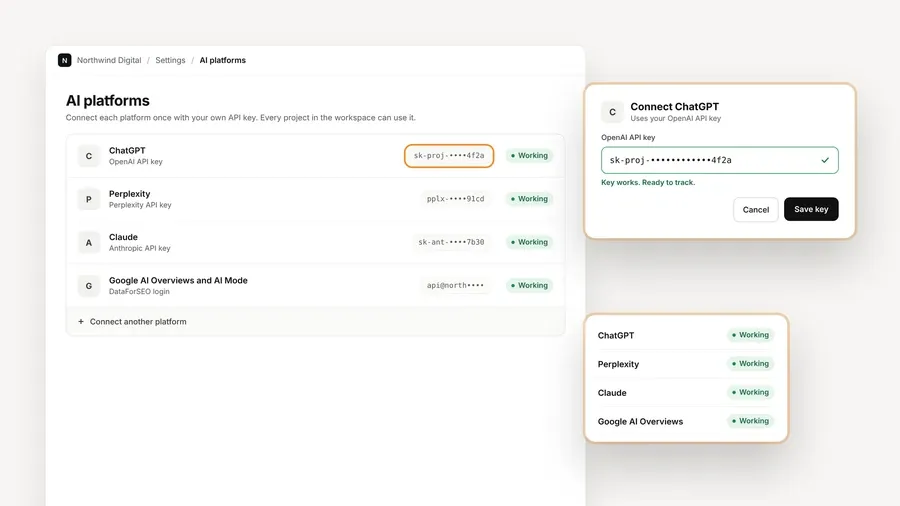
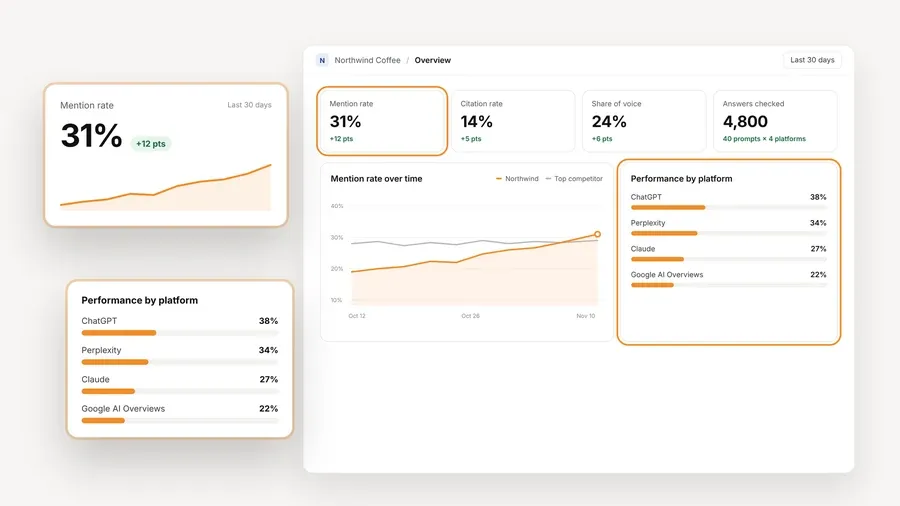
What you get from the tracking looks a lot like what Adobe describes on the visibility side. AeoNut measures Mention rate, Cited, Avg. position, Share of voice and Sentiment. You can see trends by engine, prompt and country, a competitor leaderboard, each competitor's cited pages, the sources the engines cite, and the raw AI answers behind every number, which is the same idea as citation source analysis. It tracks twelve engines: ChatGPT, Gemini, Perplexity, Claude, Grok, Google AI Overviews, Google AI Mode, Mistral, Meta AI, Qwen, Z.ai and MiniMax. Per project you choose the engines, the countries, the prompts and how often it runs, either daily, twice a week or weekly. For each engine you can pick scraped data, which is the answer real people see in the apps at the lowest cost, or API data from a specific model.
A few things on Free tend to surprise people. White-label client reports are included, so a client sees your branding, not ours (more in free reporting tools for client updates). Reports export as PDF, Excel and Markdown, and CSV export is there too. You also get the hosted MCP server, which lets an assistant like Claude read your visibility data and draft a weekly briefing, plus a read-only API. If you are starting from another tool, the Done-For-You Switch can import prompts, competitors and tracking history, so a client's trend line doesn't reset. If you are comparing how long a free plan keeps your history, see free AI search monitoring tools that keep history.
A practical way to start is to ask the client for twenty or thirty of the questions their buyers ask before they buy, add a few that name their main competitors, and run those on the two or three engines their buyers use. That's enough to show where they stand in the first month. If you want help choosing prompts, the guide on free AI prompt research tools walks through where good ones come from.
The limitation to know about: Free is for one client project, so it isn't a free multi-client workspace. That is a scope limit, not a missing feature, and a solo consultant with one client isn't affected by it. If you grow past one client, Pro is $99 a month for up to 10 client projects ($79 a month billed annually), and Unlimited is $499 a month ($399 a month billed annually). Every plan has every feature. Remember the provider's data charges either way.
Best for: A consultant who wants a permanent free plan for a small, recurring prompt set and can work within credits and a three-day refresh.
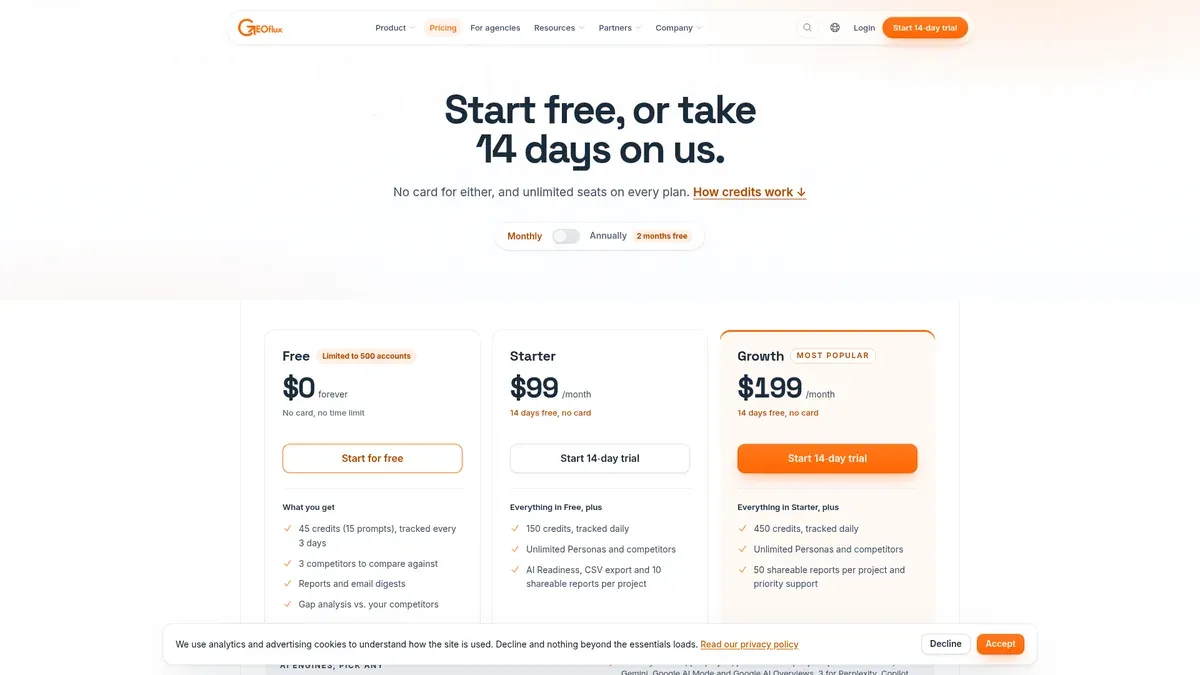
GEOflux is the one other option here that is a real, ongoing free plan. Its pricing page describes Free as $0 forever, with no card and no time limit, and it isn't a trial. You get 45 credits, which works out to 15 prompts, a refresh every three days, three competitors, reports with email digests, and gap analysis against competitors. GEOflux says Free stays free for as long as you use it, but it doesn't give an inactivity threshold or say what happens to an idle account. The pricing page also limits the free offer to 500 accounts.
Credits are the thing to understand. On the pricing page, Free tracks ChatGPT, Gemini and Google AI Mode, each at one credit per prompt. Perplexity, Copilot, Claude and Grok cost three credits per prompt. GEOflux says it queries engines through their own apps rather than their APIs, and it doesn't say you have to bring your own keys. A 200-credit add-on is listed at $66.
| Plan | Price | Included capacity |
|---|---|---|
| Free | $0 forever | 45 credits (15 prompts), three competitors, refresh every three days |
| Starter | $99 a month | 150 credits, daily refresh, 14-day trial without a card |
| Growth | $199 a month | 450 credits, daily refresh, 14-day trial without a card |
| Enterprise | No published list price | Quoted by tracking scope |
There is one discrepancy to flag. GEOflux's separate Free AI Rank Tracker page lists ChatGPT, Gemini and Perplexity, while the pricing page says the Free plan covers ChatGPT, Gemini and Google AI Mode. The pricing page is the plan-specific source, so don't promise a client Perplexity on Free until you've confirmed it at signup.
The limitation to know about: The free prompt cap and the three-day refresh are tight for client work. Free includes reports and email digests, but the page doesn't clearly promise shareable or white-label reports, so check the current plan before you promise a client a branded export. For a consultant who needs broader coverage, the cap forces choices that an unlimited-prompt plan doesn't.
Best for: Someone who wants a real ChatGPT brand-visibility check before deciding whether to pay for recurring tracking.
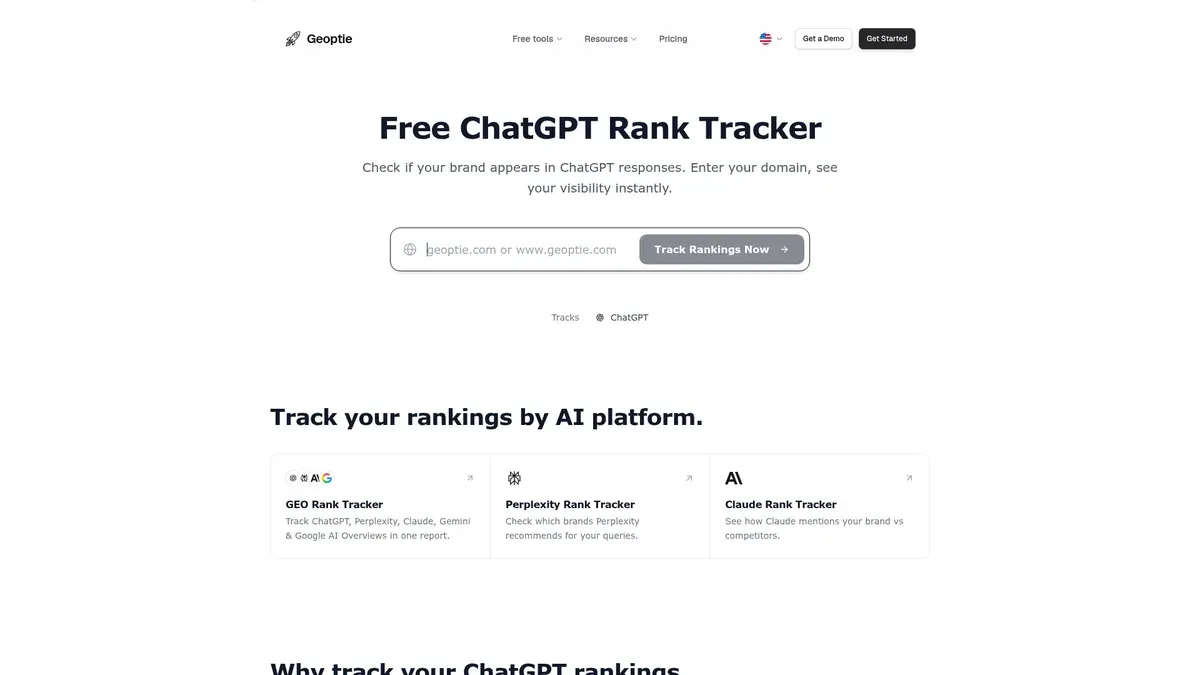
Geoptie's free checker asks for a domain, infers the brand and its category, runs a ChatGPT query and hands back a visibility report with a competitor comparison. You see whether the brand is mentioned, which competitors appear and where the brand ranks in the answer. It's a check, not a recurring tracker, and the checker page doesn't say anything about running on a schedule with your own prompt set. It makes a decent first conversation piece with a prospect, and that's the job it does best.
The paid side is where tracking lives, and it's worth knowing what that costs so the free check doesn't mislead you. Starter is $49 a month for 15 monitoring prompts and two brands. Professional is $99 a month for 100 prompts and ten brands, and it adds white-label reports, a REST API and MCP. Business is $249 a month for 300 prompts and unlimited brands. All three track daily and let you pick any four of seven engines: ChatGPT, Claude, Perplexity, Gemini, Microsoft Copilot, Google AI Mode and Google AI Overviews. A country-specific prompt counts separately for each country. The pricing page doesn't state a permanent free subscription or a free trial.
The limitation to know about: The free checker is not evidence of recurring monitoring on your own prompts, and white-label reporting starts on the $99 plan. If you want an ongoing tracker for free, this isn't the one, though it is a fine place to take a first reading.
Best for: A reader who wants a quick, no-signup look at a fixed sample of AI brand recommendations, not a tracker for one client.
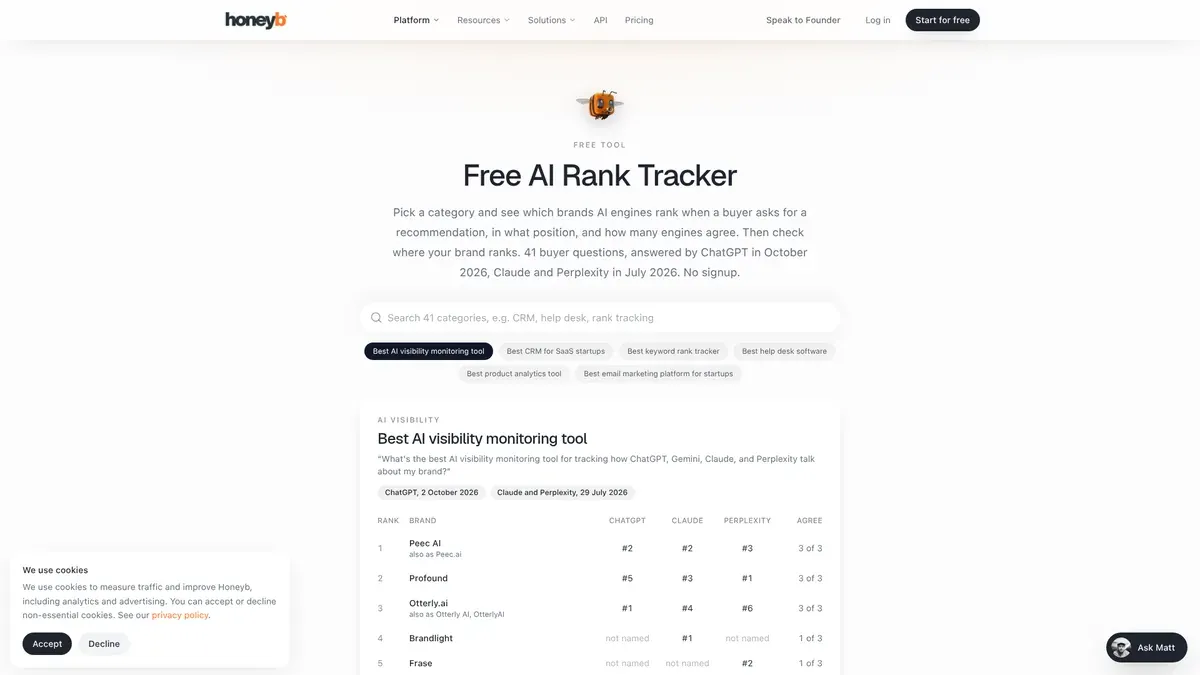
Honeyb's free AI Rank Tracker lets you pick a category and search for a brand in a leaderboard. It's built on a fixed set of 41 buyer questions, and the page checks answers that were already captured, so nothing runs live when you use it. Each question has one measured answer per engine, refreshed in batches. The ranking orders brands first by how many engines name them, then by average position.
The capture dates matter. ChatGPT answers were captured in October 2026, while Claude and Perplexity answers were captured in July 2026, so a gap between engines can reflect timing as much as the engines themselves. This is a historical snapshot, and it isn't a daily check or a tracker for your own prompts.
The full product is paid and runs your questions daily. The Minimum is $23 a month billed annually at $276 a year, with 10 daily prompts on one model. Multi-Model is $63 a month billed annually at $756 a year, with 50 prompts on three models and up to five workspaces. Full Spectrum is $159 a month billed annually at $1,908 a year, with 100 prompts across all eight engines and up to ten workspaces. Enterprise is custom. No permanent free plan is stated, and the source material doesn't map white-label or API access to a specific tier, so don't promise either on a particular plan.
The limitation to know about: A fixed-question leaderboard is good for orientation and weak for a client who needs a current trend on their own prompts.
Pick based on the job in front of you, not the price tag alone.
If you have one client and want ongoing tracking with your own prompts, unlimited prompts, white-label reports and a visible data cost, start with AeoNut Free. Budget for your provider's data charges, use the cost preview, and set a spending limit on the key you connect.
If you only need a small recurring prompt set and a refresh every three days is fine, GEOflux's free plan is a reasonable choice, and free AI search rank tracking tools that run daily lists options if you need a faster refresh. Confirm which engines Free covers at signup, and don't promise a client a branded report from the free tier.
If all you need today is an answer to "does ChatGPT mention this domain?", Geoptie's checker is a lightweight way to get one. Treat it as a first look, not a replacement for tracking, and see free ChatGPT monitoring options if ChatGPT is the engine your client cares about.
If you want a broad sense of how a whole category gets recommended, Honeyb's leaderboard can orient you. The fixed questions and the different capture dates make it a poor fit for a live client report.
If you're evaluating Adobe itself, ask Adobe for the prompt quota in your Sales Order, the paid price, the trial length and who is eligible for the trial. The public pages don't settle any of those. Teams with no Adobe stack who want an Adobe brand visibility alternative for the tracking part will usually find the tools above a faster place to start.
If you're still deciding between several options, the free alternatives to paid AI visibility trackers guide compares what you keep and give up at each step, and which kind of free offer fits you helps you sort checkers from trackers.
If one client is where you're starting, start free with AeoNut. Create the project, add the client's prompts, connect one provider key and pick how often it runs. The cost preview shows what the data will cost before the first run, so there are no surprises on your provider's bill.
No. Adobe renamed it Adobe Brand Visibility, and the new name took effect on August 21, 2026. People still search for the old name, which is why this guide uses both.
Adobe's documentation describes a free trial for specified customer groups, not a general plan that runs without a time limit. For new activations on or after April 1, 2026, the trial includes up to 100 prompts and one domain. The trial length and whether a card is required are not stated.
AeoNut Free is an ongoing tracker for one client project, with unlimited prompts and every feature. The platform is free, and the AI answer data is billed by your own provider at its price. For a side-by-side of caps, see free AI visibility plan limits compared.
No. A checker gives you one reading, and tracking runs your own prompts on a schedule so you can see a trend. The free AEO, GEO and LLM tracking tools labels explained guide sorts out the names. GEOflux Free is a capped recurring plan, Geoptie's checker runs a single ChatGPT check, and Honeyb's free page reads captured answers to fixed questions.
Tools & Comparisons ·
Compare free tools that report citation rate and brand mention rate as separate numbers, and see which are ongoing plans and which are one-time checkers.

Tools & Comparisons ·
Is a self-hosted AI visibility tracker worth your time? Compare setup, upkeep, data control and engine coverage with a managed free plan before you decide.

Tools & Comparisons ·
Which free AEO tracking tool keeps running, saves history and shows change? Compare five free options on schedule, trends and alerts to pick one for a client.