

Tools & Comparisons ·
Free Tools That Track Citations and Brand Mentions Separately
Compare free tools that report citation rate and brand mention rate as separate numbers, and see which are ongoing plans and which are one-time checkers.
Trakkr has no free plan, only a 14-day trial. See which free options track one brand or a few clients, what each leaves out, and how to switch safely.
Avinash Saurabh · · 18 min read
If you are looking for a free Trakkr alternative, the first thing to know is that Trakkr does not have a free plan to compare against. Its FAQ says there is no free version, and the entry offer is a 14-day Growth trial that needs a card and turns into a paid subscription unless you cancel. So the real question is which free option can do the part of the job you actually need, whether that is one brand, a handful of client brands, or a quick look at a prospect before a call.
We made this list for brands and agencies who want a free AI tracker for brands and agencies without a time limit on it. AeoNut comes first, because its Free plan is a hosted tracker that runs your saved prompts on a schedule, free forever, with unlimited prompts and your own keys. There is one boundary to keep in mind from the start: the Free plan covers one brand or client project, and the AI answer data is billed by your own provider. If you track a roster, you will land on a paid plan. Our wider guide to free alternatives to paid AI visibility trackers covers the same trade-offs across the whole category.
We ranked these on the decision you are actually making, not on a single software score. This is an editorial fit assessment based on each tool's published offer and documented features. It is not a hands-on benchmark, a customer survey or a ranking of data accuracy. These are the questions we asked of each one.
Two of the four options below are ongoing trackers. The other two are free diagnostics, which are useful but are not a replacement for scheduled tracking. The table makes that split visible before the details. If you want the broader picture first, our guide on which kind of free offer fits you sorts free plans, trials and one-off checkers.
| Rank and tool | What is actually free | One brand or several clients | Reporting and evidence | Main decision boundary |
|---|---|---|---|---|
| 1. AeoNut | Hosted platform, forever, for one client project, with unlimited prompts and every feature. Provider data is billed separately. | One brand or client free. Pro covers up to 10 projects, and Unlimited has no project limit. | Ongoing analytics, raw answers, client reports, CSV, MCP server and API | Start with one brand free, then move to a paid tier for a roster |
| 2. Elmo | MIT-licensed software on your own infrastructure, with unlimited prompts | Supports multi-brand agency use. The exact self-hosted brand and permission limits were not clear from the pages we reviewed. | Stored raw answers and citations, shareable reports, API, SDKs and MCP | You host it, run it and pay the providers |
| 3. Ahrefs AI Visibility Checker | No signup and no card. No limit on how many brands you check. | Good for checking prospects one at a time, but not a multi-client workspace | Mentions, platform breakdown, topics and cited sources, with top-five previews | Saved custom prompts and history belong to the paid Brand Radar |
| 4. HubSpot AI Search Grader | One-time brand diagnostic | Can analyze your brand or a competitor, with no documented free client workspace | Composite score, dimension scores and a written interpretation | Not recurring tracking. Ongoing HubSpot AEO is paid. |
For comparison, Trakkr Growth is $100 a month for one brand, 50 active prompts and three seats. Trakkr Scale is $500 a month for ten brands, 50 active prompts per brand and unlimited seats. Both check all eight of its engines daily, and neither is a permanent free tier.
Most confusion in this space comes from five words that sound alike, so it helps to settle them first.
A free platform is not free data. AeoNut charges no platform fee on Free, but your connected provider charges for the AI answers it collects. Elmo has no license fee when you self-host, but hosting, providers and upkeep are on you. Ahrefs and HubSpot do not ask you to set up paid provider keys, but they also do not give you an ongoing workflow.
Tracking is not a checker. A tracker saves your prompts, runs them on a schedule and builds a history you can compare month to month. A checker gives you a snapshot. Running a checker by hand every month does not give you a controlled, comparable series.
A brand project is not a team seat. A project keeps one brand's prompts, competitors, scope and results apart from the others. Seats let people into the data. Unlimited seats do not mean unlimited client projects.
A mention is not a citation. A mention means the answer names the brand. A citation means the answer points to a source URL. A brand can be mentioned without its own site ever being cited.
The same engine name does not mean the same measurement. An answer in a consumer app can differ from one returned through a model API, and country, wording, timing and repetition all change the result. When you compare two tools, compare the setup before you compare the numbers.

Best for: an in-house team watching its own brand, a freelancer watching one client, or an agency proving the workflow on one client before it adds more.
AeoNut's Free plan is built around three ideas: free forever, unlimited prompts and your own keys. In plain terms, you get a free platform for one client project, and you pay your own provider for the AI answers it collects. There is no card to start, and no feature is held back for a paid plan. The tracker has the same analytics, white-label reports, MCP server, API and CSV export that the paid plans have.
Each client project has its own prompts, competitors, engines, countries and schedule. You choose daily, twice a week or weekly checks, and for each engine you can pick scraped data, which is the answer a real person sees in the app at the lowest cost, or API data from an exact model. Inside the project you see Mention rate, Cited, Avg. position, Share of voice and Sentiment, with trends by engine, prompt and country. You also get competitor comparisons, a view of the sources AI engines cite (see our look at free citation source analysis tools for how that compares), your own cited pages and the raw AI answers behind every number.
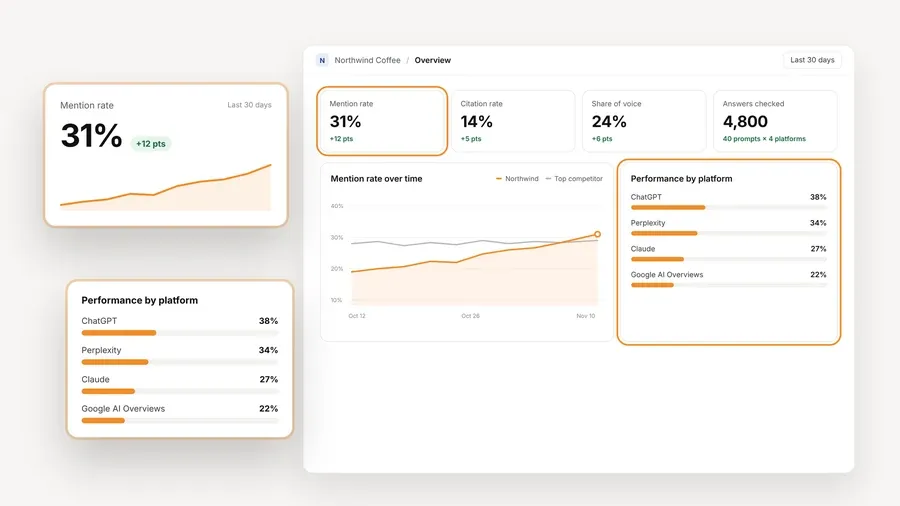
That screen is one project from the demo workspace, so the numbers are sample data and not a customer result. The point is the shape of it: one brand, measured against its competitors, over time, on each engine. AeoNut tracks twelve engines: ChatGPT, Gemini, Perplexity, Claude, Grok, Google AI Overviews, Google AI Mode, Mistral, Meta AI, Qwen, Z.ai and MiniMax. Having an engine on the list does not mean every key reaches it, and our guide to free trackers that use your own API keys explains how the setup works, so connect the provider that matches the engines you care about. You can bring keys from OpenAI, Anthropic, Gemini, Perplexity or DataForSEO, and one key from one provider is enough to start.
Cost control is where most people relax. AeoNut shows an estimated monthly data cost before anything runs, lets you see spend per client, and supports budget caps and alerts. You should restrict the key you create and set a spending limit on the provider side too. As the site's own example, 10 clients with 100 prompts each, tracked daily on ChatGPT, Perplexity and Google AI Overview, comes to about $135 a month in data. That is an estimate for that exact setup, not a quote, and your engines, frequency and provider route will change it.

If you outgrow one project, the path is published. Pro is $99 a month, or $79 a month billed annually, for up to 10 client projects. Unlimited is $499 a month, or $399 a month billed annually, with no project limit. Every plan includes every feature and unlimited seats, so the plans differ only by how many client projects they hold. Adding a client inside a plan does not raise the platform fee, though more collection can raise what your provider charges. Paid plans also carry three guarantees: "3x Savings, or It's Free," the "Lowest Cost Guarantee" and the "30-Day Money-Back." The savings guarantee compares platform plus data cost on the same engines and volume, and it does not refund provider charges.
For switching, there is a free setup call and a Done-For-You Switch that imports prompts, competitors and tracking history. The offer is general, so send a sample of your Trakkr export first and ask the team to confirm what it can bring in before you count on exact continuity.
Where it stops: Free is one project, and the data is chargeable. That does not stop you from proving the whole workflow on one brand. Use the cost preview and the setup call first, then pick Pro or Unlimited only when you need separate client projects. AeoNut also does not list DeepSeek as a tracked engine, which matters if a client depends on it.

Best for: an agency or brand with technical help that wants to run its own AI visibility platform, keep the raw evidence and see how every metric is calculated.
Elmo is a real ongoing tracker, not a one-time grader, and its MIT-licensed self-hosted version has unlimited prompts. That is worth saying plainly, because it means AeoNut is not the only forever-free option with unlimited prompts. The difference is who does the work. With Elmo you run it yourself, and with AeoNut it is hosted for you.
You set it up with Docker Compose, a CLI and an interactive setup. It tracks visibility, share of voice, sentiment, position, citations and prompt performance, and it stores raw answers, citations and fan-out searches in PostgreSQL. The code is public, so you can trace a metric back to the answer behind it. It offers shareable reports that stakeholders can open without an Elmo account, and it supports agency use with several client brands in one product. Integrations include a REST API, TypeScript and Python SDKs and an MCP server.
If you would rather not host, Elmo also sells Cloud plans. Starter is $29 a month for one brand and 50 tracked prompts on ChatGPT only. Basic is $99 a month for one brand and 50 prompts. Pro is $299 a month for two brands and 150 prompts, and Business is $649 a month for five brands and 350 prompts. Those limits belong to Cloud, not to the self-hosted edition, so do not carry them across.
Where it stops: free software still means deployment, upkeep and provider costs. The pages we reviewed did not show an exact self-hosted brand cap, a client permission model, a CSV format or a way to import existing history, so check those before you promise a client anything.

Best for: agencies checking a few prospects before a pitch, and brand teams that want a fast look across the major AI platforms without making an account.
The strength here is how easy it is to start. With the Ahrefs free checker there is no signup, no card and no limit on how many brands you can check. It accepts brand, product, personal-brand and competitor names, and it covers ChatGPT, Gemini, Perplexity, Microsoft Copilot, Google AI Overviews and Google AI Mode. You get total AI mentions, a platform breakdown, the topics linked to those mentions, and the cited domains and pages. The free view shows the top five results in each section, and it uses prompts based on search behavior, so you cannot build a saved custom prompt study with it.
It works well next to a tracker. You can look at a prospect in a couple of minutes without spending a project on them. It does not become a free client workspace just because you can check many names.
Ongoing monitoring sits in the paid Brand Radar, which adds history, AI share of voice, competitor benchmarking and custom prompts. Select platforms is $199 a month and All platforms is $699 a month, before tax. We could not confirm a free API, saved workspace, scheduled report or export on the free checker.
Where it stops: it cannot replace a controlled, recurring prompt set with a trend history. Use it for the first look, not as proof that month-over-month monitoring is covered.

Best for: a marketer or agency strategist who wants an easy-to-explain read on how AI systems describe a brand, with a score and a written summary.
HubSpot describes the grader as a free, one-time diagnostic. You enter a company name, location, industry and product or service, and it can assess your brand or a competitor. It covers ChatGPT, Perplexity and Gemini. The composite score is out of 100, built from Sentiment Results at 40 points, Presence Quality at 20, Brand Recognition at 20, AI Share of Voice at 10 and Market Competition at 10. HubSpot says the report is ready in under two minutes, which is the vendor's own figure.
That makes it a good conversation starter with a client. HubSpot AEO, at $50 a month, is the separate product for ongoing monitoring, and it is also included in Marketing Hub Pro and Enterprise according to the grader page. The grader page does not show that product's prompt, workspace or seat limits.
Where it stops: a weighted perception score is not the same as a recurring mention rate or a citation trend. Choose it when you need a diagnostic you can explain, not when you need a saved multi-client monitoring system.
Before you decide, it helps to know what Trakkr gives you today, so you can check each piece against the new setup. Growth is $100 a month, or $1,000 a year, for one active brand, 50 active prompts, all eight models daily and three seats. Scale is $500 a month, or $5,000 a year, for ten active brands, 50 active prompts per brand, unlimited seats, an agency workspace, a REST API, Looker Studio and a client portal. Extra brands are $50 a month each, and extra prompts come in packs of 50, 100 or 200 per brand.
Trakkr covers ChatGPT, Claude, Gemini, Perplexity, Grok, DeepSeek, Meta AI and Google AI Overviews. Google AI Mode is not in that list, and DeepSeek is not on AeoNut's. That is a coverage difference, and neither tool is a superset of the other. Both Trakkr plans also include competitor intelligence, citation tracking, perception analysis, shared dashboards, CSV and Google Sheets export and MCP access, plus article credits and automations. It is more than a plain dashboard, and that is a fair reason to stay.
Searching for Trakkr free options mostly turns up the trial, so it is worth knowing what the paid plans hold. Trakkr also keeps one year of history on Growth and indefinite history on Scale, so be careful with old results when you change plans or tools.
You can switch in a few steps, and none of them need to happen in a rush.
First, write down your setup for each brand: the name, domains, aliases, competitors, active prompt text, tags, markets, engines, schedule and reporting period. Check your real plan limits too, because add-ons and grandfathered prices can differ from today's public offer.
Second, export your evidence before you cancel. Trakkr has a detailed rankings export and several citation exports, and you can pick all time, 30 days, 90 days, 12 months or a custom range. CSV and Copy as a table need a paid plan, and generated files stay in the export history for seven days, so download them right away. A Google Sheets sync only holds the latest 90 days, so do not treat it as a backup. Save your client-facing PDFs too, and keep the prompt list apart from the charts.
Third, agree the import with AeoNut, and if retention matters to you, read about free tools that keep your tracking history. Send a sample ranking export, a citation export, your prompt list and a report through the free setup call and Done-For-You Switch, and ask which files, dates and fields it can bring in. Keep your original files even after a good import. Trakkr's own switch page describes imports into Trakkr, so its file size limits tell you nothing about AeoNut's rules.
Fourth, run a pilot on one project. Use the same prompt text, competitors and market you track in Trakkr, and compare the engines both tools share first, such as ChatGPT, Gemini, Perplexity and Google AI Overviews. Treat AI Mode as extra coverage, not a stand-in for an older AI Overviews series.
Fifth, connect your provider key with a spending limit, read the monthly cost preview before you turn on the full schedule, and set budget caps and alerts. One key is enough to begin, but it will not reach all twelve engines by itself.
Sixth, keep Trakkr running during an overlap. Set the length to match your client's reporting cadence, and compare prompt coverage, captured answers, citation sources, timestamps and failures, not only the headline score. Differences often come from timing and method, not from a real change in visibility.
Last, check that your prompts and competitors are in place, that scheduled runs finish on the right engines, that a sample report and CSV hold what you expect, and that provider spend matches your plan. Then pick Pro for up to 10 projects or Unlimited for more. Check your Trakkr renewal terms before you cancel, because we found nothing that promises a refund on an unused annual term.
If you are still deciding, see free AI visibility tools by job for a task-by-task match. For a match by role, try free AI visibility tracking by reader and industry. Our look at free AI visibility plan limits compared helps you see which limit is most likely to block you.
Start free with one project, connect your provider key and check the cost preview before tracking runs. Start free with AeoNut.
AeoNut offers a free-forever hosted platform for one brand or client project, with unlimited prompts and every feature. You bring provider keys and pay those providers for the AI answer data. Agencies need Pro or Unlimited for several separate client projects. Elmo is another ongoing option if you are happy to self-host.
Trakkr does not offer a permanent free tracker plan. Its Growth trial lasts 14 days, needs a card and converts to paid access unless you cancel. Its pricing page also advertises a "free 90-day plan" under Managed, but the page does not say what that includes, so do not treat it as a free tracking subscription.
It depends on what free means. AeoNut Free covers one client project, and the paid tiers add more. Elmo offers free self-hosted software with multi-brand features, but you supply the infrastructure and the provider usage. Free checkers can look at many brands without becoming separate, ongoing client workspaces.
Export your evidence before you cancel. AeoNut advertises importing prompts, competitors and tracking history through its Done-For-You Switch, but ask the team to confirm the Trakkr export mapping first. Keep your original files, and do not expect the new platform to reproduce old scores exactly.
Tools & Comparisons ·
Compare free tools that report citation rate and brand mention rate as separate numbers, and see which are ongoing plans and which are one-time checkers.

Tools & Comparisons ·
Is a self-hosted AI visibility tracker worth your time? Compare setup, upkeep, data control and engine coverage with a managed free plan before you decide.

Tools & Comparisons ·
Which free AEO tracking tool keeps running, saves history and shows change? Compare five free options on schedule, trends and alerts to pick one for a client.