

Tools & Comparisons ·
Free Tools That Track Citations and Brand Mentions Separately
Compare free tools that report citation rate and brand mention rate as separate numbers, and see which are ongoing plans and which are one-time checkers.
Looking for a free AthenaHQ alternative? Compare five free options, see what no credits really means, and learn what your own provider key will cost you.
Avinash Saurabh · · 15 min read

If you are looking for a free AthenaHQ alternative, the first thing to know is that AthenaHQ itself advertises a Free option, so the real question is how the free tracking is metered. AthenaHQ's own credit calculator defines one credit as one AI response, and it estimates monthly use from the prompts, locations, models and cadence you pick. That is a response-credit model. AeoNut Free works differently. It is free forever for one client project, with unlimited prompts, every feature and no card, and the platform does not hand you a bucket of response credits to spend. You bring your own provider key, and the provider charges you for the AI answer data it supplies.
That last part matters, so here it is plainly. The AeoNut platform is free on the Free plan. The data is not free, because OpenAI, Perplexity or whichever provider you connect bills you at its own price, and AeoNut shows you an estimated monthly data cost before anything runs. Everything below is written for a freelance consultant tracking one client, who wants a trend line to show on a monthly call and not a one-time score.
Five things decided who made the list and in what order.
This is a short list on purpose. We looked for free options a consultant could use today, and four tools besides AeoNut met that bar. We have left out AthenaHQ's plan details, since they change, and you should read them on its own site.
| Rank | Tool | Free option and billing unit | Ongoing tracking? | Best fit |
|---|---|---|---|---|
| 1 | AeoNut | $0 forever for one client project, unlimited prompts, every feature. Data is billed by your own provider. | Yes, set per client | A freelancer who wants continuing client tracking with no platform response cap and can manage a provider key |
| 2 | RankBits | $0 forever for one brand, five prompts per scan, 100 AI responses a month | Yes, every seven days | Someone who wants a simple hosted tracker and can live inside a small allowance |
| 3 | Ahrefs AI Visibility Checker | Free, no signup, top five results per section | No, one-time snapshot | A quick first look across several AI platforms |
| 4 | HubSpot AI Search Grader | Free one-time check, full report behind a form | No, one-time diagnostic | A fast scored impression across three AI systems |
| 5 | AEOProof | $0 offer with one OpenAI test per account, no card | No, one test | Trying one real test before paying for recurring tracking |
It helps to be exact about what "without credits" means, because it is easy to read too much into it. When a tool meters responses, the number you can actually track depends on several things multiplied together: how many prompts you run, on how many engines, in how many locations, and how often. A prompt list of 30 can turn into a lot of responses once you add engines and a daily schedule. That is a general point about response metering, and it is why prompt counts and credit counts are not the same number.
So in this article, an AthenaHQ alternative with no credits means a tracker where the platform does not meter your usage with a finite response allowance. For AeoNut that is one flat platform fee per plan, which is $0 on Free, and the data is billed separately by your own provider. It does not mean unlimited free AI answers, and it does not mean zero cost. The cost moves from a platform allowance to a provider bill that you can see and control, which is the same trade-off covered in ChatGPT monitoring on a free plan.
For a deeper look at what each kind of free offer gives you, the guide to which kind of free offer fits sorts plans, trials and checkers side by side.

Best for: An independent SEO or AEO consultant tracking one client brand continuously, who wants to add the client's real prompts without a platform cap and is fine managing a provider key and its bill.
If you came looking for an AthenaHQ free plan alternative that keeps running, this is the one built for that. AeoNut is AI visibility tracking built for agencies, and every client brand is its own project with its own prompts, competitors, engines, countries and schedule. The Free plan costs $0 forever, covers one client project, includes every feature, and needs no card. Prompts are unlimited on Free. It is the only AI visibility tracker that is free forever with unlimited prompts, and the full wording matters, because some tools have credit-capped free plans and several offer one-off checkers that are not ongoing tracking.
What you can track. AeoNut tracks twelve engines: ChatGPT, Gemini, Perplexity, Claude, Grok, Google AI Overviews, Google AI Mode, Mistral, Meta AI, Qwen, Z.ai and MiniMax. For each client you set the engines, the countries and the prompts, and you pick how often it runs, either daily, twice a week or weekly, which is how free AI search rank trackers that run daily compare on cadence. For each engine you also choose between scraped data, which is the answer real users see in the ChatGPT, Gemini or Google apps at the lowest cost, and API data from the exact model you pick.
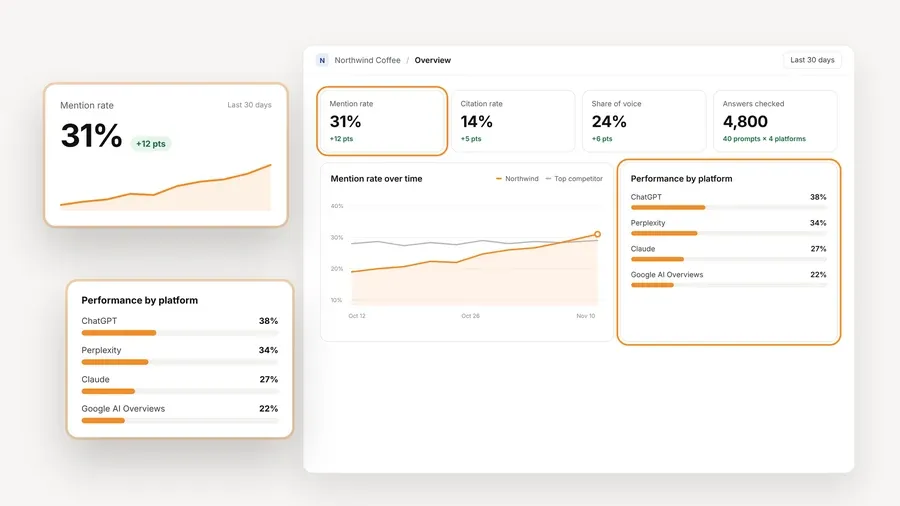
The analytics are the part you will show a client. Each project reports mention rate, citation rate, average position in the answer, share of voice against the competitors you track, and sentiment, with trends by engine, prompt and country. There is a competitor leaderboard, the cited sources, and the raw AI answer for every prompt, so when a client asks why a number moved you can open the answer itself. The numbers in the screenshot are demo data from a sample project, not a customer result.
How the data cost works. You connect keys from OpenAI, Anthropic, Gemini, Perplexity or DataForSEO, and one key from a single provider is enough to start. The provider bills you directly at its own price, and AeoNut never marks it up. Before tracking runs, a cost preview shows the estimated monthly data cost, and you can see spend per client, set budget caps and get alerts. AeoNut recommends restricted keys with spending limits and shows you how to set them up, which is the sensible way to keep a bring-your-own-key setup from turning into a surprise bill. The guide to free trackers that use your own API keys walks through the setup in more detail.

Handing it to a client. White-label client reports and shareable links carry your branding and not AeoNut's, on Free too. Reports export as PDF, Excel and Markdown, and CSV export is there as well. There is also a read-only MCP server and a REST API, so an AI assistant can read the same data when you want help writing the monthly summary.
The honest limit. Free covers one client project, and free applies to the AeoNut platform and not to the answer data. If you already track several clients, Pro is $99 a month ($79 a month billed annually) for up to 10 client projects, and Unlimited is $499 a month ($399 a month billed annually) for unlimited projects. Every plan includes every feature, so you move up only when you need more projects, and your history stays with you. For the reader this article is written for, one client, one project is the intended use and not a hidden prompt limit. If you want to see where else free plans cap you, free AI visibility plan limits compared lays out prompts, engines and projects across tools.

Best for: A solo consultant who wants hosted recurring tracking without setting up a data-provider key, and whose first tracking needs fit five prompts and 100 responses a month.
RankBits is the closest thing to a like-for-like free tracker here, and it is worth being fair to it. From its pricing page, as of November 2026, the free plan is $0 forever and lists one brand, one tracked scan, five prompts per scan, five engines or search sources, 100 AI responses a month, and tracking every seven days. The free engines are ChatGPT, Google AI Overview, Google Search, Bing Search and Perplexity. Public shareable reports are included on Free, and API access is listed on every plan after email verification.
The paid tiers are Starter at $49 a month, with three brands, 20 prompts per scan and 2,400 responses a month, and Pro at $99 a month, with unlimited brands, 50 prompts per scan and 5,000 responses a month. The page calls top-ups response credits, says they never expire, and says they are used automatically once the monthly allowance runs out.
The honest limit. The free option is recurring, but it is capped at one brand, five prompts per scan and 100 responses a month, and exports are not included on Free. The page does not explain how the 100 monthly responses are spread across weekly scans, so check that against your own prompt set before you commit. It is a better fit than AeoNut for someone who wants a small hosted allowance and a simpler start. It is not the right fit if you want the uncapped platform prompt volume covered in free prompt tracking tools with unlimited prompts.

Best for: A consultant who wants a quick first look across several AI platforms before deciding whether to set up continuous tracking.
The free AI visibility checker asks for a brand name and uses search-backed prompts based on real search behavior. It names ChatGPT, Gemini, Perplexity, Microsoft Copilot, Google AI Overviews and Google AI Mode. The result shows total AI mentions, a platform breakdown, the topics that trigger mentions, and the cited domains and pages. The free tool shows a limited preview of the top five results per section. Ahrefs says no signup is needed and there is no limit on how many brands you can check.
Ahrefs describes its separate Brand Radar product as the one for historical data and ongoing monitoring, and we have not put a price on it here, because that is worth checking on the day you read this.
The honest limit. The checker is a snapshot. It is useful for opening a conversation with a prospect, but it cannot give you a client trend history, because you would have to come back and run it again by hand. We did not find that it offers exports, an API or white-label reports, so do not count on those. For more on the difference, see how free AI search monitoring tools keep your history.

Best for: A consultant who wants a fast, structured one-time read on how AI systems describe a brand, with no account needed to start.
You enter a company or brand name, a location, an industry and a product or service. The AI Search Grader then assesses the brand using GPT-5.4 mini from OpenAI, Perplexity and Gemini from Google, and cross-checks the results across the three. HubSpot describes the check as asking how the systems characterize the brand based on their training-data knowledge, so it is not a live-web visibility crawl and it does not keep a prompt history.
The report gives a score out of 100 across five dimensions: sentiment results (up to 40 points), presence quality (20), brand recognition (20), AI share of voice (10) and market competition (10). HubSpot says no account is required to get started, but a form with required fields is needed to see the full score, the breakdown and the written interpretation. Its ongoing product is separate, HubSpot AEO, listed at $50 a month or included in Marketing Hub Pro and Enterprise.
The honest limit. One composite score is not a trend line, and the full report sits behind a form. We did not find that the grader supports exports, an API, integrations or white-label reports. If a client wants to know whether the score moved last month, this will not tell you.

Best for: Someone who wants to run one test through a paid product's pipeline before deciding whether recurring tracking is worth paying for.
On its pricing page, AEOProof advertises a $0 free offer that includes one Pro-style AI visibility test, no card, one test per account, and an OpenAI-only run with page caps. The page also lists readiness scans, and those are not ongoing AI mention tracking. Free has no scheduled cadence, so there is nothing to build a trend from after that first test.
The recurring tracking is on the paid plans. Pro is $49 a month for weekly tracking of ChatGPT, Gemini and Claude, with 5,000 prompts and up to 60,000 AI answers analyzed a month, and Agency is custom priced with daily cadence, white-label reports and API access. AEOProof says its Pro scans work without you setting up an API key, and that an optional bring-your-own-key setup can raise the prompt and crawl caps by up to five times. It does not remove them.
The honest limit. Free is a single test and not an ongoing tracker. It is a fair way to try the product once, but it is not an AthenaHQ alternative unlimited in prompts, and it will not give a consultant month-over-month data.
Start with what you need to show the client in three months. If the answer is a trend, only the first two tools can give you one on a free plan, and the rest are snapshots or a single test.
If you want help comparing more of the wider field, the free alternatives to paid AI visibility trackers guide covers what you keep and give up when you leave a paid tool, and free AI visibility reporting tools for client updates covers the reporting side. If you are matching a tool to a specific job, free AI visibility tools by job helps. Whatever you pick, compare your prompt set, engines, countries and schedule before you compare prices. A no-credit platform removes one allowance you would otherwise have to manage, and it does not remove the cost of the data itself.
Ready to try it on one client? Start free with AeoNut, connect one provider key, and read the cost preview before you switch tracking on.
Yes. AeoNut offers a $0 forever platform plan for one client project with unlimited prompts and no platform response-credit allowance. You bring your own provider key, and the provider charges for the data. AthenaHQ's own pages also advertise a Free option, so the difference is the credit model and not whether a free tier exists.
No. It means AeoNut does not meter platform usage with a response-credit bucket. You still pay the connected provider for the answer data. AeoNut shows a cost preview before runs, and lists spend per client, budget caps and alerts, so you can see the number before it grows.
It is ongoing tracking for one client project, and you set how often it runs. That is different from the Ahrefs snapshot, the HubSpot grader and the AEOProof test, which are one-time checks.
The Free plan includes one project. Pro covers up to 10 client projects and Unlimited covers unlimited projects, and every plan includes every feature. Choose a larger plan when your roster needs it, and note that project count and prompt volume are separate limits.
Tools & Comparisons ·
Compare free tools that report citation rate and brand mention rate as separate numbers, and see which are ongoing plans and which are one-time checkers.

Tools & Comparisons ·
Is a self-hosted AI visibility tracker worth your time? Compare setup, upkeep, data control and engine coverage with a managed free plan before you decide.

Tools & Comparisons ·
Which free AEO tracking tool keeps running, saves history and shows change? Compare five free options on schedule, trends and alerts to pick one for a client.