

Tools & Comparisons ·
Free Tools That Track Citations and Brand Mentions Separately
Compare free tools that report citation rate and brand mention rate as separate numbers, and see which are ongoing plans and which are one-time checkers.
Looking for a free tracker that covers ChatGPT, Gemini and Perplexity together? You will see which plans keep running, what each allows and how to choose.
Avinash Saurabh · · 18 min read

A client asks whether they show up when people ask ChatGPT, Gemini or Perplexity for a recommendation, and you would like to answer with real data instead of a screenshot you took by hand. So you start looking for a free ChatGPT Gemini Perplexity tracker, and the first few results turn out to be a seven-day trial, a one-time score that asks for your email, or a plan that covers one engine and charges for the other two. None of those gives you a trend, and a trend is what you will want to show on the next call.
This guide covers the free options that track all three engines together and keep running after the first week. If you want to track ChatGPT and Perplexity free of any trial clock, and add Gemini to the same setup, there are only a few that count as a free multi-engine AI tracker. We go through three of them, then look at the question that matters more than the tool: whether three engines are enough for your client's audience.
A free tracker has to pass a few checks before it earns a spot here. We used six.
We did not run a hands-on accuracy test, and we did not sign in to any competitor's account. Competitor details come from each vendor's public product and pricing pages as of November 2026, and the currency on their pages was not stated, so we repeat their dollar signs as displayed. AeoNut prices are in USD. A published free plan is also not a promise that the vendor never changes it, so check the plan page before you build a client's reporting on it.
| Tool | Free offer covering the three engines | Prompt allowance | Refresh and history | Client-facing output | Best fit |
|---|---|---|---|---|---|
| AeoNut | $0 platform forever; the data is billed by your own provider | Unlimited prompts, one client project | Daily, twice a week or weekly; trends by engine, prompt and country | White-label client reports, shareable links and exports, all on Free | One client tracked properly, with a large prompt set, under your own brand |
| GEOflux | $0 forever, with the three-engine tracking included | 15 prompt credits, each prompt tracked on all three engines | Every three days; answer history kept and exportable | Three shareable client reports, CSV export, email digests | A small recurring baseline with no provider keys to manage |
| AI1stSEO | Advertises $0 free forever for its rank tracker; the product page lists the three engines among its live engines | Up to 100 queries, one site | Advertises daily refresh, position changes and alerts | PDF export on Free; white-label reports are listed on its Expert plan | Someone who also wants technical SEO and AEO audits |
The table shows the main split. AeoNut's platform is free and the data collection is billed to you by the provider you connect. GEOflux includes the collection in its free allowance but caps it at 15 prompts. AI1stSEO advertises the biggest allowance but does not itemize which engines the free rank tracker covers. Among these three, AeoNut is the only one with unlimited prompts on a permanent Free plan.
Best for: a freelance SEO or AEO consultant tracking one client, who wants the full working prompt list and reports under their own name.

AeoNut is the only AI visibility tracker that is free forever with unlimited prompts. The headline is simple: free forever, unlimited prompts, your own keys. The Free plan is a full tracker for one client brand, not a trial and not a one-off checker. You can pick ChatGPT, Gemini and Perplexity together inside that one project, and AeoNut also tracks nine more engines if the client's audience ever calls for them.
The reason it comes first for a consultant is the whole workflow in one place. You set up the client's scope, collect answers on a schedule, look at mentions and sources, compare against competitors, and then hand over a white-label report. Every plan includes every feature, so the Free plan is the same product as the paid ones. The only thing that changes between plans is how many client projects you can hold.
Because the prompt count is unlimited, you do not have to trim the list to fit a quota. You can keep questions from every stage of the buying path: discovery ("which payroll tools suit a small consultancy"), comparisons, objections and the final decision. For each engine you choose scraped data, which is the answer a real user sees in the app at the lowest cost, or API data from a specific model. It helps to write down which one you used, because an API answer from a chosen model is not always the same thing a person sees in the consumer app.
What you get on Free:
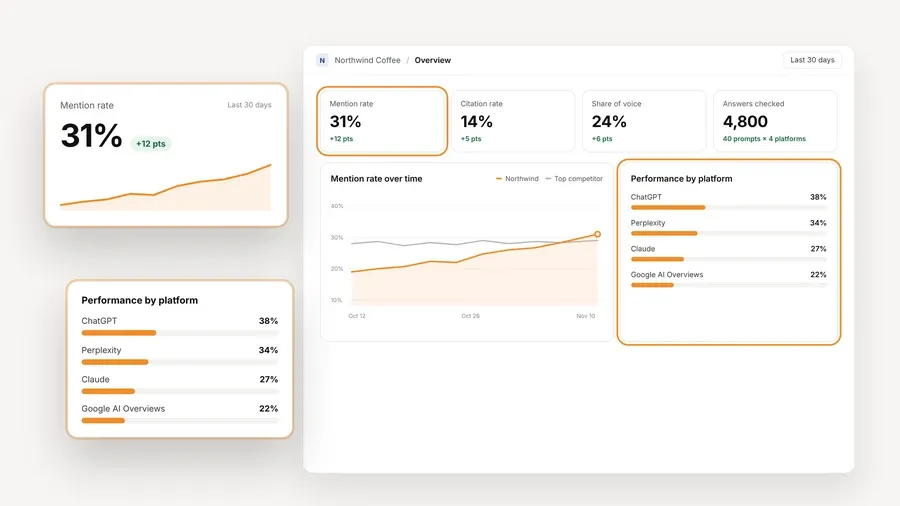
The platform is free, and the AI answer data is not. You connect a key from OpenAI, Anthropic, Gemini, Perplexity or DataForSEO and pay that provider directly at its price, with no markup from AeoNut. One key from a single provider is enough to start. That is why we do not call it "$0 tracking": the software costs nothing and the data costs what your provider charges. The way to stay in control of that bill is the cost preview, which shows the estimated monthly data cost before any run starts. On top of that you can set budget caps and alerts, and AeoNut recommends restricted keys with spending limits so a mistake cannot get expensive. If you are comfortable with API keys, as most consultants are, this is a reasonable trade for a prompt list nobody has asked you to shrink.

The Free plan holds one client project. When you take on more brands, Pro is $99 a month ($79 a month billed annually, $950 a year) for up to 10 client projects, and Unlimited is $499 a month ($399 a month billed annually, $4,790 a year) for as many as you need. A free setup call is available on every plan, and our guide to free tools by job shows where AeoNut fits next to other free options, so you can have someone walk through the keys and the first prompts with you.
Best for: a consultant who wants a small, recurring three-engine baseline with collection included and no provider keys to set up.

GEOflux states that every plan tracks ChatGPT, Gemini and Perplexity, and its Free plan re-asks 15 prompts on all three engines every three days. It keeps the answers and builds tracking history for visibility, share of voice, sentiment and citations. Its own description is that it runs the prompts in real browser sessions and captures the whole answer, which is the vendor's account of how it collects and not something we tested.
This is the strength worth being plain about. With GEOflux you get recurring three-engine data inside the free allowance, without a provider account and without a separate bill for answers. For a small client with a short list of questions, that can be the simpler path, and it may even be the cheaper one.
The Free plan uses credits. One credit tracks one prompt for one month across all three engines, so 15 credits means 15 tracked questions, each run on every engine. It does not mean 15 answers split three ways. Adding a Persona to a prompt costs another credit, and Personas are not part of Free. You also get three competitors, three shareable client reports, CSV export, email digests and the Overview, Answers, Sources, Brands and Topics views. Team members and client access are unlimited, with clients getting read-only access.
| Plan | Price | Allowance | Refresh |
|---|---|---|---|
| Free | $0 forever | 15 credits | Every three days |
| Starter | $99 a month | 50 credits | Daily |
| Growth | $199 a month | 150 credits | Daily |
The limit to weigh is the size of the allowance. Fifteen prompts and a three-day refresh (compare daily free rank tracking) work for a tightly scoped baseline, but a consultant with a longer question list or a daily reporting habit will need a paid plan or a different tool. The reviewed pages also show shareable reports and do not establish white-label branding, so a report may carry GEOflux's look instead of yours. A few other things to know before you count on it. Free accounts are capped at 500, and later applicants join a waitlist. Free is separate from its 14-day Starter and Growth trial, and a Free account cannot be switched into that trial later. Google AI Overviews and AI Mode are not tracked yet and have no published date, so if your client needs them, Gemini will not stand in.
Best for: a consultant who wants an advertised free rank tracker next to technical SEO and AEO auditing, and who can live with a PDF instead of a white-label report on the free tier.

AI1stSEO advertises a free-forever AEO Rank Tracker for up to 100 queries, with daily refresh, position-change alerts and competitor comparison. Its live-engine section lists ChatGPT, Gemini, Claude and Perplexity, so the three engines you want are named on the page. The Free-plan pricing row does not spell out an engine-by-engine entitlement for the rank tracker, and different parts of the site give different engine counts. That is why we place it third and keep the qualification visible. If you need every engine entitlement stated together in black and white, treat AeoNut and GEOflux as the main picks.
The free tier also includes a 236-point audit, a GEO Scanner and PDF export, all for one site. The paid tiers are Pro at $5 a month for five sites and Expert at $15 a month for unlimited sites, with API access, webhooks and white-label reports listed on Expert. Annual billing is advertised at a 20% reduction, and we could not confirm the exact annual totals. The page does not explain whether "up to 100 queries" means per engine, per site or something else, so use the vendor's wording and ask before you plan around a specific number. It also does not establish a provider-key requirement, a separate answer-data charge or a retention period.
The limit that matters for client work is reporting. White-label reports sit on Expert, so the free PDF is good for an internal baseline or a prospect conversation, and it is not the same as handing a client a report in your own branding.
Three engines are enough when they match where your client's audience asks questions and what you agreed to report on. They are a sensible starting set, and they are not full coverage. The steps below are a working method we suggest, not a vendor rule or a tested threshold.
Start with the people closest to the buyer. Ask the client, their sales and support teams and a few recent customers which AI product they used before getting in touch, what they typed in their own words, whether they were learning, comparing or ready to buy, and which country and language were involved. Write down exact product names and the real wording of the question. "We use AI" is not enough to choose engines.
A simple evidence sheet works well, with a column each for the platform, the question, the audience segment, the country and language, the date, the type of evidence and what you decided. A customer comment, a referral visit and a sales lead are different kinds of evidence, so keep them in separate rows instead of adding them into one usage number.
Then look at the traffic. A last-90-days window compared with the period before it is a practical place to start, and it is a working window, not a statistical minimum. In Google Analytics 4, the Traffic acquisition report is the place to look.
Google notes that the report can be missing from a property's navigation if it was removed or is not in the default view, so do not assume every account has it. An engaged session is one that lasts at least ten seconds, has a key event or has two or more page or screen views, and key events only count if you set up the business action as one.
Referral data only tells part of the story. GA4 files traffic as direct when source information is missing or the source is set to be ignored, and guidance on AI-driven traffic in analytics points out that referrals miss much of the customer journey and should be read as a direction rather than a count to defend. If you see no referrals from an engine, that does not prove nobody uses it, and someone can see your client in an answer, remember the name and come back later through another door.
| What you find | What to do |
|---|---|
| Interviews and visits point to the three engines | Start with the trio and note that as the agreed scope |
| The client wants Google AI Overviews or AI Mode | Treat those as their own requirement, because Gemini does not cover them |
| Customers keep naming another AI product | Add that product to the measurement brief |
| Referrals are thin and interviews are unclear | Run a clearly labeled baseline and do not claim full coverage |
| An engine sends little traffic but matters to a target segment | Keep it in and review its business relevance |
If a client does need Google's surfaces, our guide to free Google AI Overviews rank trackers covers that side. We found no sound universal percentage for deciding when three engines are enough, so we will not invent one.
Once you pick a tool, a few habits keep the data useful and the cost predictable.
Build a prompt set that mirrors real tasks. Cover different jobs instead of repeating one branded question: a category question ("which payroll tools suit a UK consultancy with five employees"), a question with constraints ("which options handle several currencies and a small finance team"), an alternatives question, a pre-purchase objection and a comparison with a named competitor. These are examples, so swap in the client's own wording. On GEOflux Free, choose your 15 most distinct questions. On AeoNut you can use the full list the engagement needs.
Keep the observations comparable. Use the same core wording across the three engines when you want to compare them, and note the country, language, collection mode and schedule. Leave the first prompts alone long enough to produce a trend, so you can tell a changed prompt from a changed answer. Read the raw answers as well as the dashboard, and tell a failed collection apart from a real answer that left your client out.
Estimate answer volume before you run anything. At one answer per prompt per engine per refresh, 15 prompts on three engines make 45 answers per completed refresh, and ten refreshes make 450. A list of 30 prompts on the same three engines, refreshed daily for 30 days, makes 2,700. That is plain arithmetic, not a vendor quota or a price quote, and extra countries or repeated sampling will raise it. Use your real settings and your provider's pricing for the actual estimate.
On AeoNut, set the limits first. Choose the three engines and the collection source, connect a provider key, use a restricted key with a spending limit where your provider supports one, and add the prompts, countries and frequency. Then read the estimated monthly data cost in the cost preview, set a budget cap and alerts, start the schedule, and compare actual spend with the estimate after the first weeks.
Report with evidence. A useful client report names the brand, the date range, the engines, the prompts and the countries. It says whether any prompts or settings changed during the period, how often the brand appeared, whether the client's own site was cited, and which competitors showed up instead, with a few real answers as examples. It lists the cited pages and what changed over time, and it is honest about what is still unclear. Keep referral visits and business results as supporting evidence, separate from visibility. Avoid comparing a visibility score from one tool with a score from another, since a 60 does not mean the same thing everywhere. For more on how the free offers differ, see our guide to which kind of free offer fits. Our comparison of plan limits compared covers prompts, engines and projects side by side.
Choose AeoNut when one client needs a big prompt set, a schedule you control and a report in your own brand, and you are fine paying the data provider directly. It is the complete one-client workflow with no platform subscription and no prompt cap.
Choose GEOflux when 15 questions are enough, a refresh every three days is acceptable and you would like the collection usage included in the free allowance. For that smaller job without keys to manage, it is the better fit, as long as a free account is available when you sign up. Its reports are shareable, and white-label branding is not documented.
Look at AI1stSEO when the wider audit workflow matters to you and a free PDF is enough. Keep in mind that its engine entitlements are not itemized on the free tier, and that white-label reports need Expert.
Go beyond the three engines when your customer evidence or the client's agreed scope calls for another surface. A three engine AI tracker free of charge is a good place to start, but pick the scope from audience behavior and not from how many logos a tool shows.
If you are still deciding between separate checkers and one tracker, our comparison of per-engine free checkers or one free tracker lays out the trade-offs. For a freelance consultant's setup in particular, free AI visibility tracking by reader matches setups to roles. If ChatGPT is the engine your client cares about most, free ChatGPT rank trackers with unlimited prompts goes deeper on it.
AeoNut's Free plan gives you one client project with ChatGPT, Gemini and Perplexity together, unlimited prompts and every feature, with no card. The platform is free and your provider bills the AI answer data, and the cost preview shows the estimate before tracking starts. Start free with AeoNut and track your first client's real questions this week.
AeoNut covers all three on its Free plan, with unlimited prompts and one client project. The platform is free forever, and your own provider bills the answer data. GEOflux also covers the three engines on its permanent Free plan, with 15 prompts refreshed every three days.
Yes. AeoNut has a permanent free platform plan, with provider data charged separately, and GEOflux has a permanent free allowance that includes the three-engine collection schedule. Check the recurring allowance on the plan page, because a free checker or a 14-day trial does not give you ongoing tracking.
They can be enough for a first scope when customer interviews, referral traffic and the client's priorities point to those engines. They are not complete coverage by definition. Google AI Overviews and AI Mode are separate surfaces, so include them when your audience evidence or your reporting brief calls for it.
AeoNut includes white-label client reports on Free. GEOflux documents shareable reports but does not establish white-label branding, and AI1stSEO includes PDF export on Free while listing white-label reports on its paid Expert plan.
Tools & Comparisons ·
Compare free tools that report citation rate and brand mention rate as separate numbers, and see which are ongoing plans and which are one-time checkers.

Tools & Comparisons ·
Is a self-hosted AI visibility tracker worth your time? Compare setup, upkeep, data control and engine coverage with a managed free plan before you decide.

Tools & Comparisons ·
Which free AEO tracking tool keeps running, saves history and shows change? Compare five free options on schedule, trends and alerts to pick one for a client.