

Tools & Comparisons ·
Free Tools That Track Citations and Brand Mentions Separately
Compare free tools that report citation rate and brand mention rate as separate numbers, and see which are ongoing plans and which are one-time checkers.
Need Google AI Overviews tracking without a platform fee? Compare four AirOps alternatives, then set up a free tracker for one client and switch over.
Avinash Saurabh · · 18 min read

If a client has asked whether they show up in Google's AI Overviews, and the tool that could answer that costs more than the client's whole tracking line, you are probably looking for a free AirOps alternative. The honest answer starts with a small correction. AirOps does track Google AI Overviews, so the reason to switch is not a missing engine. The reason is fit and cost. If tracking is the only part of AirOps you need, you can get that part without a platform subscription.
AeoNut is that kind of free AirOps alternative for Google AI Overviews tracking: one brand, unlimited prompts and every tracking feature, free forever, with no card. You bring your own provider credentials and pay the provider what the data costs. The platform is free, and the data is whatever your provider charges. That second part is worth keeping in view from the start, and we come back to it below with the setup steps.
This guide covers the tracking side only. It does not cover content workflows, automation or page generation, which is what AirOps is mainly used for. If you are comparing AirOps alternatives with Google AI Overviews tracking, here is how the four choices compare, how to set up the free one for a single client, and how to move over without losing your place.
Free means different things on different pricing pages, so we judged each tool on the same seven points:
This ranking is built for a cost-sensitive independent consultant with one client to start. It is not a claim that the first tool wins every enterprise buying decision. We did not run a hands-on benchmark of each product. The comparison rests on each vendor's public pages and on AeoNut's own product facts, checked in November 2026.
| Tool | Best for | Google AI Overviews | Free-access boundary | Paid starting point |
|---|---|---|---|---|
| AeoNut | Ongoing tracking and white-label reports for one client | Supported | Free forever, one project, unlimited prompts, no card | Pro, $99 a month for up to 10 projects |
| Ahrefs free tools | A first check on a prospect or brand | Supported | No signup; the broader checker shows the top five results per section | The broader checker advertises $199 a month for one AI platform |
| OtterlyAI | Hosted tracking at a low entry price | Supported | Seven-day trial, no card | Lite, $29 a month |
| Peec AI | Paid team analytics with model choice | Available among model choices | Free trial, length not stated on the pricing page | Starter, $95 a month |
Three different things hide behind the word free in that table. AeoNut Free is an ongoing platform. The Ahrefs tools are free reports with a boundary on how much you see. OtterlyAI and Peec AI offer trials. Keep that in mind as you read each entry, because they solve different problems.

Best for: a freelance SEO or AEO consultant who needs recurring Google AI Overviews evidence and a client-ready report before the engagement has paid for a tool.
The Free plan has the combination a one-client consultant actually needs. You get one client project, unlimited prompts, unlimited team seats, ongoing collection and every feature the paid plans have. It is not a seven-day evaluation and it is not a limited report preview. A project is one client brand with its own prompts, competitors, engines, countries, schedule and reports, so you can track the questions the client's buyers really ask instead of picking a handful to fit a cap.
AeoNut tracks twelve engines: ChatGPT, Gemini, Perplexity, Claude, Grok, Google AI Overviews, Google AI Mode, Mistral, Meta AI, Qwen, Z.ai and MiniMax. All twelve are available on Free, and Google AI Overviews and Google AI Mode are separate choices. You do not have to turn them all on. An engagement that is only about AI Overviews can start with that one engine and add others when the client's scope calls for them, because every engine you enable adds to the data bill.
For each project you choose the engines, the countries, the prompts and how often it runs: daily, twice a week or weekly. The analytics cover Mention rate, Cited, Avg. position, Share of voice and Sentiment, with trends by engine, prompt and country, a competitor leaderboard, the cited sources and the raw AI answer for every prompt. White-label client reports and shareable links carry your branding, not ours, and they are on Free too. CSV export, the API and the MCP server are also included.
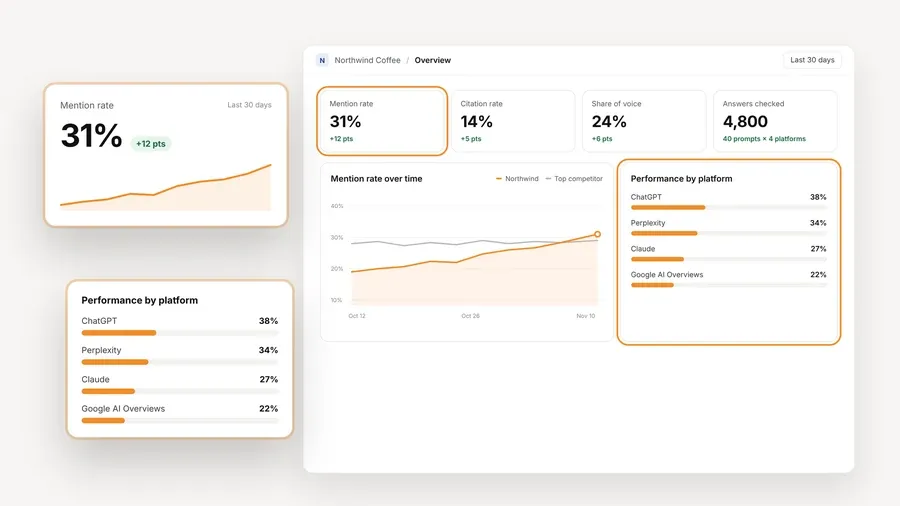
The money works like this. AeoNut Free costs $0 and needs no card. The answer data is billed by your own provider at its price, and AeoNut never marks it up. For Google AI Overviews, the provider route is DataForSEO, one of the providers AeoNut supports along with OpenAI, Anthropic, Gemini and Perplexity. An OpenAI key does not capture a Google AI Overview, so an AI Overviews setup connects a search-data provider instead. One provider connection is enough to start.

Before anything runs, the cost preview shows the estimated monthly data cost for the engines, countries, prompts and frequency you picked. You can set a budget cap and alerts per client, and AeoNut recommends restricted keys with spending limits on the provider side too. Keys are encrypted at rest and not shown again after you save them. When a second client arrives, Pro covers up to 10 client projects for $99 a month, or $79 a month billed annually, on the same features.
If you are leaving another tool, a free setup call and the Done-For-You Switch come with every plan. The switch imports prompts, competitors and tracking history from the tool you are leaving. If you want the wider picture of what you keep and give up when you replace a paid tracker, the guide to free alternatives to paid AI visibility trackers walks through it.

Best for: a consultant who wants to look at a prospect's current visibility without creating an account, connecting a provider or starting a trial.
Ahrefs has two relevant free tools, and they are separate. The Free AI Overviews Tracker says it shows how Google's AI Overviews appear for a brand, which of the brand's pages they cite and which other sources show up instead. It needs no signup and returns results in seconds. The broader Free AI Visibility Checker covers ChatGPT, Gemini, Perplexity, Microsoft Copilot, Google AI Overviews and Google AI Mode. Its free report is a limited preview of the top five results per section, with no signup or card and no limit on how many brands you check.
The strength is how little it asks of you. There is no account, no card and no provider setup, which makes it a good way to bring real evidence to a first conversation with a prospect.
The limit is what the public pages do not establish. We could not confirm a recurring schedule, a custom prompt allowance, free history, client-branded reports or an export on the free tools, so we do not claim them. The top-five limit belongs to the broader checker, and we do not attach it to the AI Overviews tool. The checker also advertises paid access at $199 a month for one AI platform and $699 a month for all platforms. If a quick inspection is the whole job, use Ahrefs and stop there. If the job turns into measuring the same client every week and sending them a report under your name, that is where a recurring tracker earns its place.

Best for: someone who would rather pay a subscription for a hosted package than manage provider billing.
OtterlyAI supports Google AI Overviews. Its pricing page lists brand visibility, sentiment, citation-source tracking, competitor metrics, detailed reports and exports, and a help page confirms a seven-day free trial without a credit card. The entry plan, Lite, is $29 a month. Standard is $189 and Premium is $489. On the pricing page, unlimited team members and unlimited brands are listed across those three plans, with one workspace on Lite and unlimited workspaces on the higher two.
Pay attention to the pricing change. An announcement dated November 10, 2026 moves OtterlyAI to monthly prompt credits: 2,000 on Lite, 15,000 on Standard and 50,000 on Premium. The announcement gives Lite an example of 20 prompts on three engines or 16 on four. The pricing page still shows older fixed prompt caps and engine add-ons, so the two do not agree on capacity even though the monthly prices do. We use the newer announcement for credits and skip the older caps, and we suggest you ask for the current engine setup before you buy.
The strength is a $29 hosted entry point that includes AI Overviews. The limit is that it is a paid subscription after a seven-day trial, and the capacity depends on the plan and the setup you pick. It does not give you a free platform that keeps running.

Best for: a team that wants a hosted analytics subscription with several users and clearly defined prompt, project and integration allowances.
Peec AI's pricing page is specific, which helps. Google AI Overviews and Google AI Mode are among the models you can choose from, alongside ChatGPT, Microsoft Copilot, Gemini and Naver AI, and the page also names Perplexity in its additional-model section. Starter is $95 a month with 50 tracked prompts, three active models, one project and one country. Pro is $245 with 150 prompts, two projects and three countries. Advanced is $495 with 350 prompts, five projects and three countries. Annual billing is listed at 15% less, and we use the monthly prices.
Starter, Pro and Advanced all list daily tracking and unlimited users. Prompts feed a monthly allowance of AI answers, 4,500 on Starter, and that allowance depends on prompts, active models and frequency, so it does not equal the number of unique prompts. Shareable dashboards and custom CSV exports are listed across plans, API access starts at Pro, and a Looker Studio connector starts at Advanced.
AI Overviews is one of the models you can select within the three active ones, so it does not automatically cost extra. Extra models are charged at $30, $70 or $140 a month depending on the plan. If you want ChatGPT, Gemini, Perplexity, AI Overviews and AI Mode all at once, three active models is not the full set. Peec advertises a free trial, but its length is not stated on the pricing page, so we do not give one. The shareable dashboards are not described as white-label reports there, so check that if your client should see your brand and nobody else's.
AirOps is the reference point here, not one of the alternatives, and it is fair to say what it offers. Its documentation lists Google AI Overviews and Google AI Mode alongside ChatGPT, Gemini, Perplexity, Claude, Microsoft Copilot, Grok and Muse Spark, with Claude and Muse Spark depending on your plan and setup. Its tracking covers mention rate, share of voice and average position over time, prompt-based monitoring, competitors and personas, and a combined page view that joins AI citations with Search Console and GA4 traffic. There is an Insights API as well.
What we could not find is a public base price. The pricing cards show Solo, described as ChatGPT Insights Only, and Pro, described as insights across 10+ answer engines, with Enterprise on custom terms. A trial FAQ describes 14 days of access to the Scale plan, a name that does not appear on the current cards, and the trial's tracking allowances are not specified. Prompt caps, collection frequency and the historical export path were not established either. Where the public pages are silent, we say not publicly established, not that AirOps lacks the feature, and we do not put a savings figure on a price we could not find.
So the case for switching is narrow and honest. If your existing AirOps account already covers the engines you need and the combined citation, Search Console and GA4 view is worth the price, staying is a perfectly good decision. If you only need ongoing tracking and client reports for one brand, AirOps alternative tracking on a free plan covers that half without a platform subscription.
Before you set anything up, it helps to separate three things that get mixed together. AI Overviews is a feature inside Google Search, and Google says an overview appears only when its systems decide it adds to the classic results, so it often does not show up. AI Mode is a separate Google AI search experience, and support for one does not mean support for the other. A reply from a Gemini model through an API is also not proof that your brand appears in Google's AI Overview, so the search feature itself has to be captured through a search-data route.
Mentions and citations are different too. A brand can be named without its site being linked, and a page can be cited without the brand being recommended in the text. Track the two separately, and do not read a missing overview as a competitor win until you have looked at the record.
Google Search Console is a useful companion here. Google announced Search Generative AI performance reports on June 3, 2026, with a worldwide rollout it describes as complete by August 31, 2026. They show first-party impressions and pages in generative AI features, including AI Overviews and AI Mode. That is evidence about your own site. A prompt tracker answers the other question, which is what a chosen set of questions returned, which brands appeared and which sources were cited. You can read about how Google describes these features in its AI features documentation.
This is a sequence built on documented capabilities, not a click-by-click interface tour, so the exact screens may differ a little from what you see. We have not timed it, so we do not promise how long it takes.
Moving tracking from AirOps takes some care, because we could not confirm an AirOps-specific export or import path. Here is a sequence that does not depend on one.
If you land on the first option, start free with AeoNut, turn on Google AI Overviews, read the provider-data estimate and build the client's baseline before you add more engines.
AeoNut offers a free-forever platform for one client project with unlimited prompts, Google AI Overviews tracking, analytics and white-label reports. You connect your own provider credentials and pay that provider for the data. It replaces the tracking job, not the whole AirOps product.
The AeoNut platform is free on the one-project plan, but the provider data is billed separately. Check the cost preview before tracking runs and set budget controls. A provider may also ask for an upfront balance, and DataForSEO publishes a $50 minimum payment.
Yes. Its documentation lists Google AI Overviews and Google AI Mode. Its Solo card says ChatGPT Insights Only, while Pro advertises 10+ answer engines. Exact prices, prompt allowances and trial access to each engine were not publicly established in the pages we reviewed.
For some jobs, yes. The Ahrefs free tools are handy for an initial check, and Search Console now reports first-party impressions and pages in generative AI features. When a client needs a steady set of questions, competitor context, raw answers and ongoing branded reports, a recurring prompt tracker is the better fit.
Tools & Comparisons ·
Compare free tools that report citation rate and brand mention rate as separate numbers, and see which are ongoing plans and which are one-time checkers.

Tools & Comparisons ·
Is a self-hosted AI visibility tracker worth your time? Compare setup, upkeep, data control and engine coverage with a managed free plan before you decide.

Tools & Comparisons ·
Which free AEO tracking tool keeps running, saves history and shows change? Compare five free options on schedule, trends and alerts to pick one for a client.