

Tools & Comparisons ·
Free Tools That Track Citations and Brand Mentions Separately
Compare free tools that report citation rate and brand mention rate as separate numbers, and see which are ongoing plans and which are one-time checkers.
Compare free and low-cost Surfer AI Tracker alternatives, see what carries over, and move your prompt list without losing it. Start with one client brand.
Avinash Saurabh · · 17 min read

If you track one client brand in AI answers and your Surfer bill has started to feel too big for that one job, a free Surfer AI Tracker alternative is worth a serious look. The catch is that "free" means different things from tool to tool. Some are free forever, some are free for seven days, and some give you one score and then stop. This guide sorts out the best alternatives to Surfer AI Tracker so you can tell which ones can actually take over for your work, and which ones only look like they can.
Here is the short version. As of November 2026, the only AI visibility tracker that is free forever with unlimited prompts is AeoNut's Free plan. It covers one client project, needs no card, and runs on your own provider key, so the platform costs nothing and the AI answer data is what your provider charges. The other free options we found are one-time checkers or trials that end. Surfer itself has a seven-day trial that asks for billing details, and we found no Surfer plan that is both ongoing and free. So the premise of the title holds up, with one qualification we cover below.
We only look at AI answer tracking here. Surfer's content editor and on-page tools are a separate decision and belong in a writing-tools comparison.
A list of alternatives is only useful if you know what it was judged on. For a consultant tracking a client over time, these five things matter most:
Vendors also call this job AEO, GEO or LLM tracking, and which label means which tool is worth a read if the names confuse you. Free checkers and trials stay on the list because you will run into them, but we mark them as a different kind of option. A one-time score is not a replacement for a tracker.
It helps to know what you would be replacing. Surfer sells AI Tracker access two ways, as a standalone AI Search Analytics plan or inside its broader plans. These are the listed monthly prices in USD, with the monthly-equivalent price when billed annually in brackets:
| Surfer plan | Monthly price (annual billing) | Prompts and refresh | Engines |
|---|---|---|---|
| AI Search Analytics | $95 ($82) | 50 prompts, daily, can scale to 200 | All five |
| Standard | $119 ($99) | 25 prompts, weekly | ChatGPT only |
| Pro | $219 ($182) | 50 prompts, daily | All five |
| Peace of Mind | $359 ($299) | 100 prompts, daily | All five, API access |
| Enterprise | Custom | Custom | Confirm with Surfer |
The five engines are ChatGPT, Gemini, Perplexity, Google AI Mode and Google AI Overviews. Extra prompts on Standard, Pro and Peace of Mind come in packs of ten at $18 a month each. Annual billing is paid up front for the full year, and plans renew on their own unless you turn auto-renewal off.
On access, Surfer's trial article says a new account gets seven days of Pro. You have to enter billing details at checkout, and the plan you picked starts and the card is charged when the trial ends unless you cancel first. That is a real trial, and it is useful for testing a workflow, but it is not a free plan. We did not find a Surfer AI Tracker plan that stays free, so "free alternative" in practice means a different tool with a plan that does.
| Tool | Price and access | What you get | The distinction that matters |
|---|---|---|---|
| AeoNut | Free plan: $0 forever, 1 client project, no card. Provider data charges are separate. | Unlimited prompts, every feature, twelve engines, ongoing tracking, white-label reports, cost preview | Recurring tracking for one brand with no platform fee. Your provider still bills for data. |
| Ahrefs AI Visibility Checker | Free, no signup | A quick snapshot across several AI platforms | A one-time snapshot, not ongoing monitoring |
| Semrush AI Visibility Checker | Free checker | A view of brand visibility from Semrush's prompt database | Good for a first scan, not a scheduled tracker |
| LLMrefs | $79 a month, with a seven-day trial | 500 prompts, unlimited projects, weekly reports, CSV and API | Paid and ongoing, not free forever |
| OtterlyAI | Paid plans, plus a seven-day no-card trial | Daily monitoring on the entry plans, 15 prompts on Lite | The trial ends, so it cannot build a lasting trend |
Best for: a freelancer or small team that needs ongoing tracking for one client brand, enough prompts to cover the real questions buyers ask, a branded report to hand over, and a clear view of what the data will cost before it runs.
AeoNut is AI visibility tracking built for agencies, and its Free plan is the part that matters for this list. It is $0 forever with no card, it covers 1 client project, and it has unlimited prompts and every feature the paid plans have. That includes analytics, white-label client reports, the MCP server, the API and CSV export. You connect your own key from OpenAI, Anthropic, Gemini, Perplexity or DataForSEO, and the provider bills you directly at its own price. AeoNut does not mark the data up. One provider key is enough to start.
That last point is where people get nervous, and it is a fair thing to be careful about. The Free plan is free, and the AI answer data is not. AeoNut shows an estimated monthly cost before anything runs, tracks spend per client, and lets you set budget caps and alerts. It also recommends restricted keys with spending limits and shows how to set them up. Scraped data, which is the answer a real person sees in the ChatGPT, Gemini or Google apps, is the lowest-cost choice, and API data lets you pick the exact model. As a guide, the example AeoNut publishes is 10 clients with 100 prompts each, tracked daily on ChatGPT, Perplexity and Google AI Overview, which comes to about $135 a month in data. That figure is tied to that exact setup, so your own number will move with the engines and volume you choose.

Each client is a project with its own prompts, competitors, engines, countries and schedule, and you pick daily, twice a week or weekly. AeoNut tracks twelve engines: ChatGPT, Gemini, Perplexity, Claude, Grok, Google AI Overviews, Google AI Mode, Mistral, Meta AI, Qwen, Z.ai and MiniMax. That covers all five engines Surfer tracks and adds seven more, so nothing you rely on in Surfer drops out on the engine side.
What you see for each project is Mention rate, Cited, Avg. position, Share of voice against the competitors you track, and Sentiment, with trends by engine, prompt and country. You can also open the raw AI answer for every prompt, see which pages and sources are cited, and read a competitor leaderboard. Reports go out under your own name, not AeoNut's, as PDF, Excel or Markdown, and the same data is open to Claude, Cursor and other assistants through a read-only MCP server.
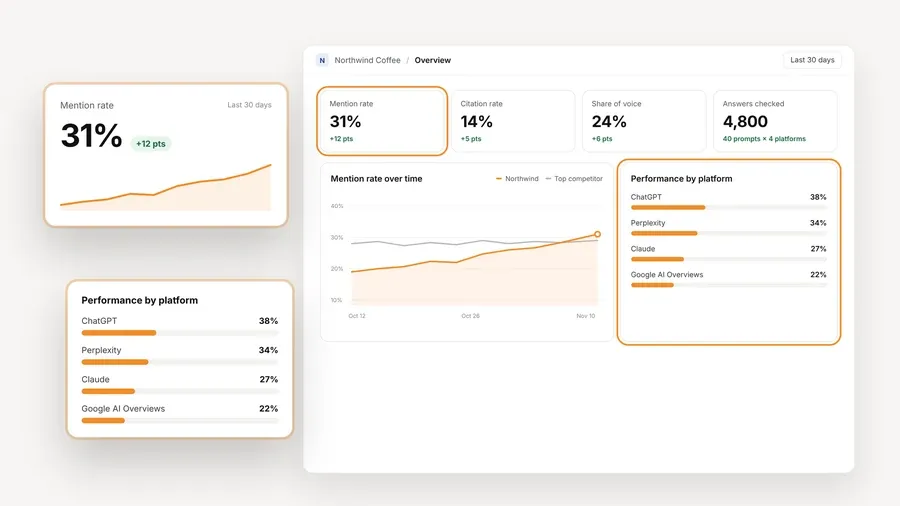
The honest limit is the project count. Free holds one client project, so if you track several client brands you will move to Pro, which is $99 a month for up to 10 client projects, or $79 a month billed annually. Pro has the same features, and plans differ only in how many projects they hold. For a consultant with one brand to prove out, or one client who pays for tracking, that limit does not get in the way. When you add a second client, the same prompts and history carry on with you rather than starting again, and when a free plan is no longer enough lists the signs that it is time.
Best for: a quick, no-signup look at whether a brand appears in AI answers, or a visual for a first prospect conversation.
The Ahrefs checker tests ChatGPT, Gemini, Perplexity, Microsoft Copilot, Google AI Overviews and Google AI Mode. The report can show total AI mentions, a breakdown by platform, the topics tied to those mentions, and the domains or pages cited next to the brand. It runs search-backed prompts and checks whether the brand shows up in the response, and the result comes back in seconds.
Ahrefs describes it as a one-time snapshot, and that is the limit. There is no maintained prompt set, no trend line and no recurring client report. Custom prompt tracking is a separate paid feature that starts on Ahrefs Lite, with 5 prompts and 150 checks a month. Use the checker when you need a fast first answer, then move to a tracker when the client wants to see change over time.
Best for: an initial scan when you already work in Semrush or want a broad view built on a large prompt database before you invest in tracking.
Semrush says its free checker draws on a database of more than 26 million prompts and responses across ChatGPT, Gemini, AI Mode and AI Overviews. It can show brand visibility, the topics or prompts where the brand appears, and the pages that drive citations, and it describes a competitor comparison as well.
The paid AI Visibility Toolkit is a different product. The Base plan is listed at $99 a month per domain billed annually, with one project and 25 prompts for prompt tracking, and Semrush's own pages disagree on whether the Toolkit comes with a free trial, so check that before you plan around one. The free checker is not documented as a scheduled tracker, so treat it as a starting point for a conversation and not a replacement for what Surfer does. If you are weighing several single-engine checkers against one tracker, per-engine free checkers or one free tracker walks through the trade.
Best for: a consultant who will pay for an all-in-one tracker with many prompts and several client projects, and who wants to import keyword lists and use exports or an API.
LLMrefs lists one All in One plan at $79 a month. It includes 500 prompts, unlimited projects and unlimited team members, across ChatGPT, Google AI Overview, Google AI Mode, Gemini, Perplexity, Claude, Grok, Copilot and Meta AI. It supports brand mentions, sources, competitor benchmarking, share of voice and position, with weekly visibility reports, CSV export and API access. You can import SEO keyword lists, and the site also offers client dashboards. The site advertises a seven-day trial with no card.
At $79 a month this is a paid tool, so it is an alternative to Surfer's price and not to its bill being above zero. It is also worth reading its pricing page slowly. The page talks about both prompts and keywords without explaining how they relate, and it gives two different figures for country and language coverage. Ask before you count on a specific import size or a specific number of countries.
Best for: a consultant who wants to try a paid daily tracker for a short stretch before deciding whether the features and reporting fit.
OtterlyAI lists Lite, Standard, Premium and Enterprise plans. Lite has 15 search prompts, Standard 100 and Premium 400, and Enterprise starts from 1,000. The three named paid tiers list daily tracking. The base engines are ChatGPT, Google AI Overviews, Perplexity and Microsoft Copilot, and Claude, Google AI Mode and Gemini are add-ons. Standard and higher list API, MCP and Data Studio Connector features, and Lite does not. The free trial runs seven days, needs no card and allows 50 prompts.
Two things to know. The pricing page shows two sets of monthly prices without clearly saying which is the annual one, so confirm the price at checkout and not from the page alone. And a seven-day trial cannot build a lasting trend, so use it to judge the workflow and not to start a client's history. If you move later, we did not find anything on prompt import or history retention, so do not assume a smooth migration.
When you move off Surfer, some things come across easily and others need a decision. Here is how it looks if the free tool is AeoNut, which is the only one of these that tracks on an ongoing basis for free.
What carries over.
What may drop out.
One thing we could not confirm is exactly how a Surfer export maps into AeoNut's Done-For-You Switch, which imports prompts, competitors and tracking history from a current tool. Confirm the fields with AeoNut before you cut over if a continuous trend matters to your client.
If you decide to switch, the prompt list is what you most want to keep. These are the steps that keep it intact.
If you want more on why a free checker, a trial and a free plan behave so differently, which kind of free offer fits lays out the three types. For the wider picture of what you keep and give up when you replace a paid tool, the guide on free alternatives to paid AI visibility trackers goes through the options side by side.
If you are searching for a Surfer AI Tracker free alternative, the right pick depends on the job in front of you, and sometimes it is not AeoNut.
If you are weighing a free tool against the bigger claim that anything is free forever, it is worth knowing how to test a free forever claim yourself before you build a client's tracking on it. To match a free tool to a specific task, see free AI visibility tools by job. For setups by role, free tracking by reader and industry covers freelancers and more.
If you want to see ongoing tracking on one brand before you spend anything on a platform, start free with AeoNut. Set up the project, add the twenty or thirty questions your client's buyers ask, connect one provider key, and look at the cost preview before the first run. After a few weeks you will have a real trend to show instead of a screenshot, and you will know whether the free plan is enough or whether it is time to look at Pro.
AeoNut Free is the clearest fit for ongoing tracking. It is free forever for one client project, includes unlimited prompts and every feature, and needs no card. You bring a provider key and pay the provider for the AI answer data. Ahrefs and Semrush also offer free checkers, but those give a first look and not continuing monitoring.
Not as an ongoing plan. Surfer offers a seven-day Pro trial for new accounts, which asks for billing details and turns into the paid plan you chose unless you cancel first. Its current AI Tracker plans are paid.
Mostly, yes. Surfer documents CSV export for the Prompts tab, and AeoNut's Done-For-You Switch imports prompts, competitors and tracking history from a current tool. Check the Surfer export and confirm the mapping before you switch, because the Surfer documentation we reviewed does not promise the file holds every field or the full history.
No. AeoNut's platform fee is $0 on Free, but the AI answer data is billed by your own provider at its price. The cost preview, spend per client, budget caps and alerts help you see and limit that cost.
Tools & Comparisons ·
Compare free tools that report citation rate and brand mention rate as separate numbers, and see which are ongoing plans and which are one-time checkers.

Tools & Comparisons ·
Is a self-hosted AI visibility tracker worth your time? Compare setup, upkeep, data control and engine coverage with a managed free plan before you decide.

Tools & Comparisons ·
Which free AEO tracking tool keeps running, saves history and shows change? Compare five free options on schedule, trends and alerts to pick one for a client.